• This forum is the machine-generated translation of www.cad3d.it/forum1 - the Italian design community. Several terms are not translated correctly.

parameters of the view "disabled"

  • Thread starter Thread starter valtic
  • Start date Start date

valtic

Guest
Hello everyone,
I don't know how to handle it. .any assembly I open or I create from scratch only loads the logical tree with its part, but of the assembly there is no trace, moreover in the toolbar "view" shadings are disabled! when I try to zoom with the central key + the right of the mouse, I crank the logical tree...:mad:
in the catppart it all works!! !
I tried to restore everything: bars, controls, various settings. .

Is there someone who kindly can give me some advice on this?

Thank you so far
 
Please, you should do me two things.
try to open some of the cat part that I compose the axieme and leaving them open the product that contains them.
If nothing happens, you have to give me an image of the work area so that you can see the tree of your set shockly.

Hi.
 
is it not that you enter with product structure and not with product??? :confused:
the top right icon must be 2 gears .:wink:
for the fact that "zooms" the tree, try to click on the axes
that you have down to dx and you should solve.
cmq follow the advice of ferrezio and if you can post an image .:smile:
 
Here I am!
then mcbramby and ferretium, I attached the screen and as you can notice the shading turns out disabled, there are no axes in the lower right and are still in the product environment. :mad:

What can I do? :confused:

Thank you.
 

Attachments

  • screen.webp
    screen.webp
    69.1 KB · Views: 32
from the symbol of the "grey gear" part it turns out that you are in hybrid medella, I attach a piece of documentation....

a solid partbody. This type of part body cannot include wireframe nor surface elements.

the iconing solid part bodies is:

* gray in a hybrid environment (default environment)
* green in a non-hybrid environment.


For the rest, it never happened to me I tried to reproduce the problem by messing with the options but I haven't been able yet............... .

could also be a problem of "catsetting" to be reinitialized......

What do you have with cat??? besides the version and servicepack :rolleyes:
 
I never met her.

I almost feel that you a problem of video card not very compatible with the cad.
but the most curious thing is that you have disabled the functions of rotation and "view direction" disabled.

you have to try and install the cad again and possibly update the drives.

Hi.
 
Ladies and gentlemen, ferrezio and mcbramby as well as all the greats of the forum :bekle:

I solved! !
You know it was?
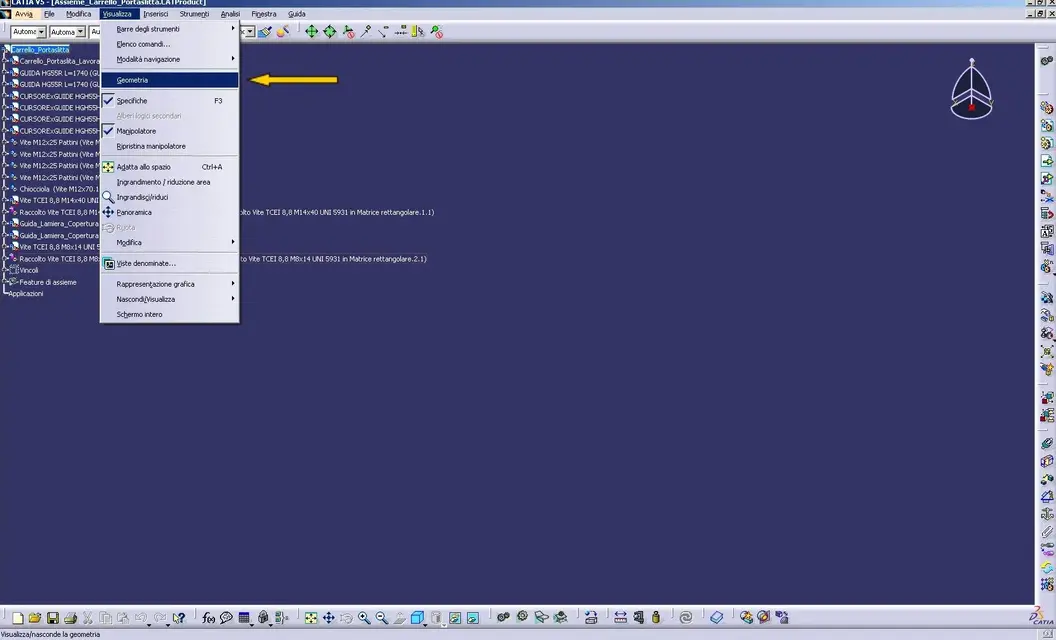
there was no check on "geometria" in the menu bar display!!!:biggrin:
try to believe! :finger:
I don't know how but I never happened, maybe I accidentally touched, or maybe the cat...:rolleyes: bah!

Thanks anyway for the time you have dedicated me, how much I would like to be on your level, slowly.. .

greetings
 
go to the product, go to view and see geometry if you remove the
see what happened to valtic

cmq geometry is on all workbench............ and disable the display of the geometry:smile:
 
Hello falonefff!!! :wink:
place the image, good work to all... :smile:
 

Attachments

  • screen_2.webp
    screen_2.webp
    92.3 KB · Views: 32
Okay, I found the function, too.

Then I read the whole post and realized that none of us had helped you.
we were looking for the solution somewhere else.

ask everyone:
- to what could the function of not displaying geometry?
If I popped up, I thought I was hiding the gemoetry in the no show environment. But it's not like that. where is geometry placed?
 
Okay, I found the function, too.

Then I read the whole post and realized that none of us had helped you.
we were looking for the solution somewhere else.

ask everyone:
- to what could the function of not displaying geometry?
If I popped up, I thought I was hiding the gemoetry in the no show environment. But it's not like that. where is geometry placed?
Good question I ask myself.................. what's a key like this?? ? ?
 
Besides, the strangest thing is that it also inhibits transformations, and the exchange of visible space and unseen space.
The option moves to scenes in the assembly, but does not move between workbach.
I'd almost beat him as a useless command... or make a joke to a colleague... It's carnival.

Hello everyone
 
Besides, the strangest thing is that it also inhibits transformations, and the exchange of visible space and unseen space.
The option moves to scenes in the assembly, but does not move between workbach.
I'd almost beat him as a useless command... or make a joke to a colleague... It's carnival.

Hello everyone
quotone :finger::smile::biggrin:
 
:confused:
You can't see the bat!

other hypothesis, to lighten the interface if you are doing operations that do not involve geometry... but, knowing dassault, it might even have no use. :biggrin:
 
no guys a reason we have to be.
Perhaps it serves as lightening when you load something heavy and interface with smarteam...
we do in parallel research and post here answers and or solutions. Okay?

Perhaps the lord of the noble could help us
 
Last edited:
no guys a reason we have to be.
Perhaps it serves as lightening when you load something heavy and interface with smarteam...
we do in parallel research and post here answers and or solutions. Okay?

Perhaps the lord of the noble could help us
Surely there is a reason but I did not draw any reference.
probably serves to lighten the opening phase of a file regardless of the use of pdm, but the most surprising thing is that it disables transformations.
If I find something, I'll know.

Hello everyone
 
in the online documentation r20 I couldn't find anything about it.
Usually for each command there is a well-made description.
for this command nada de nada. : eek:: eek:: eek:
 

Forum statistics

Threads
44,997
Messages
339,767
Members
4
Latest member
ibt

Members online

No members online now.
Back
Top