• This forum is the machine-generated translation of www.cad3d.it/forum1 - the Italian design community. Several terms are not translated correctly.

parametric quotas with equations

  • Thread starter Thread starter Goffry83
  • Start date Start date

Goffry83

Guest
Good morning.
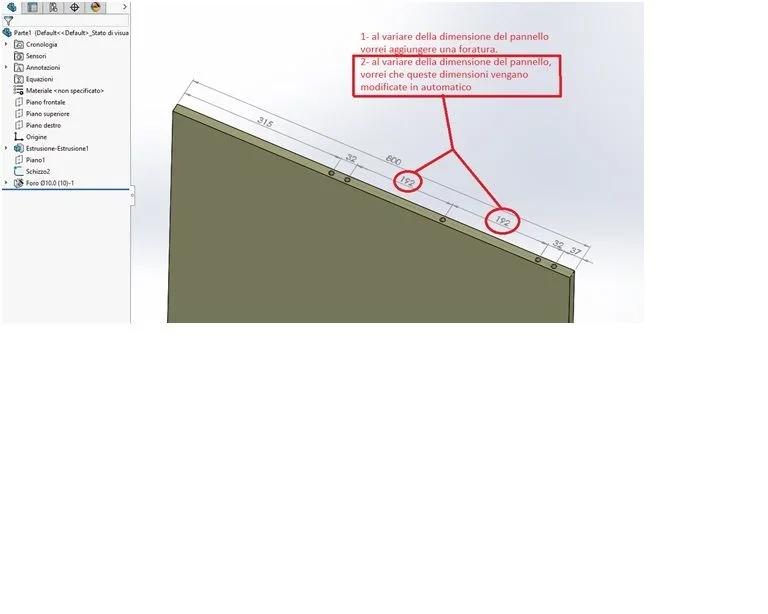
I use the version 2016 and 2018. I would like to know if in equations, there is a formula that can modify the entirex between holes in automatic handles, following a drilling step n=32mm.
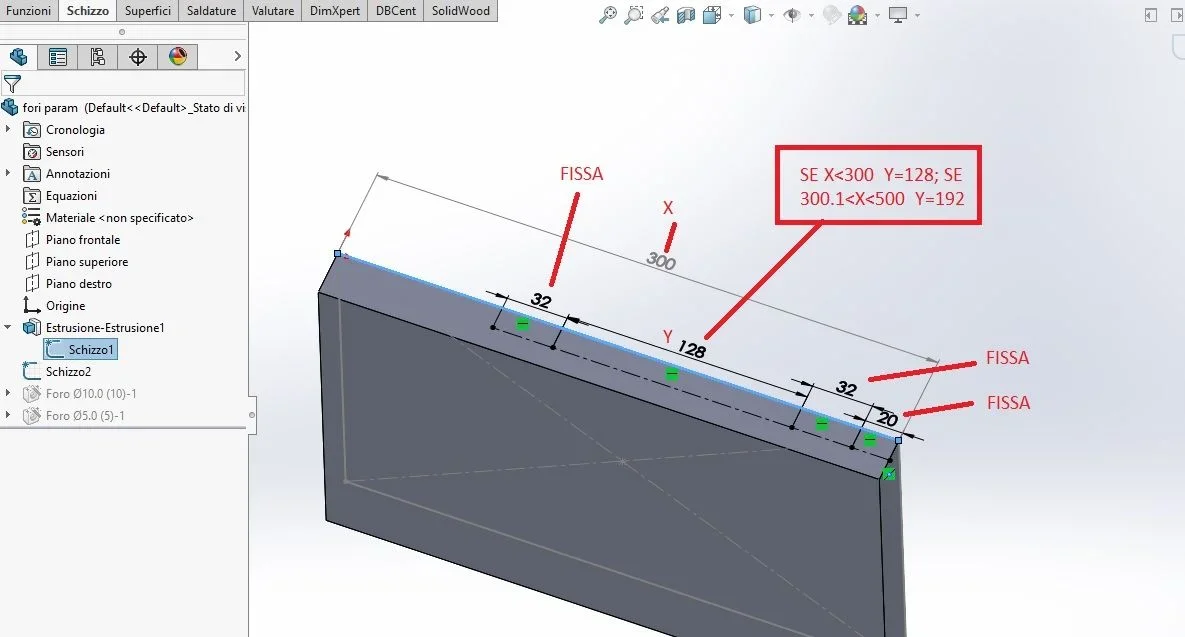
In addition if it is possible that when changing the size of a panel, the formula is able to insert or remove the puncture automatically, following certain rules.
I attach two pictures.
Thank you.
 

Attachments

  • 01.webp
    01.webp
    12.3 KB · Views: 42
  • 02.webp
    02.webp
    18.4 KB · Views: 47
I would like to know if in equations, there is a formula that can modify the entirex between holes in automatic handles, following a drilling step n=32mm.
the formula you must insert it yourself and will be, to the eye, 192=(800-315-37-(32*2))/2
In addition if it is possible that when changing the size of a panel, the formula is able to insert or remove the puncture automatically, following certain rules.
should always be possible using an equation similar to the previous one; In this case it may be necessary to make 2 equations, one to define the number of holes and one to define the intersection.
needs to have precise data to understand the feasibility and correct use of functions that allow the solution
 
I forgot that instead of numbers you have to enter quota names, write them or directly by selecting them
 
thanks to the massive response, you are always very helpful and precise.
Now I try what you proposed, even if I don't think it's the right equation (and it's my fault that I didn't really explain myself). in the wood sector is used as a drilling step on the 32mm. so I will have (looking the pictures), 37mm from the front must remain fixed, the 32 after it remains fixed, the two quotas 192mm are those that I have to make editable with + or - 32mm (depending on the size of the panel). It would take a rule to say: if the tot of the panel is between x and y, this quota you do tot, if instead it is greater than y, you have to do it tot. )
 
The rule is what I wrote on you.
Open Equations Panel
in global variables insert a name to the variable that will manage the 192
in values/equations write formula similar to this
(d1@schizzo1) - "d4@schizzo2" - "d3@schizzo2" - (d1@schizzo2" * 2 ) ) / 2 )
where:
"d1@schizzo1" is the length of the plate (800)
"d4@schizzo2" is a border distance (315)
"d3@schizzo2" is the other distance from the edge (37)
"d1@schizzo2" is the intersection (32)

to not have to write by hand everything once inside the equations panel select the sketch containing the odds that interest you and you will be able to select them automatically by filling out the formula.
if all correct in the currency field will appear the result
at this point you enter the sketch to which to assign the variables, enter into change value of the quota, write = and select in global variables what you created.
allego images for clarification
 

Attachments

  • Cattura.webp
    Cattura.webp
    21.4 KB · Views: 22
  • Cattura2.webp
    Cattura2.webp
    21.9 KB · Views: 23
  • Immagine.webp
    Immagine.webp
    16.5 KB · Views: 20
to be precise you can do directly the equation instead of the variable
the procedure is the same only that instead of a name (what I have defined interasse) you have to select the interest rate and make the formula as above.
the difference between the two procedures is that l0eqaution will only work on that share of the sketch while the variable can be recalled on quotas of different sketches
 
But as I said, the big problem I have in my field is that the parametric quotas must be at step 32mm.
I thought of this solution. Do you know how and if you can do it?
 

Attachments

  • Immagine.webp
    Immagine.webp
    47.8 KB · Views: 20
I don't know what's wrong....
in the equation that I wrote both Step 32 and the others are fixed (unless you go to change them in the sketch you mean)
in equations you can also recall global variables
the function (if) is present so you can try to make your equation

I found that the equation can be written directly in the quota; enter the share, write equal and use the aids that appear: global variables, functions, selection of quotas
 
discussion of the annihilated functionshttps://forum.solidworks.com/thread/106723The equation you would like would be this:
=iif (d1@schizzo34) < 299.9 , 128 , iif (d1@schizzo34) > 299.9 , 192 , 100 )
where at the place of "d1@schizzo34" you must enter the name of your control quota

the equation does not foresee in the second iif that the control quota is included in a range, sincerely I do not know if this is possible to do so; possibly add another nested iff
 
Last edited:
Thank you very much. I try it today and let me know. in another group they recommended linear repetition with chosen step. I have to figure out how to do it.
 
I have to figure out how to do it.
to do what? linear repetition?
just look in the guide and it is explained how you do and where the commands are located.
you must have clear the final result to choose what to do; if you just have holes to variable interaxes that you manage from time to time you the roads are different, if you want interaxes that adapt automatically according to certain factors the roads are other and year well studied.
even a data table with excel functions, decidedly more powerful than solo ones, can do to your case
 
ah true... even the data tables. I didn't think about it because I never had to tie them directly to drilling quotas, but usually to total size of a panel. Today, if I have a free hour, I'll do some evidence. But I think your last equation is the easiest and right way for me. I'll let you know.
 
Massivon, forgive me. I'm trying to insert the if() function just that I don't recognize it. I'm definitely wrong, I never used it. can you please make me a screen of the formula how to compile it on solidworks?
 
Yes, I tried to put in what you wrote to me, but it makes me mistake. If I can make the screen.
 
That's not what I wrote at all.
is a plate with 4 holes, why don't you attach the file?
 
The equation is missing.
but why do you, like many others, do a sketch to do the drilling guided? the guided drilling already has its doive sketch insert points, you are doing a double job
 
The equation is missing.
but why do you, like many others, do a sketch to do the drilling guided? the guided drilling already has its doive sketch insert points, you are doing a double job
because I feel comfortable. I select it from the tree. What is missing in the equation?
if you mean that just missing is because saving the design, and being wrong you delete. cmq is that of the previous image.
 

Forum statistics

Threads
44,997
Messages
339,767
Members
4
Latest member
ibt

Members online

No members online now.
Back
Top