MaiMollare
Guest
Good morning
I have a problem with a part list in my drawing together.
I operated in the following way, I uploaded all the parts in session then I selected the bom and right button, edit levels and I selected all the parts that interest me.
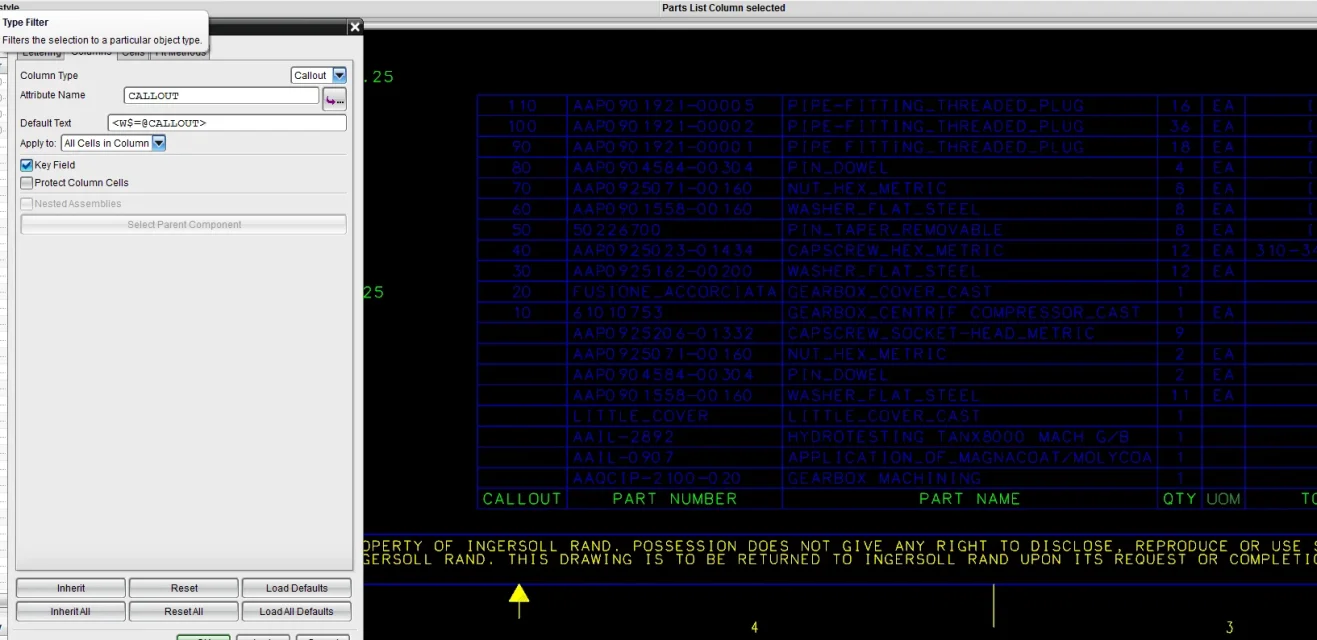
appears all correctly except that the callout 10/20/30 (see figure) does not follow the whole table but only one part and some cells remain empty.
I tried to insert under default text $~c but too much grace, the callout is complete but all components split up even if they have the same part number.(see figure)
what I would like to get is a table with the callout starting from 10 to climb and if it were possible to exclude 2 items to which instead of the number I would like to put a hyphen
use the release 8 of ug
thanks to all
I have a problem with a part list in my drawing together.
I operated in the following way, I uploaded all the parts in session then I selected the bom and right button, edit levels and I selected all the parts that interest me.
appears all correctly except that the callout 10/20/30 (see figure) does not follow the whole table but only one part and some cells remain empty.
I tried to insert under default text $~c but too much grace, the callout is complete but all components split up even if they have the same part number.(see figure)
what I would like to get is a table with the callout starting from 10 to climb and if it were possible to exclude 2 items to which instead of the number I would like to put a hyphen
use the release 8 of ug
thanks to all