
• This forum is the machine-generated translation of www.cad3d.it/forum1 - the Italian design community. Several terms are not translated correctly.

partial quotation

  • Thread starter Thread starter MaxBigno80
  • Start date Start date

MaxBigno80

Guest
Good morning
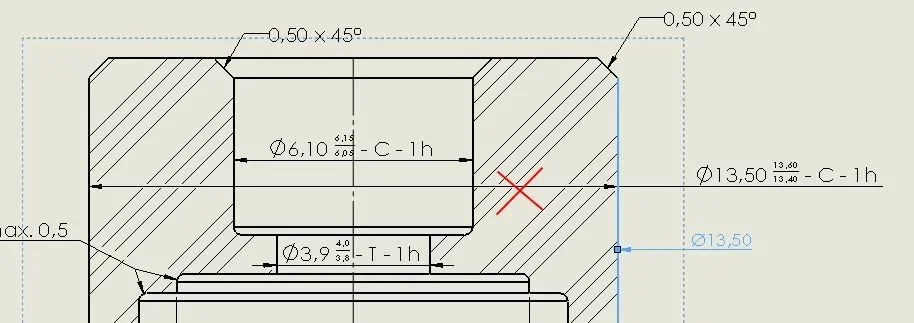
I would need help with the external quotation of a piece.
I would need that for all external ø the quotation line is not complete but only partial "known type" is possible?

I attach image to make me understand, I hope, better

Thank you.

maximum
 

Attachments

  • Cattura.webp
    Cattura.webp
    29.5 KB · Views: 4
Good morning
I would need help with the external quotation of a piece.
I would need that for all external ø the quotation line is not complete but only partial "known type" is possible?

I attach image to make me understand, I hope, better

Thank you.

maximum
dx button on the > Hide quotation line > click dx on the extension line that remains without quota indication > hide the extension line.
 
dx button on the > Hide quotation line > click dx on the extension line that remains without quota indication > hide the extension line.
in this way it only works if the quota is centered between the extension lines, otherwise, bringing the quota externally you also see the line indicated with the red x.
I don't think it's possible to do something like that.
 
thank you first of all for the answer, you are right massive when you try to bring it out the inner line you see anyway.
 
thank you first of all for the answer, you are right massive when you try to bring it out the inner line you see anyway.
quoti the diameter>hide the extension line >hide quotation line >click on the quota and in the sx tree go on '' association line'' >flagghi custom text position >selects the 3 icon '' aligned text,line of uncomposed association'' >nascondi quotature line > move the quotation and turn the arrow.
Hi.
 
quoti the diameter>hide the extension line >hide quotation line >click on the quota and in the sx tree go on '' association line'' >flagghi custom text position >selects the 3 icon '' aligned text,line of uncomposed association'' >nascondi quotature line > move the quotation and turn the arrow.
Hi.
Good. thanks for the explanation
 
quoti the diameter>hide the extension line >hide quotation line >click on the quota and in the sx tree go on '' association line'' >flagghi custom text position >selects the 3 icon '' aligned text,line of uncomposed association'' >nascondi quotature line > move the quotation and turn the arrow.
Hi.
That's what I was looking for.

Thank you very much

Hi.
 

Forum statistics

Threads
44,997
Messages
339,767
Members
4
Latest member
ibt

Members online

No members online now.
Back
Top