
• This forum is the machine-generated translation of www.cad3d.it/forum1 - the Italian design community. Several terms are not translated correctly.

particular balls belonging to a welded assembly

  • Thread starter Thread starter maxmazzinghi
  • Start date Start date

maxmazzinghi

Guest
Hello everyone, I have the following problem:
I put on the table a welded set composed of n parts with the three classic views and the various sections.
in the same table of the axieme I make the views and quotation of every single detail (plates profiles etc.)
When I go to the ball, I realize that the numbers I put on the axieme are not the same as those I put on every detail.
In practice, the table reflects the numbers I put on the axieme, but each detail seems unscrupulous from the axieme itself and I have to number manuals every single piece.
Is there a way to tell inventor that the pieces I put on the table are the same ones that are seen in the axieme (and therefore must have the same number? )
Thanks for the answer.
ps. use inventor 2011.
 
I, even for the single pieces, put in the table all the welded assembling then for every view I hide all the details except what I want to quote, in this way I have the corresponding number.
If you have so many pieces I know that it is a tribulate, but it is worth it also because if you copy it (for any changes or to realize a particular similar) and keep the table associated, it remains perfectly in place.
 
I created a block of the "pallino" that I go to put close to every single detail, with the number I write..
it will not be fantastic, but it is enough
 
Damn. ..but it's a serious lack... to always put the asses up and to turn off the pieces seems a little too complicated... I'll do with the handballs. .
thanks to all of the answers.
 
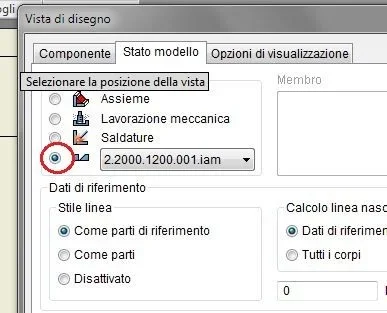
with welded assemblies when placing a view if you go to the "model status" menu and selecting the preparation option, you can choose which part of the unfolding axieme (see image).
Cattura.webpballad inventor will return the number relative to the distinct components. if instead you only fly the part, (as I always do) you have to enter the number manually, because inventor does not know what together refers because precisely a view of a part selected manually by the user is placed.
 
I add a few things:

1. If you place the only parts released from the axieme and by chance you should decide to change even only the size of the tubular (from 50x50x3 to 60x60x3 for example) in the table remains the previous tubular, and you should re-set everything and go then repeat the right piece with the names of the acelerator design is not so painless. . .

2. I also tried with the solution of wedges, but it seemed more uncomfortable to understand which particular was to put on the table rather than to turn off with a window of selection of the parts the whole assemblies. Then it always depends on the axieme to fly obviously.

according to my opinion and for what I need to draw myself, at the expense of 1 minute more during the placing of the piece at the table (then it should be placed and quoted anyway, the extinguishing the pieces is not as long as it seems, try to believe) it is worth doing so because of the association of pieces, numbers, tables and what else.

my personal opinion after several tests.
 
I realized now that we are talking about assemblies welded in general and not of generator frames... Excuse me... the solution of peppe then is the best in my opinion :-)
 
with welded assemblies when placing a view if you go to the "model status" menu and selecting the preparation option, you can choose which part of the unfolding axieme (see image).
View attachment 33262ballad inventor will return the number relative to the distinct components. if instead you only fly the part, (as I always do) you have to enter the number manually, because inventor does not know what together refers because precisely a view of a part selected manually by the user is placed.
I didn't know that. so it is very comfortable!! thank you! !
 
Pay attention to one thing:
if you have done mechanical processing to your welded assembly, and unfold in the method I described before, you will find only any processing done in preparation (e.g. bevels or welding filling processes).
 

Forum statistics

Threads
44,997
Messages
339,767
Members
4
Latest member
ibt

Members online

No members online now.
Back
Top