• This forum is the machine-generated translation of www.cad3d.it/forum1 - the Italian design community. Several terms are not translated correctly.

pass me

  • Thread starter Thread starter blubossa
  • Start date Start date

blubossa

Guest
Bye to all,
is it possible to move an object with a course constraint but to steps or steps? ?

I'll explain. .
a set must move with constraint from the starting position 0 to the maximum position 1000 mm...
But I would like it to stop first at position 300, then at 700, then at 850 and finally at 1000.

I have no idea if this is feasible and if it is what way to go... .

Do you have any suggestions? ?

Thank you.
bb
 
Hey, bb, you okay?

I know two methods, or via snapshots, or you can change the connection limits through parameters.
 
Hey, bb, you okay?

I know two methods, or via snapshots, or you can change the connection limits through parameters.
Hi, dani,
I don't know exactly how it works. Can you help me understand something? ? ?
while to command the connection from parameters what relationships should I write? ?

Thank you.
bb
 
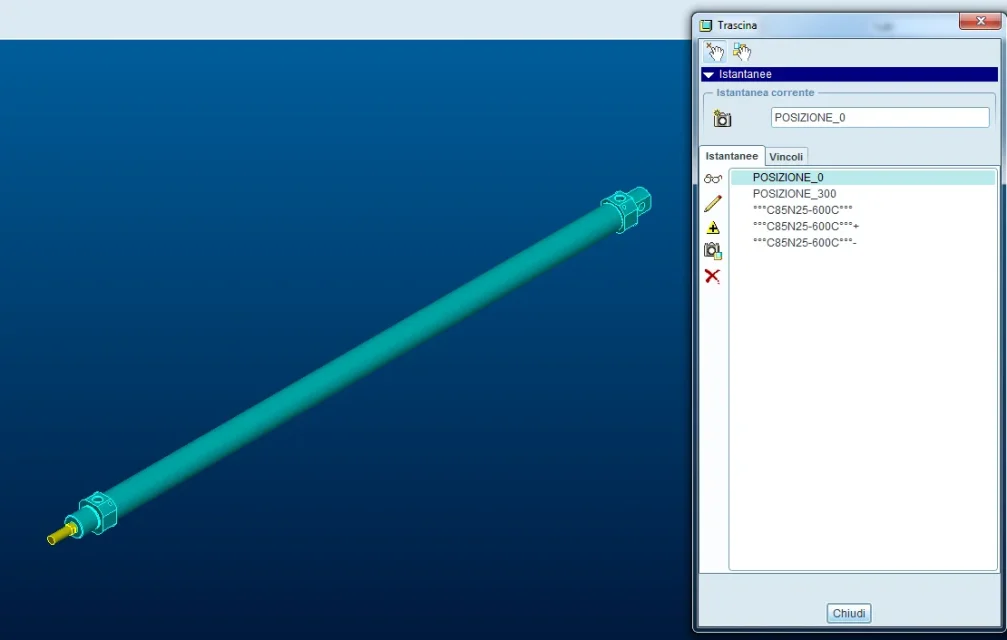
for snapshots, see image, with the command drags > snapshots give him a name and saves. This is the method I prefer, also because you can call them individually in a drw and show all the various steps.

with relationships you can manage the parameters translation1_minimum_limit etc. To see them you must choose parameters > filter criteria > all sublevels including current ones.

I hope I've been clear.
 

Attachments

  • Immagine.webp
    Immagine.webp
    54.6 KB · Views: 8
hello I attach to what I suggested by giving my experience.
how to create a snapshot for each posizone:
create first instant >> > > > > > > > > > > > > > > > > > > > > > > > > > > > > > > > > > > > > > > > > > > > > > > > > > > > > > > > > > > > > > > > > > > > > > > > > > > > > > > > > > > > > > > > > > > > > > > > > > > > > > > > > > > > > > > > > > > > > > > > > > > > > >
to duplicate the snapshot by resetting a new location: select the snapshot >>> > > click on the icon you used to create instant > > > rename new instant > > > > > sets the new posion in the "vincle" > > > > > > > > > > > > > > > > > > > > > > > > > > > > > > > > > > > > > > > > > > > > > > > > > > > > > > > > > > > > > > > > > > > > > > > > > > > > > > > > > > > > > > > > > > > > > > > > > > > > > >
repeat for others.

I think you can double-click the snapshot, but I don't like it.
I created a macro that recharges the set constraints of the snapshot by selecting going on: tab "wins" and pressing the icon "remember only according to the constraints" and then returns to the language " snapshot".

p.s. my annotations are purely self-taught, someone more experienced could be you more help.

p.p.s. Last thing: I recommend that you rename the constraints during their creation with recurring names to be able to track them more easily.

hello and good day
 

Attachments

  • istantanee.webp
    istantanee.webp
    22.5 KB · Views: 5

Forum statistics

Threads
44,997
Messages
339,767
Members
4
Latest member
ibt

Members online

No members online now.
Back
Top