• This forum is the machine-generated translation of www.cad3d.it/forum1 - the Italian design community. Several terms are not translated correctly.

photo alignment on reference line

  • Thread starter Thread starter gianluca82
  • Start date Start date

gianluca82

Guest
Hello, I write here not to open other posts!!! the command aligns for inventor where is he??? ? I have to align a photo to a line "how do you equal with the cad", with inventor how do you do it?? ?

Thank you in advance thanks:redface::redface:
 
I moved you here because the subject is different.
Anyway, I don't know what you're asking.

Bye.
 
ok thank you so much, in the cad there is the command aligns, if I have a photo and I want to align it to a line, type align I take the 2 ends of a line that I did and align it to the photo or the contrary.
with inventor how do you do? is this type of command? ? ?

Thank you.
 
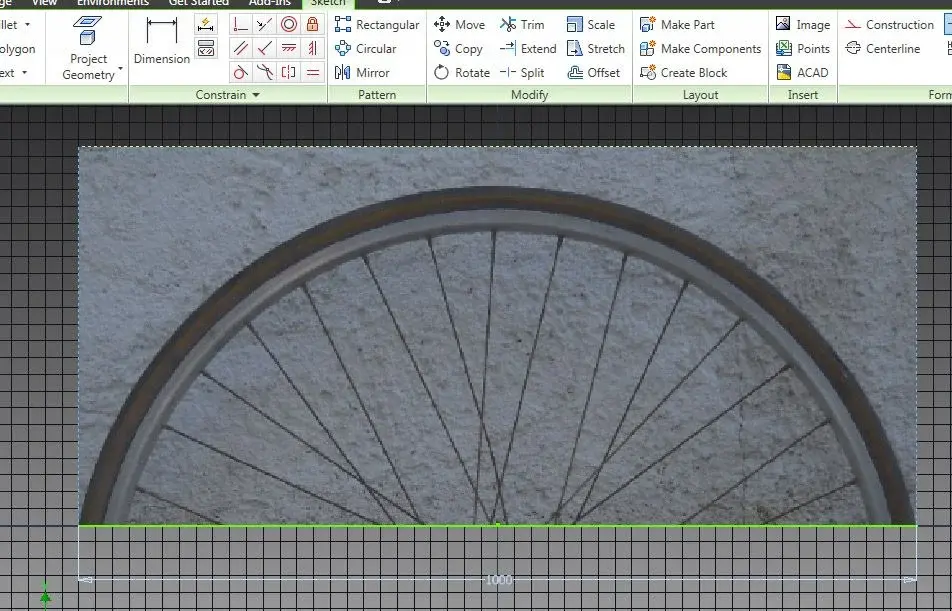
hi no, I mean, as you can see from the image, I have to tie the green line to the two ends of the circle
 

Attachments

  • a.webp
    a.webp
    105.5 KB · Views: 29
Hello guys can't tell me if there is "surely there" how does the button align with inventor?? ? :confused::confused

Thank you.
 
Sometimes the quickest solution is "another solution".
discount with photoshop and then line
 
Okay, but does the command line for inventor exist?? Does coem work? if I have a line of 1 meter and the diameter of a circle is 50 cm, how do I bring the diameter of the circle to 1 meter?

Thank you.
 
I don't know if I understand. .
raster you can bind, quote, etc.
 

Attachments

  • Untitled-1 copy.webp
    Untitled-1 copy.webp
    92.2 KB · Views: 15
the green line that is in the image I put, I have to put it inside the circle where there are the two points!! !
the line must remain of the same measure of "one meter" should not be modified! ! !

Thank you.
 

Attachments

  • b.webp
    b.webp
    91.7 KB · Views: 14
the green line that is in the image I put, I have to put it inside the circle where there are the two points!! !
the line must remain of the same measure of "one meter" should not be modified! ! !

Thank you.
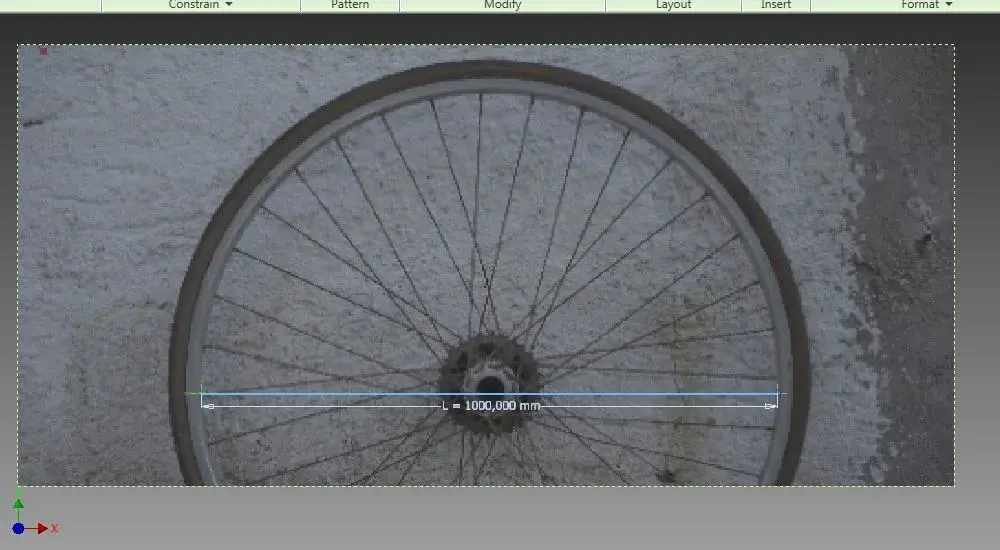
the inserted parameter you do not see is 1000 mm/l, which is your scale factor.
 

Attachments

  • 1.webp
    1.webp
    43.2 KB · Views: 19
  • 2.webp
    2.webp
    29.7 KB · Views: 18
  • 3.webp
    3.webp
    63.3 KB · Views: 16
Anyway, I don't know what you're asking.
it took 10 questions / answers ( 6 days) before explaining well what you need.
It is not a question of aligning but of putting in scale, as it did pump ( 4 h from clarification )

the more precise in the question, with drawings that help to understand, the easier it is to have targeted answers.

Bye.
 
ooooooo thank you very much Pompeo thank you! !so you climb, in autocad you use the command line:finger::finger: thanks

I'm sorry if I'm not perfect her!!
 
................................................................................................................................................................................................................................................................................................................................................................................................................................................................................................................................................................................................................................................................................................................................................................................................................................................................................................................................................
But you know I haven't figured out what you want to do yet?
:confused:? :confused:?
in autocad the command aligns mainly serves to align one or more objects according to one direction, it is not the ad hoc command to scale it, unless you want to change the orientation too. . .
 
align, in autocad I use it when I have to bring an image, a photo to the same width or height of a line, or vice versa. I don't use the scale command.

and the same thing that I was wondering if there was an equal command in inventor, but as Pompey explained to me there is therefore no need to use the Scale command! !
 
use the matching bond, select the top of the image and the end of the line, do the same with the other top of the image and the line. If it's not clear, tell me I'm sending you a video.
 

Forum statistics

Threads
44,997
Messages
339,767
Members
4
Latest member
ibt

Members online

No members online now.
Back
Top