
• This forum is the machine-generated translation of www.cad3d.it/forum1 - the Italian design community. Several terms are not translated correctly.

pieces blocked without constraints

  • Thread starter Thread starter Gianlucagiangian
  • Start date Start date

Gianlucagiangian

Guest
Hi, I've been looking for more topic but I haven't found anything.
Something strange happens to me, I have a set, which from nowhere blocks the parts. In the sense, I insert a part, which remains mobile, but as soon as I insert the first constraint, it no longer moves if I try to move it and a symbol of ban appears to me. this also happens with parts already within the study, mobile parts bound perhaps only on 2 axes that should clearly move in the missing verse, but nothing moves.
I've been thinking about an adactivity in some piece that can be boring, but I have nothing. to some display in particular representation, but nothing. Do you have ideas? Has anyone happened yet?
I think I've already happened in the past, but I don't remember how I solved it.
Wasn't there any way to do an analysis?


Thank you.
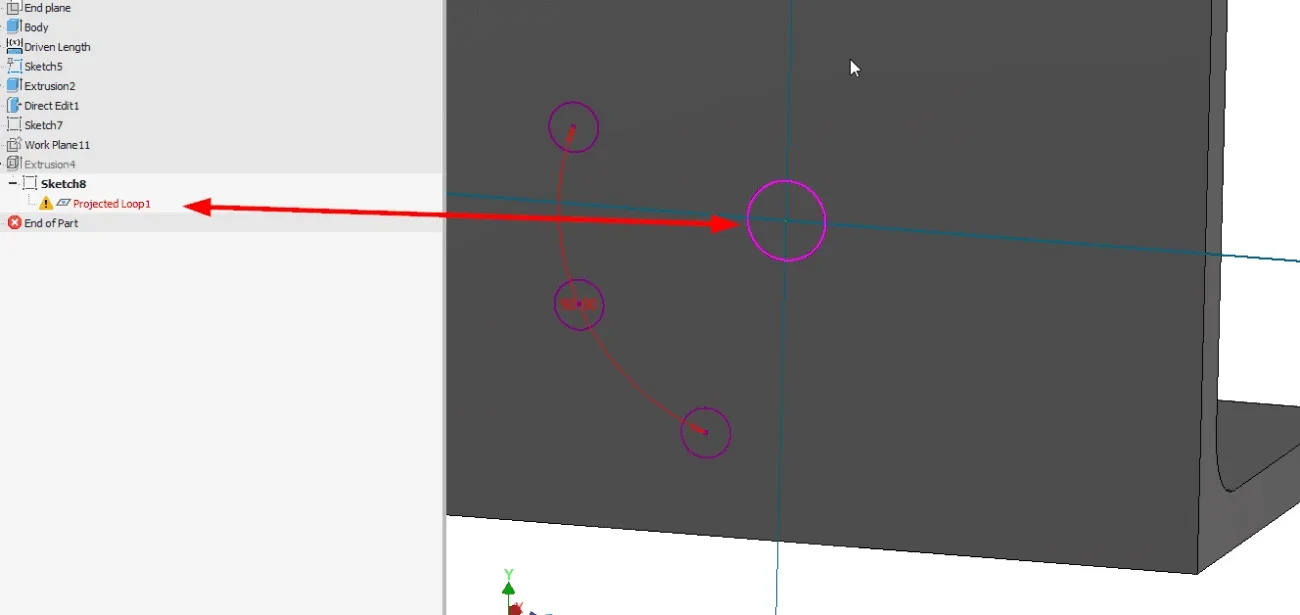
 
Do you have error messages (red cross)?
or other type errors in the component patterns?
 
No. This is the mystery. I don't understand. No cross.

sent by my mar-lx1a using tapatalk
 
I'm sure I had the same problem before.. .
If you want to try to remove parts to find which one is creating the problem.
I would find on some sketch with missing links.
 
I'm sure I had the same problem before.. .
If you want to try to remove parts to find which one is creating the problem.
I would find on some sketch with missing links.
Could be a solution. I had begun to eliminate the most pope parts m nothing. I have to step up. What do you mean? But then, isn't this a half bug you think?

sent by my mar-lx1a using tapatalk
 
Okay. I'll check tomorrow. I've already given an eye, I thought about something like that. but nothing. I look deeper. cabbage but without alert is a sin...

janluca r&d department - sent by my huawei p30 lite using tapatalk
 
that sketch has a problem, color fuchsia and what is written in the browser clearly denounce it.
You probably made some changes on the part and the sketch lost references.
if I hadn't put the photo, I would also tell you to check the window of the bond " pin / hole ", where there is activated by default the snack with the padlock, novelty from rel. 2019, which blocks the rotation / translation of the bound parts, ideona that could quietly leave in the drawer.
 
that sketch has a problem, color fuchsia and what is written in the browser clearly denounce it.
You probably made some changes on the part and the sketch lost references.
if I hadn't put the photo, I would also tell you to check the window of the bond " pin / hole ", where there is activated by default the snack with the padlock, novelty from rel. 2019, which blocks the rotation / translation of the bound parts, ideona that could quietly leave in the drawer.
That photo is not my project. He posted it to me to show me what he meant. Anyway, I'll check what you told me tomorrow. Thank you. I'll let you know.

janluca r&d department - sent by my huawei p30 lite using tapatalk
 
That photo is not my project. He posted it to me to show me what he meant. Anyway, I'll check what you told me tomorrow. Thank you. I'll let you know.

janluca r&d department - sent by my huawei p30 lite using tapatalk
Sorry, I didn't notice the name of who posted the picture.
At this point, I bet you have the damn snack.
 
My partner tried to open my car and gave him no problem. then I figured out how to work out.

Uninstalled and remitted everything. Now go.
 

Forum statistics

Threads
44,997
Messages
339,767
Members
4
Latest member
ibt

Members online

No members online now.
Back
Top