• This forum is the machine-generated translation of www.cad3d.it/forum1 - the Italian design community. Several terms are not translated correctly.

plant region

  • Thread starter Thread starter warburg
  • Start date Start date

warburg

Guest
when drawing in the plant I would always like to see the projections of what is above, as "antiquely" was done in the hand drawing and then with autocad drawing the dotted of the higher bodies more significant.
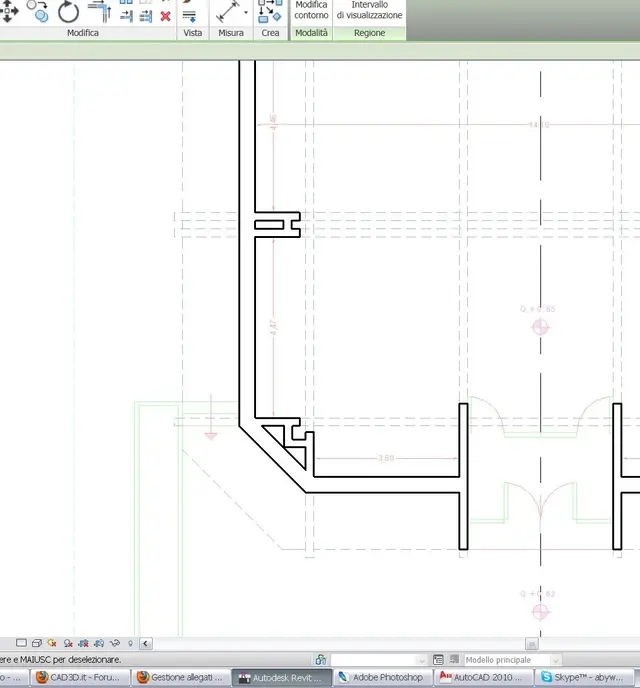
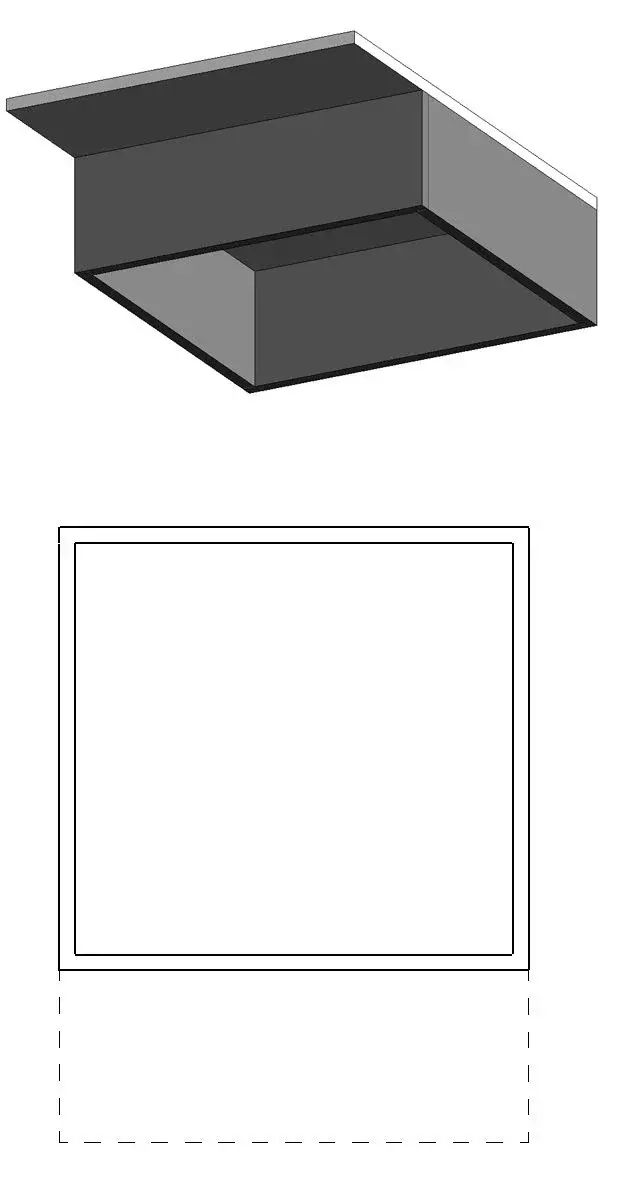
If I didn't get it wrong in revit it's not automatic, and that surprises me a bit, I don't know why I expected it to be. a friend suggests that the only way to show the projections is the command plant region. I tried to use it but, you see attached, in the empty corner at the bottom left of the box I should see the projection (or what will be) of what is above but I can't view it while having put "unlimited" in the upper viewing range.
in the online help however I see that, probably, I will not get what I have in mind (see second attachment, where there is the dwg that I am pulling up, with the beautiful restraints etc), but the actual plant of what is above!
Thank you!
 

Attachments

  • rdp.webp
    rdp.webp
    20.5 KB · Views: 18
  • rdp2.webp
    rdp2.webp
    41.6 KB · Views: 17
Hu! It works, but then I don't need a plant region, do I? If I eliminate it, the grey trait of the above encumbrance is the same
Thank you.
ps: Can I change the section of the "projected" lines? in v/g I find nothing
 
the 'underground' only serves to see a background plan that could serve as a support for drawing in the current floor. when we need to see something that is out of the usual 'cutting plan' we need to resort to the plant regions, change (for the region) the viewing range and possibly replace the graphical visibility of the element.
I look for denial:finger:
 
ah you! I saw it last night, thank you, and I put in favorites your series of tutorials on revit, very useful :-)
In spite of the clarity of your piece, however, I'm a little hard to understand, as my mantovana teacher of mathematics told me in high school (and I pissed me off throwing it on the wounded southern pride...:).
Maybe he was right aarrghhhh!
we say so:
- I realized how plant region works, it is a fantastic tool. but: I still can't "customizzarlo"
to get graphically what it takes to me and that old classic thing you see in the second attachment. not only, but, wanting that result, every time I make a plant it would touch me to make a region of plant as big, very annoying and very little bim, admit. . .
example: if I had to use revit in the restoration, very feasible with profit according to the texts of the 24 hour sun, I would absolutely need to see the projections in plant of times, arches and other traditional elements without which the design is wrong and unreadable. in the excellent revitforum, in which I went to post a topic similar to the search for as many indications as possible, for now the kind kalle user has written to me that a good way is ... retrace the lines of how much it is made to cut from plant region, then eliminate the plant region, and you remain the projection. . .
I'm telling you this because I've written other things that might serve the discussion. http://www.revitforum.com/forum/showthread.php?t=2676ciao!
 
for now the kind kalle user has written to me that a good way is ... retrace the lines of how much you got cut from plant region, then delete the plant region, and you remain the projection. . .
I agree with good kalle...for now, even if little bim, is the best solution
 
All right, so I'm going to the rescuer's friend to give me 60% of the money I spent on buying it :-)
no it is not possible that there is no better solution: but how the hell do they draw?
 
I should have understood how to do, always with plant region (I would say that the hypothesis of roberto has turned out to be the one best suited to the case). Basically, right-click on the elements that appear within the region (with cutting plan in the upper level that interests us) > replace view graphics > by element > tick "visible" and "transparent" and also wanting "mezzitoni" and then under "project lines" choose what you want. remove from v/g the visibility of the region and voilà, as I desired the imaginative projection. . .
for the lines of times to cruise, for example, I think there is nothing to do, touch draw them. sin, but perhaps it would be a bit like to demand from the software endowed by paragnost:-)
Christian Christian
 

Attachments

  • rdp.webp
    rdp.webp
    12 KB · Views: 7

Forum statistics

Threads
44,997
Messages
339,767
Members
4
Latest member
ibt

Members online

No members online now.
Back
Top