• This forum is the machine-generated translation of www.cad3d.it/forum1 - the Italian design community. Several terms are not translated correctly.

possible to create windows or quick keys to recall "previous couplings"? how?

  • Thread starter Thread starter reggio
  • Start date Start date

reggio

Guest
hi, my favorite pairings are distributed in different tabs:
coincidence
parallel
width
asola
...

is uncomfortable every time having to change tab, it would be nice to be able to collect them in a custom "tab/menu" that collects them so as to stay at 98% of the times always in the same tab and choose more quickly

do you know if it is possible and how to do it?

alternatively, can you assign quick keys to individual couplings? How could you do that?
 
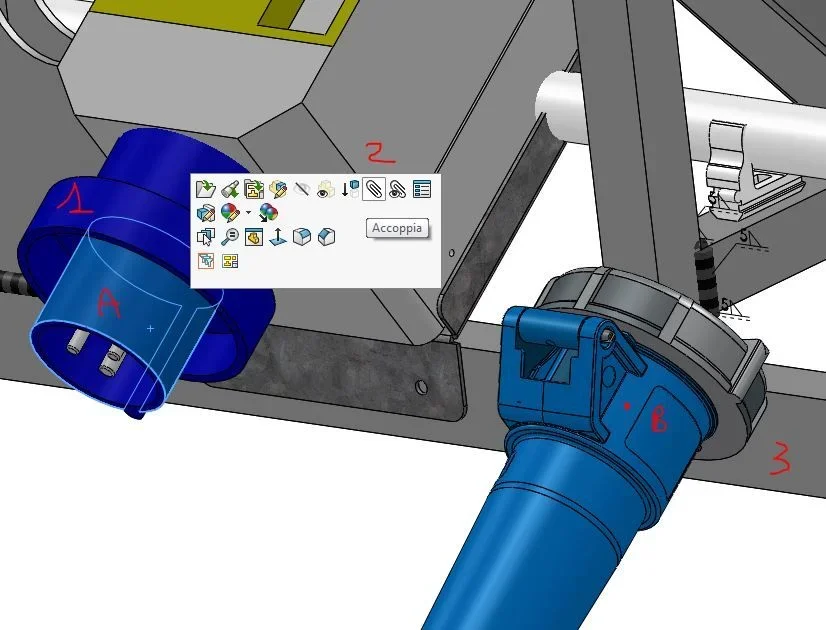
Excuse me, have you ever tried to use them from context menu, the one that appears with the control button? I feel very comfortable.
 
Can you tell me more about this tab thing?
I always select the entities before launching the coupling, which I combined with a quick button.
instead, if I didn't understand badly, you would like to launch the coupling and then set the type of coupling to use without selecting it from the property manager, right?
 
what appears with the control button?
Control key? What is it? Where is he? (I have sw16)
I always select the entities before launching the coupling, which I combined with a quick button.

do you need the quick button instead of pressing the clip?
instead, if I didn't understand badly, you would like to launch the coupling and then set the type of coupling to use without selecting it from the property manager, right?
I usually select the part/face to mate,
opens the window with "open" "normal to" and also "double", I choose the slice
I choose the desired coupling
and finally select the other part/face

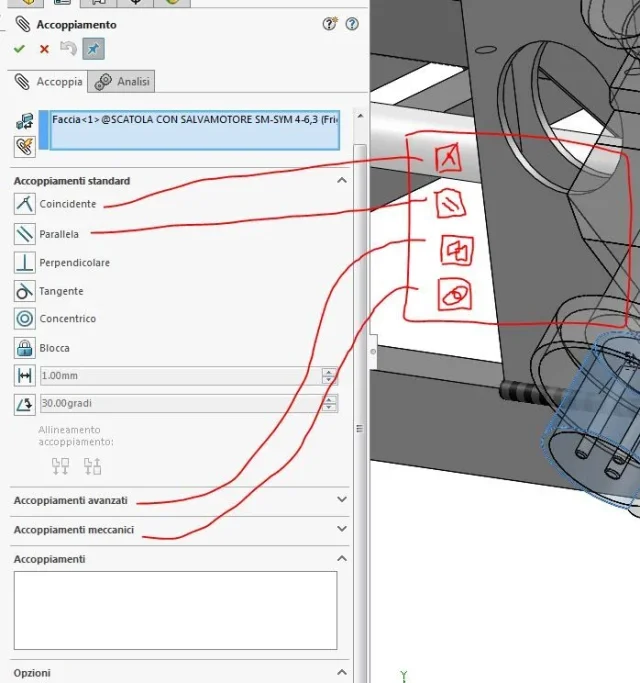
so I get the 1st mating, at that point I have the window mating open and I can continue with the 2nd and 3rd mating, but I will have to turn between the tabs/tends
standard couplings
advanced couplings
mechanical couplings

as the + used couplings are scattered between advanced and mechanical standards, I was wondering if I could "collect them in a group" like "my favorites" ...
 

Attachments

  • accoppia.webp
    accoppia.webp
    53.7 KB · Views: 16
  • accoppia-2.webp
    accoppia-2.webp
    52.8 KB · Views: 18
reggio said:
do you need the quick button instead of pressing the clip?
That's right.
reggio said:
as the + used couplings are scattered between advanced and mechanical standards, I was wondering if I could "collect them in a group" like "my favorites" ...
You can't
 
thanks to both... what shame ... simply I am not still using sw...
I've been working on it forever, but I was wrong with the procedure by touching only one part and not using "the suggestions" that sw gives me ...??

... but at this point I do not understand why massive you made a button... when selections+ctrl selections already appear to you all the possible couplings collected ... to what do you need a quick button?
 
but at this point I do not understand why massive you made a button... when selections+ctrl selections already appear to you all the possible couplings collected ... to what do you need a quick button?
because I feel better with the property manager... old habits to die
 

Forum statistics

Threads
44,997
Messages
339,767
Members
4
Latest member
ibt

Members online

No members online now.
Back
Top