• This forum is the machine-generated translation of www.cad3d.it/forum1 - the Italian design community. Several terms are not translated correctly.

presentation and bases of autocad

  • Thread starter Thread starter Ale.Solmo
  • Start date Start date

Ale.Solmo

Guest
hello to everyone, I'm new to this world, actually I've started for a couple of weeks. . . .

are self-taught and for self-taught I mean tutorials on youtube and more... .
work in the field of fashion and I would like to expand my skills with digital design and so specialize.. . .
I realize that without direct indications it is not easy

I'm here to learn how to give me the opportunity to help me, so to begin with I still don't know where to publish my questions that ( yes) have a category but for now they are so trivial that they are basic.

Thank you.
 
welcome and, given the period, good holidays!

talk about digital design and basic information, my suggestion (banal too) is:

- if you have doubts about, for example, autocad, there is the special section
- this applies practically to any design/modeling software: if you look in the tree of the sections find the corresponding one, wanting with more specific subsections
- there are sections that concern general topics, released from specific software.

If you still have doubts, try writing below 2 or 3 questions you would like to ask and someone will suggest you where you could post them.

Obviously if you use the most correct section it will be easier to receive feedback, and more centered.

(ps: there is text, in all this banality :roflmao:)
 
Okay, then I'll keep here for now.

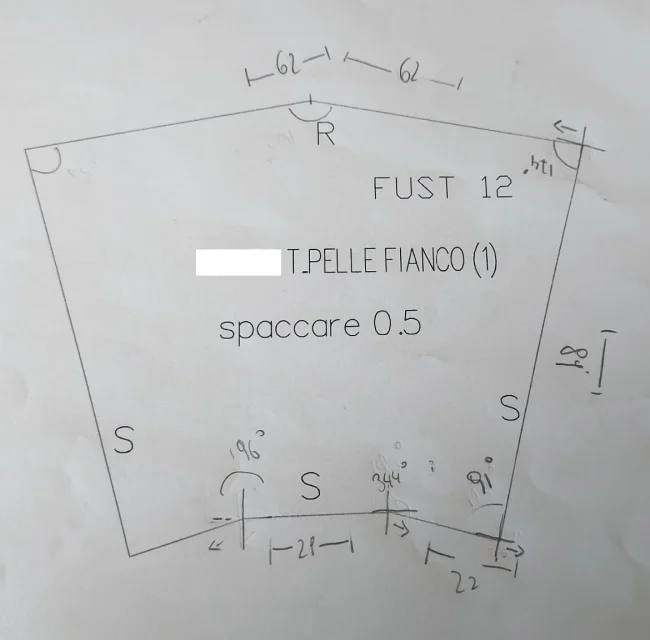
very simply I am taking some models that I have at disposal 1:1 and I am playing them on the autocad* I am armed with team and I have to say I am taking my hand, but now I am changing corners, there are no more 90° but several others (as you can see in photo) and my relationship with the goniometer not enough to report it on the cad, I can not understand how to relate the corners from the card to the cad.

probably the problem in this case is more than geometry than cad, but I repeat I cannot associate the two "worlds".

by the way, with the line I distanced and with the goniometer I took the angle opening, but if I take it back on the cad this does not match.

I searched on the internet but I didn't find what I needed, the issues are 2 or there's nothing or more likely I don't look the right way using the wrong keywords.

Can you help me?

good holidays to all of you....

*in my field (leather) we use other types of cad, the most famous are called aimpes and mozart, but not having them at home I have to use autocad
 

Attachments

  • fianco pelle.webp
    fianco pelle.webp
    51.2 KB · Views: 25
Last edited:
I don't know if I understand your problem well, but I'll give you the answers for me:

- if you don't know how to draw lines with a certain inclination in autocad, the right section and the general section of autocad. Specifically, he looks for a "line insert with polar coordinates". polar coordinates means length and angle

- if the problem is that using the angles and distances that you have detected by hand the figure in autocad does not close you (I imagine a little), it is because distances and/or corners taken by hand are not sufficiently precise. If the 91° angle you measured at the bottom right is actually 90,68° or 91,25°, it is obvious that it produces an error in determining the next summit. idem for other corners/measures.
a possibility (among many) to bring back the maple in cad i manner that the figure closes is to start on one side, to divide everything in triangles and to measure only distances, obtaining a vertex at a time (red lines). when you arrive on the other side the figure is definitely closed, but it is not said to be symmetrical and/or sufficiently correct, compared to the original.
other way is to create with the same system first the outermost vertices (always dividing into triangles, green lines) so as to have the external encumbrance, and then to get the inner silhouettes (less important? ).
 

Attachments

  • fianco pelle.webp
    fianco pelle.webp
    72.3 KB · Views: 24
in the technical design, especially in the bending at different angles of plates, is almost never over 180°, is always in the first two quadrants of 90° or 90°-180°.
in the bending the internal angle (from 0 to 180°) is used and the one to enter on cn.
I think that's what you're gonna have to put into the program.
if you need to insert the outer corner, you have to do 180° less the inner corner.
a visual help on the value of the corners, you have on the two most widespread commercial squares, where one has the angles of 90-30-60° and the other of 90-45-45°, internal sum always of 180°
 
in the technical design, especially in the bending at different angles of plates, is almost never over 180°, is always in the first two quadrants of 90° or 90°-180°.
in the bending the internal angle (from 0 to 180°) is used and the one to enter on cn.
I think that's what you're gonna have to put into the program.
if you need to insert the outer corner, you have to do 180° less the inner corner.
a visual help on the value of the corners, you have on the two most widespread commercial squares, where one has the angles of 90-30-60° and the other of 90-45-45°, internal sum always of 180°
without any controversy, but:
- from what he writes @ale.solmo, the problem is that what is measured on paper does not correspond to what is found on the cad
- leather, not sheet metal (not the whole world folds sheets, not all that is asked is aimed at folding sheets)
- I didn't understand what visual help the commercial teams give if I have to determine if an angle is 54.7° or 55.1°
- if I want to digitize a model card, that I mix a 4th or 356° angle is indifferent, just know what I'm doing (we're not talking about how a mechanical piece should be listed)
- rather, @ale.solmo should check if your autocad is set with sixty-tenthical, centimal or radiant degrees, in that case you could type a corner and find all other stuff.

We still see what the user who opened the 3d will say, unless this is already dead.
 
without any controversy, but:
- from what he writes @ale.solmo, the problem is that what is measured on paper does not correspond to what is found on the cad
- leather, not sheet metal (not the whole world folds sheets, not all that is asked is aimed at folding sheets)
- I didn't understand what visual help the commercial teams give if I have to determine if an angle is 54.7° or 55.1°
- if I want to digitize a model card, that I mix a 4th or 356° angle is indifferent, just know what I'm doing (we're not talking about how a mechanical piece should be listed)
- rather, @ale.solmo should check if your autocad is set with sixty-tenthical, centimal or radiant degrees, in that case you could type a corner and find all other stuff.

We still see what the user who opened the 3d will say, unless this is already dead.
ciao @ragnolTwo corners of 196° and 344° (not real) are listed in the drawing, while they should be listed with 164° both, or with the outer corner of 166°.
between these four values what is the one to use on the cad, since these two corners are equal?
even if here we talk about contour, the bending of the sheet makes clearly visible the difference between internal and external corner.
as stated by him, @ale.solmo is in difficulty in reading the corners, the two examples from me, give a good starting point.
The scale of degrees is sixty-eight.
 
Last edited:
The scale of degrees is sixty-eight.
How do you know how his autocad is set? Did he write it in private, or did you use it directly?

half of the dwg files that come to me from architects is set with centesimal degrees (perhaps it is their vezzo, to give a tone, I don't know).

However the good @ale.solmo entered after post #4 and #5 without being worthy of giving feedback.

so either it is a troll (and then in the end I am sorry for a life that must be pathetic) or he does not care to have help. In any case, I close here.
 
first of all thank you for the answers... .

So, I didn't use the methods you told me but I took the cue from those, I actually tried it but it was never accurate and so I started to "paint" the sheet as if I were really drawing, I admit I'm quite rusty with the technical design but it was like lighting and I'm brushing everything I did to the schools.

I try to explain
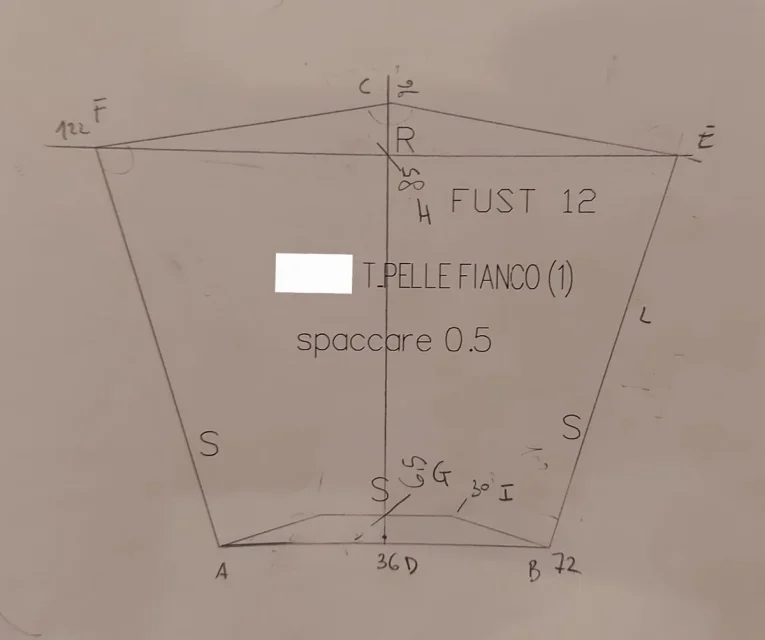
So... in practice from the sheet I pulled the lines from to b (the ones of the base of the drawing) I got half then from there I pulled another line at the tip of the "pentagon" from c to d

I pulled a line from the point and, f to understand its height and its length

from the base I climbed and determined the length so the point g and the point h

having the point the already drawn and the point h just found I placed half the length of the two values on the two points so as to have the 7 points where to connect the line without nenache measure the length of the external pentagon l .

Sure it was more difficult to explain (always if it did) than to do it on the cad, but now I ask you..... when did I wrong to reason so to create my design?

Thanks again is good holidays


p.s.
for now I still send a photo, but I assure you that the drawing is beautiful that complete on the cad, as soon as I learn to print the file directly.
 

Attachments

  • fianco pelle2.webp
    fianco pelle2.webp
    24.1 KB · Views: 18
between these four values what is the one to use on the cad, since these two corners are equal?
you can enter what value you want according to what you want to get. autocad, like all cads, is theoretically infinite and only reasons for input and doesn't give a damn about all the philosophy of design.
inserting a positive value a rotation in the sense is performed while entering a negative value a rotation in the opposite sense is performed regardless of how the autocad settings are set; if you insert a value, positive or negative, greater than 360, for example 1000, you will have the rotated element of 280° (360+360+280=1000) than the starting position.
therefore it is absolutely indifferent that you use an angle of 344, 196 or other provided you know what result you get
 
first of all thank you for the answers... .

So, I didn't use the methods you told me but I took the cue from those, I actually tried it but it was never accurate and so I started to "paint" the sheet as if I were really drawing, I admit I'm quite rusty with the technical design but it was like lighting and I'm brushing everything I did to the schools.

I try to explain
So... in practice from the sheet I pulled the lines from to b (the ones of the base of the drawing) I got half then from there I pulled another line at the tip of the "pentagon" from c to d
...
I'd say you took the road well.
I give you a tip, which will have escaped you in the years of rusting the technical design.
If you make a circle center the cf radius and a circle center to and af ray you will perfectly design the segments a-f-c. b-i center, the parallel distance to ab del segmnto you know it and you got b-i. mirror everything according to the c-d axis and you will have got all the points without measuring a single angle.
 
I'd say you took the road well.
I give you a tip, which will have escaped you in the years of rusting the technical design.
If you make a circle center the cf radius and a circle center to and af ray you will perfectly design the segments a-f-c. b-i center, the parallel distance to ab del segmnto you know it and you got b-i. mirror everything according to the c-d axis and you will have got all the points without measuring a single angle.
Where is the point d?
 

Forum statistics

Threads
44,997
Messages
339,767
Members
4
Latest member
ibt

Members online

No members online now.
Back
Top