
• This forum is the machine-generated translation of www.cad3d.it/forum1 - the Italian design community. Several terms are not translated correctly.

printable model 1:100

  • Thread starter Thread starter tatyb295
  • Start date Start date

tatyb295

Guest
Hello everyone, I'm having some trouble in model printing. in particular I have to print in a4 scale 1:100. I worked using the meters as a unit and drew the a4 window of 21 x 29,70. When I go to print, however, it seems that the print came out well, then when I go to measure with the ruler on the paper sheet, the measurements are packed a few mm. I thought maybe I was wrong to set the units in the print window. At the moment I am making centered print and "suitable to the sheet" where below, in gray, the measures are to be 1mm / 0.105 units. How do I set them up?
 
1:100=0.01
1/0.0105=95,2380
corrections accordingly

if drawings in model space and printing from layout space all these problems do not exist because drawings in 1:1 scale model space, set the window in layout space with the desired scale and always dies in scale 1:1
 
the problem is "suitable to the sheet" that overwrites your scale according to the margins of the printer.
and I confirm what he wrote over Masses.
 
1:100=0.01
1/0.0105=95,2380
corrections accordingly

if drawings in model space and printing from layout space all these problems do not exist because drawings in 1:1 scale model space, set the window in layout space with the desired scale and always dies in scale 1:1
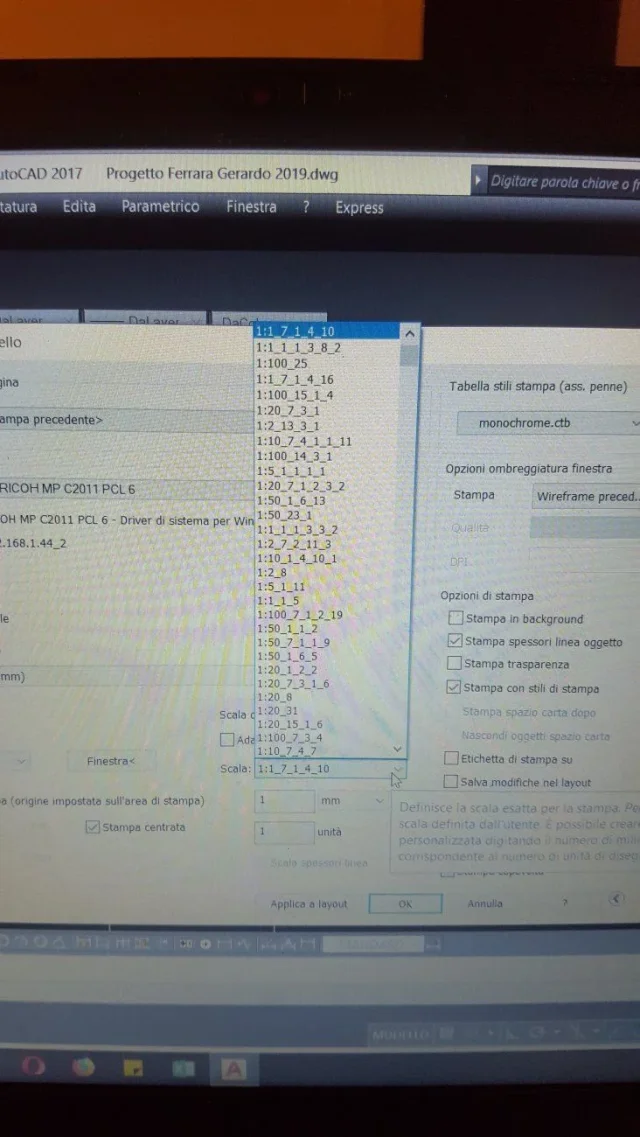
Thank you very much, the only problem is that right now I'm trying to set scale 1:100 in the press window, but I get out all strange values, as I showed in the enclosed photo. even if I insert first 1mm/0.01 units I always get the same values in that blind.
 

Attachments

  • 20191105_174343.webp
    20191105_174343.webp
    122.4 KB · Views: 6
put suitable to the sheet, you will see the values in the mm cells and units that will be 1 and 0.0105 respectively
remove the tick to fit sheet and correct the values in the cells mentioned above by hand putting the correct values 1 and 0.01
because you have those stairs I have no idea, but I suppose your file is full of dirt...
 
those you see in the image is the list of stairs present in the drawing; These scales serve for annotative odds, for window formats and for printing.
what you see is only the identification name that is given to the scale, could also call itself tatyb, and does not mean that the relationship is the one indicated.
to view, edit and clean unnecessary scales launch the command stairslistedit, a window will appear with the list you saw; by editing you can check the actual scale ratio and correct the identification name by making it understandable.

the stairs weight the files so I recommend you do a cleaning of these (http://www.cad3d.it/forum1/threads/eliminare-le-scale-di-annotazione-superflue.1664/) and in general the design with the purge command
 
those you see in the image is the list of stairs present in the drawing; These scales serve for annotative odds, for window formats and for printing.
what you see is only the identification name that is given to the scale, could also call itself tatyb, and does not mean that the relationship is the one indicated.
to view, edit and clean unnecessary scales launch the command stairslistedit, a window will appear with the list you saw; by editing you can check the actual scale ratio and correct the identification name by making it understandable.

the stairs weight the files so I recommend you do a cleaning of these (http://www.cad3d.it/forum1/threads/eliminare-le-scale-di-annotazione-superflue.1664/) and in general the design with the purge command
Thank you very much, I will try to make a cleaning
 
Hello everyone, I'm having some trouble in model printing. in particular I have to print in a4 scale 1:100. I worked using the meters as a unit and drew the a4 window of 21 x 29,70. When I go to print, however, it seems that the print came out well, then when I go to measure with the ruler on the paper sheet, the measurements are packed a few mm. I thought maybe I was wrong to set the units in the print window. At the moment I am making centered print and "suitable to the sheet" where below, in gray, the measures are to be 1mm / 0.105 units. How do I set them up?
you have to set your a4 sheet and give as a print scale 10:1 (10 mm 1 autocad unit)
 

Attachments

  • Senza titolo-1.webp
    Senza titolo-1.webp
    47.4 KB · Views: 7

Forum statistics

Threads
44,997
Messages
339,767
Members
4
Latest member
ibt

Members online

No members online now.
ciao
Back
Top