
• This forum is the machine-generated translation of www.cad3d.it/forum1 - the Italian design community. Several terms are not translated correctly.

prints with revit and hp 500 + hpgl2

  • Thread starter Thread starter manente
  • Start date Start date

manente

Guest
hi to all, I know to touch a sad and retrite topic but perhaps, especially for the reached exhaustion, I thought to ask help to those of the forum found themselves in this situation and possibly resolved (hope!!)
then this is the problem: I have a plotter hp 500 with hpgl2 card; I tried to print in all ways but nothing to do the plotter crashes in the beginning...... I first tried to print directly on 500 also with the spooler function from computer ..niente.... I did with pdf creator a file but then I can't print it (400 kb) ...and then with spooler from computer
I'm sorry if I've stretched out.....with opinions
Thank you.
 
Hi.
I collaborate with a study that has the hp 500 and the pdf printed by revit 2012 with pdf creator that sends them print smoothly (a board with images of rendering from 28 mb as well)
 
thanks to the answer, I wanted to ask you something: what settings do you use to print on pdf? dpi set on pdf creator?
thanks for the interest
 
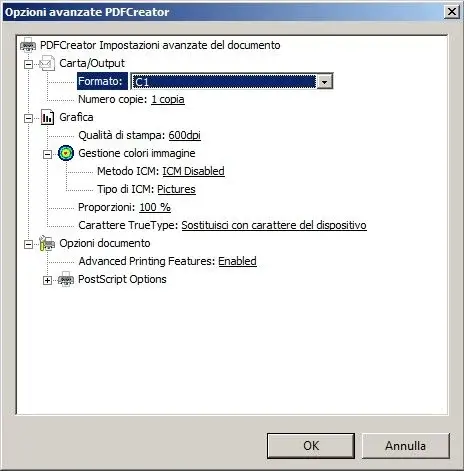
this is the config of pdf creator that I use with revit
 

Attachments

  • PDFCREATOR.webp
    PDFCREATOR.webp
    21.5 KB · Views: 33
Thanks, I was wondering if the plotter they have is connected directly to the computer or is on the net at printserver.....and what version of the hp driver have? ?
I know I'm asking a lot.... if you can't help it.
Thank you very much
 
The study is small, the arch and an employee, but with large family capital, we say that it designs and builds own things. the plotter is on the net, 2 pcs even so new, and prints directly from pc by selecting the printer.
the only change I had made to him was to send directly to the press because for some tables with the photographic relief he was planning while printing without spooler went
 
thank you, I also tried to print in spool with the computer but it's not the same......I don't know more than fish take
 
try to upload pdf-xchange vierer, save pdf in image type jpg, png or tif
and try to print them from a paint program, or imported in autocad printed by them
 
gentlemen solved...
I phoned the assistance hp is they told me this:
1) prepare the pdf file
2) when I am about to print the pdf file from acrobat go to advanced and clikkare on the item "print as image"
3) on the properties of the plotter go to services---and put the check to send from the computer

boys work......
thanks to everyone for availability
to the next
 
I was also going to answer you the same way, I solved by sending the file as an image but directly from revit!
Eviva!
 

Forum statistics

Threads
44,997
Messages
339,767
Members
4
Latest member
ibt

Members online

No members online now.
Back
Top