• This forum is the machine-generated translation of www.cad3d.it/forum1 - the Italian design community. Several terms are not translated correctly.

problem bond "movement" between two assemblies

  • Thread starter Thread starter stefano-4710
  • Start date Start date

stefano-4710

Guest
hello to all, I would like to pose a problem, I have two independent assemblies where I created a movement bond:
in the first set there is the rotation of an axis that rotates another axis by means of synchronism gears.
in the second set there is the rotation of a main axis with a crown that rotates a pinion, created by the interior design of inventor.
My problem now is to bind the pinion with the axis of the first together. I tried to insert the movement bond between the pinion and the axis of the first together, but it makes me rotate all the asses. if I bind the axieme instead gives me a mistake on the animation. Can anyone help me? can one part be bound by a set?
Thank you very much
 
Good morning, it was a bit of time that I didn't create a flexible set and I'm finding the same problem again.
I did a 3d test to make you understand the problem.
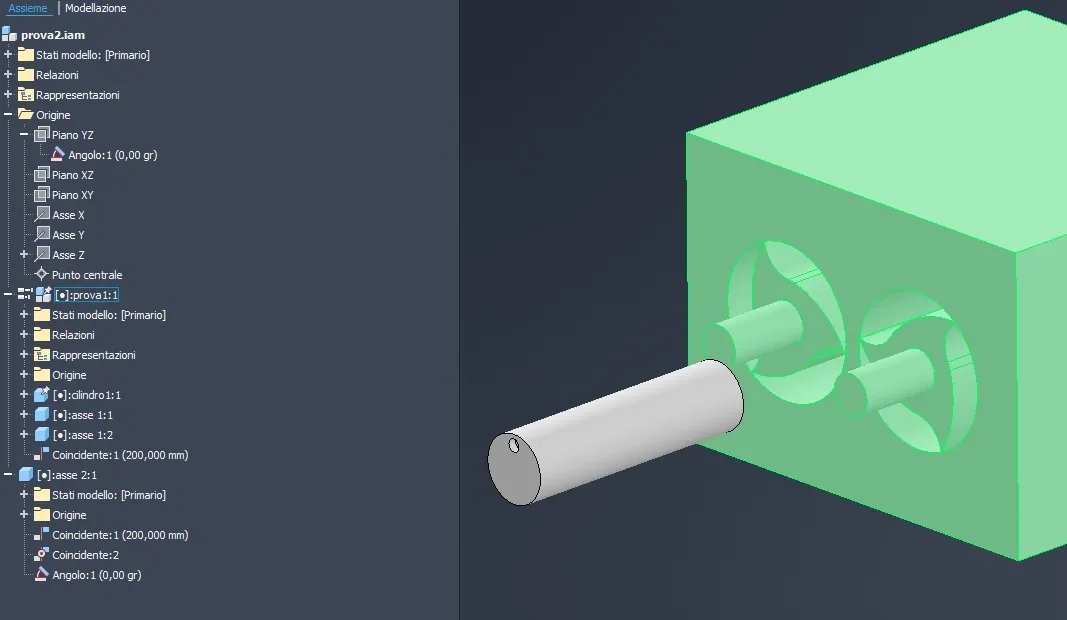
I have this set and constraints (see photo below). the primary axis, the right axis, has the angular bond to allow rotation. the secondary axis, the left axis, has a rotation ratio of 0.1. in this together, making the corner animate, everything works correctly.1713346238594.webpwhen I go to insert this together into another set, where there is an axis that rotates the primary axieme "prova1" (see image below), with the constraints you see, the single axis rotates correctly. If I go to insert the rotation movement between the single axis and the primary axieme axieme, despite the axieme being flexible, it gives me a mistake that I can't understand.1713346542283.webpI hope you can help me
Good day
 
Yeah, I did. I described it in the previous message without attaching image. I put the movement link between axis 2 and the same primary axieme test. I am the new bond and I am mistaken.
Now I'm noticing that if we stop the angle that makes me rotate the primary axis inside the axieme, it works. Is it normal?
 
I deleted the message because I thought I said nonsense.
from the second image I understand that axi2.ipt is 200mm from your test and matching set z of the main axieme (prova2) then you have given an angular bond regarding the origin yz always in the main axieme (prova2). so it can never work.
try to give a further rotation bond with ratio you decide between axis2.ipt and axis of origin of axis 1.ipt or axis 2.ipt (those inside together try to understand us)
 
I made a try to make you understand the problem. the coincidence bond is the distance between the planes. the angle of the axis 2 regarding the origin yz is to give the rotation to the axis2, and it works.
from the moment I give the rotation movement constraint with the axieme, it gives me error.
I managed to solve by suppressing the angular bond within the axieme (it allowed me to rotate the axis in the axieme). practically if I want them to rotate the axes only in the axieme, I don't have to suppress the angle, while if I want them to rotate according to the rotation of axie 2 in another set, I have to suppress the angular movement in the axieme. Can it make sense?
 
perfect, it's like I did. therefore it is normal that if we put the rotation of the axieme (with angular bond) on the axieme "principale.iam", there must be no rotation (with angular bond) in the axieme "prova.iam" otherwise generate a conflict.
so if I wanted the rotation both in the "main.iam" axieme tied to the movement of the axieme in that axieme, and both in the "prova.iam" axieme, I must add or remove the bond to rotate the axis (with angular bond) within the "prova.iam" axieme.
correct?
 
the angular bond on the main set I put it only to be able to make a bond animation but it would not be indispensable
 
Is there another way to rotate an axis besides putting angular bond and then animating it?
 
Yes, yes. I thought there was another way to turn the axes without the angle. Anyway, I fixed it, so thank you.
Good day
 

Forum statistics

Threads
44,997
Messages
339,767
Members
4
Latest member
ibt

Members online

No members online now.
Back
Top