• This forum is the machine-generated translation of www.cad3d.it/forum1 - the Italian design community. Several terms are not translated correctly.

problem color rendering display

  • Thread starter Thread starter Andre94
  • Start date Start date

Andre94

Guest
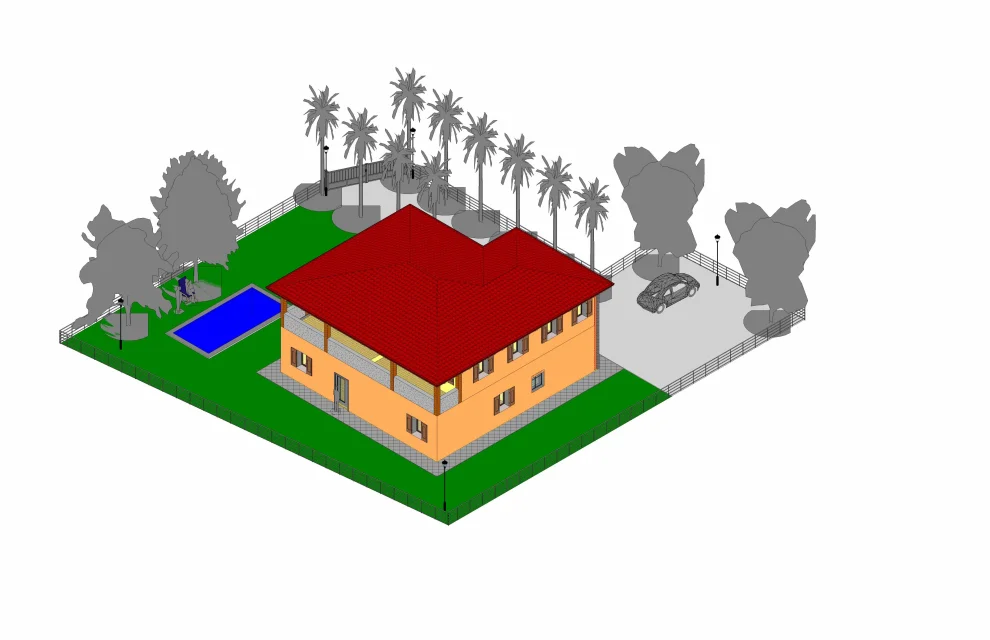
Good morning. I should perform the rendering of a project but there is the following problem: active the command 'cineta', I put myself in the view 'ground floor' and let go of the focal length to man height (1.75m) , therefore I open its window with inside its display. And up to here, all right. when then active in this window the command 'homogeneous colors' or 'realistic', does not display the material 'grass', or rather, displays it but in grey color. the other problem found in the pool, where the interior walls are displayed with the material 'grass' and instead are covered with tiles. question: how come if I put myself in view 3d the view is correct (both in 'homogeneous colors' and in 'realistic') while if I activate the camera command and then I launch the rendering the colors are wrong? I attach 1 photo in view 3d where the representation is correct and 1 photo in 'cineta' where the colors are wrong, that is the lawn is in grey color and the interior walls of the green pool. thanks to the attention, I wait for reply:)
 

Attachments

  • Progetto Porto Mantovano - 3D corretto.webp
    Progetto Porto Mantovano - 3D corretto.webp
    607.9 KB · Views: 5
  • Progetto Porto Mantovano - cinepresa.webp
    Progetto Porto Mantovano - cinepresa.webp
    312.4 KB · Views: 4
version 2015. could be a problem of only displaying or setting the colors of the materials related to a particular view (in this case 'cineta' as seen from the enclosed photo) ? in the complete view in 3d the colors are correct, both in 'homogeneous colors' (see attached photo) and in 'realistic' mode. So it seems rather strange
 
Try to make another camera in a different place. to see the project seems now to be where there is a tree and I would not want it to create confusion. test
 
already tried to put me in a different position with the camera and the problem persists. I also tried to erase all the trees and the pool and also to change material to the ground but in the camera view I always find that dark grey that I can't really understand from where it comes from. By the way, trying to make a plot by chance side and putting it in the camera view is correct. I can't understand what the problem might be
 
I quote: among other things, trying to make a plot by chance side and putting it in the camera view is correct. you have to leave here and understand the difference,
 

Forum statistics

Threads
44,997
Messages
339,767
Members
4
Latest member
ibt

Members online

No members online now.
Back
Top