• This forum is the machine-generated translation of www.cad3d.it/forum1 - the Italian design community. Several terms are not translated correctly.

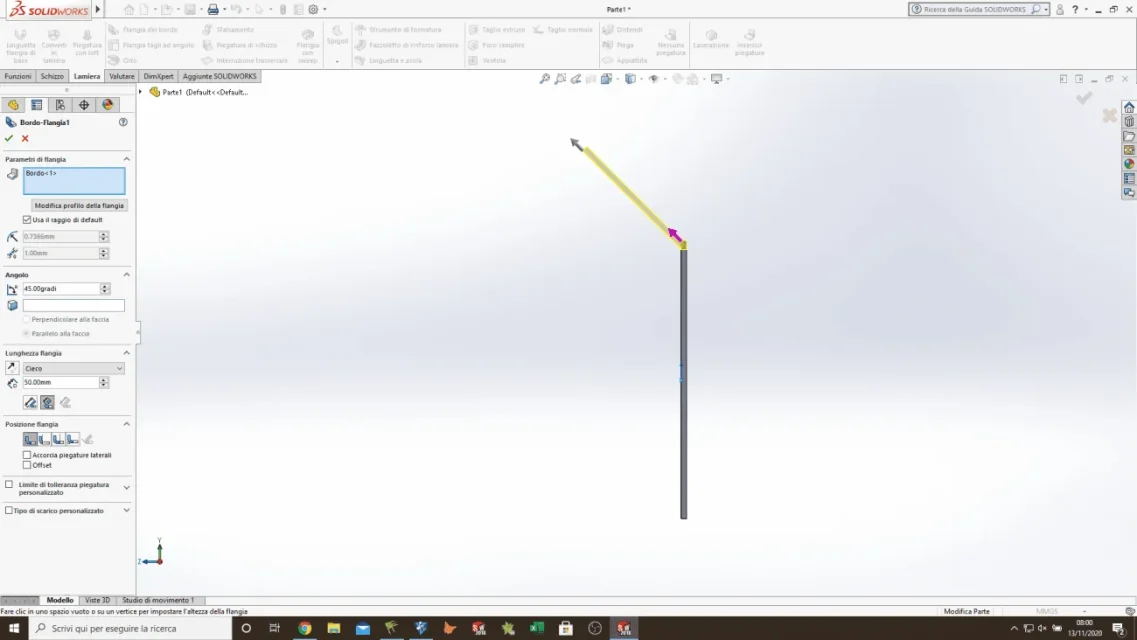
problem creating a simple fold with open corner.

  • Thread starter Thread starter B.Porcheddu
  • Start date Start date

B.Porcheddu

Guest
Good evening to all,
today my solidworks is completely crazy and tip white doesn't want to make me one more
simple fold with open corner. only allows me to make closed folds.
every now and then when I try to press ctrl+8, the fast controls for the "normal a" happen by mistake to press other buttons, possible that you center something?
I tried them all, checked in the tree if by chance the sheet section went to get some weird table, but it seems to be okay.
I tried to reset all sw settings but I don't see the button, it only asks me if I have an old file from where to restore, but I don't have it.
I absolutely have to practice that I have a test Wednesday, and I'm stuck for such a nonsense.
thanks to anyone who will help me.
 

Attachments

  • problema a fare un angolo aperto.webp
    problema a fare un angolo aperto.webp
    49.7 KB · Views: 16
write in the profile the version of solid
in the image you have an angle of 90°, if you fail to show the alert message that comes out when you try to confirm the function; instead the message you indicated tells you what values you have to put and following those indications ≥ 90 ≤ 180 you can only get an open fold.

attach files by specifying with a sketch the result to get

is welcome as well as educated to respond to the open discussions in which you received response
 
it doesn't give me a real alert, it comes out that simple written "to enter an equal number or greater than 90°". the problem I don't have on a single file, but on solidworks: either that I open an existing file or that I make a new file nothing to do! Now I draw a picture of the result I would like to get.
I still apologize for not answering that old topic.
 

Attachments

  • quello che vorrei ottenere.webp
    quello che vorrei ottenere.webp
    42.9 KB · Views: 16
from the guide http://help.solidworks.com/2019/italian/solidworks/sldworks/hidd_feat_sm_edge_flange.htmVirtual sharp esterna
PM_shm_Outer_Virtual_Sharp.gif
, virtual sharp interna
PM_shm_Inner_Virtual_Sharp.gif
piegatura tangente
PM_Tangent_Bend.gif
. specifies the origin for measurement. a virtual sharp creates a sketch point in the virtual intersection point between two sketch entities (see creation of virtual sharp). tangent bending option is valid for bending greater than 90o and allows to use the tangent length of a flange as a basis for calculating the length. tangent length can be typed without using additional calculations.
 

Attachments

  • problema a fare un angolo aperto.webp
    problema a fare un angolo aperto.webp
    49.6 KB · Views: 12
in my solidworks I know that he thinks otherwise: If I insert an angle between 90 and 180° it gives me a closed fold (and it does), if I try to insert a angle from 0 to 90° I exit that small panel with on writings to insert a angle greater or equal to 90°.
I have no absolute certainty, since in recent days I was just looking at exercises already done and I was not drawing from 0, but I think the problem only gives me it from yesterday afternoon.
This evening, as soon as I get home, I look at the virtual sharp option that you highlighted me, thank you very much.
 
in my solidworks I know that he thinks otherwise
is just a way to define the type of fold. for me bend with obtuse angle (>90°) is open while you define it closed.
There is one debate that touches the subject.
the problem, I guarantee it 100%, is the one indicated. Solid signals you, through the message you highlighted in the image, that the options you choose require those values.
 
Beyond that we can misunderstand between an open or closed corner depending on the points of view, as I show you in attached photo, at work with a solidworks 2018 sp.0 I can do what I wanted to do.
while at home it makes me only folds with angle from 90° to 180°, at work I can safely make a fold from >0° to 180°.
 

Attachments

  • angolo aperto fatto a lavoro.webp
    angolo aperto fatto a lavoro.webp
    37.3 KB · Views: 11
while at home it makes me only folds with angle from 90° to 180°, at work I can safely make a fold from >0° to 180°.
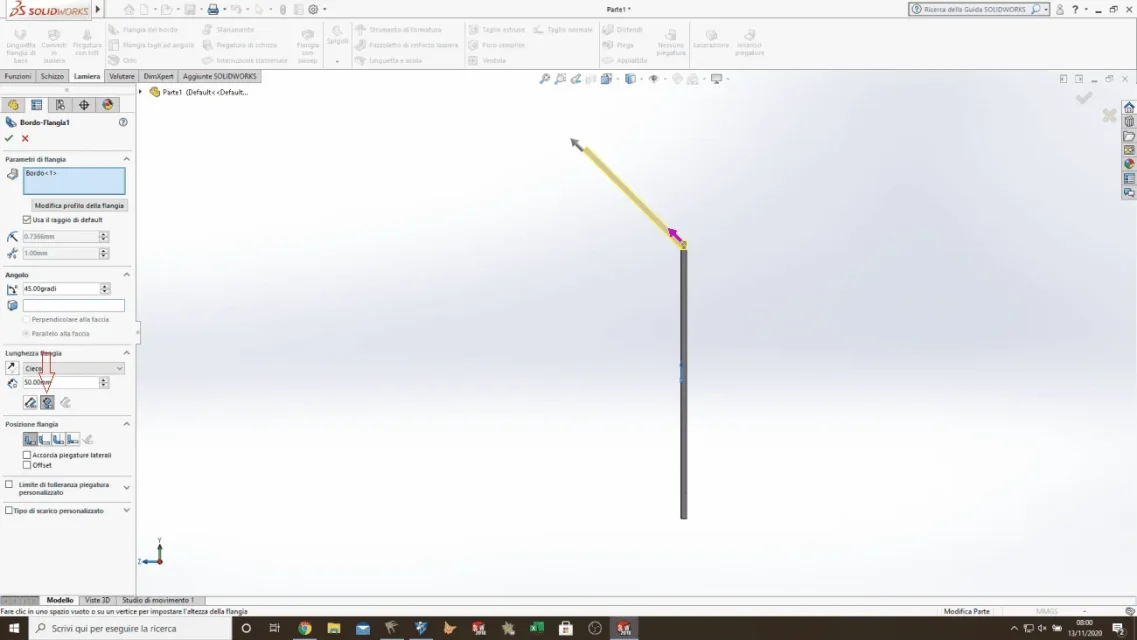
but look at the options you have selected.... I wrote it and indicated it because at home it does not work
 

Attachments

  • angolo aperto fatto a lavoro.webp
    angolo aperto fatto a lavoro.webp
    39.3 KB · Views: 14
but look at the options you have selected.... I wrote it and indicated it because at home it does not work
I'm here now! And yet I felt like I tried different options at home!
I did the tests here at work and actually selecting "vibrating padding" from that problem there.
I'm sorry, but I didn't notice the red frecciettina that you drew me in the photo you put back.
Thank you very much, problem solved!
 

Forum statistics

Threads
44,997
Messages
339,767
Members
4
Latest member
ibt

Members online

No members online now.
Back
Top