• This forum is the machine-generated translation of www.cad3d.it/forum1 - the Italian design community. Several terms are not translated correctly.

problem cut part

  • Thread starter Thread starter sangkavr
  • Start date Start date

sangkavr

Guest
hi raga, first of all welcome me, I think with pro/e I will use this forum very often:biggrin:

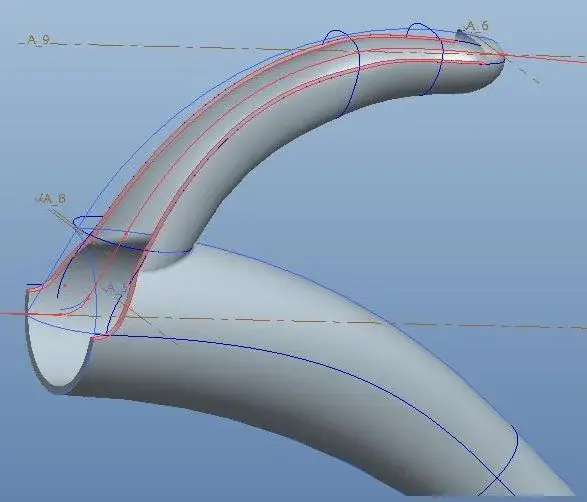
jokes aside I modeled a handle in full using the style, with the intention to cut it later and split it into two files to mate horizontally;

the surfaces that came out seem ok, but I had considerable problems with the thickening (creating strange facts, type of small thorns), and after having solved (at least I think) I find myself with a part that, in the zone of less bending, is not cut perfectly.
I attach an image to make you understand.
I hope you can help me.

Hello grz.
 

Attachments

  • prt0001.webp
    prt0001.webp
    17.1 KB · Views: 24
  • prt0002.webp
    prt0002.webp
    24.5 KB · Views: 26
If I didn't understand the problem is about the edges i.e. when you give the thickening to the surface the edges (those in pink) are not as flat as you would but take a strange inclination this because of the offset

maybe you could solve by first turning the handle into solid closed then cutting it to divide the two parts and then emptying each of the two with the shell command

Alternatively, you could create the surfaces (inside/outside) of the thickness with surface offset then cut out or extend the edges up to the closing plane then trim them then create the edge with a further surface and then make solid (after joining them with merge)

these are the two roads I follow usually while the command thickens I use it very rarely and only on flat surfaces just because otherwise I encounter the same problem that you have highlighted

I hope I've been clear
greetings
 
I tried them both but it doesn't go, in the first case it fails emptying, in the second at the offset of the handle I find myself on the other side of the undulating surfaces, and I can't explain the xkè.
 
I have tried to follow the second hypothesis, but after joining all surfaces, I do not activate the solidification command,
It forgives my ignorance, but it happens when there is some open surface or what?
 
yes if you do not activate the solidification command there are probably open surfaces or the edges of the surfaces are not adjacent to each other
 
Well maybe it's xkè I filled the sketches to make the side walls. I will try to trim from surface + wide.
 
I finally made it, there was some surface to damage.

Is there a way to make tabs and mating grooves? in the help shows it but does not mention how,
I also have the ptc manual (matton) given me after the basic course, but it seems not even there.
 
hi, I'm new to the forum and novice in using pro-e, I can't find the command to split a solid part into two parts.
Can you tell me where she is?

Thank you.
 
hi, I'm new to the forum and novice in using pro-e, I can't find the command to split a solid part into two parts.
Can you tell me where she is?

Thank you.
as they have correctly indicated, in pro/e the multibody does not exist.
there is the possibility to cut a part in two and in family table to extract the two semi-parts (for example the right and left half or the upper and lower half).
 
ok thanks, I will try with family table, but what I was interested in is to have a part with more defined volumes inside.
I will let you know how I hope I will solve!:wink:
 
not finding a smart solution in a short time, I simply opened the part =>= used the rifilo function and saved a half, reopens the original part ==> rifilo with opposite direction and saved the other half.
Hi.
 

Forum statistics

Threads
44,997
Messages
339,767
Members
4
Latest member
ibt

Members online

No members online now.
Back
Top