• This forum is the machine-generated translation of www.cad3d.it/forum1 - the Italian design community. Several terms are not translated correctly.

problem displaying odds in 3d

  • Thread starter Thread starter Eugenio1900
  • Start date Start date

Eugenio1900

Guest
Good evening to all
I'm having a problem with software graphics.
I use solidworks 2014 licensed students (I would have wanted more recent, but my university provides us this) while my laptop has a video card nvidia 840m (I also reinstalled the gpu drivers in a clean but nothing way).
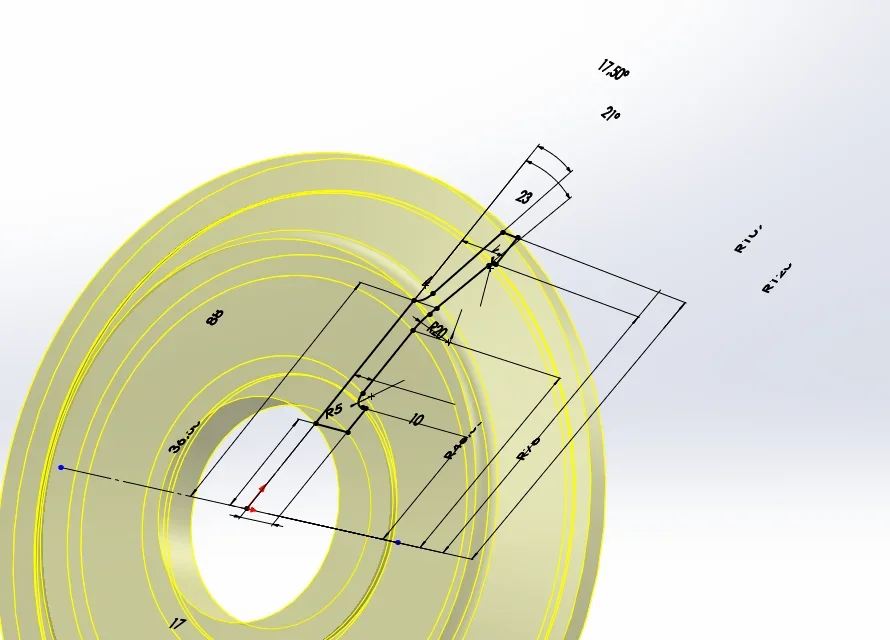
the problem appears when I'm listing a sketch (or when I pick it up to change) and start turning the view. some odds disappear, disalline from the reference lines or seem "cut".
I tried to repair the installation but nothing. Do you have any advice?
here I allege the problemImmagine.webpThank you very much in advance
 
Sounds like a video card problem.
If you work in the environment part, instead of changing part in the environment together, does it give you the same problem?
 
First of all, I thank you for the time you have dedicated to me.
the problem resided in the fact that days ago I found a guide to add the realview graphic in uncertified video cards. I added a new registry key.
I went to retrieve it, and then remove it, and now the odds are back all aligned (the problem also existed when that graphic display was not active).
and so it was really a video card problem and a little I was looking for it.

thank you again, and I hope what I wrote could be useful in case others had been in my own situation.
edit: no, I rechecked and did not resolve, it was all set for only 1 minute

ps: When I try to attach the .sldprt file it tells me impossible. do I have to upload it from a link other than what allows the "allega" tool of the forum?
 
from opengl active solidworks options. if you solve you have to install the latest nvidia stable drivers and then configure solidworks within the nvidia management with different options from the general ones. Obviously solidworks must work with nvidia and not with the integrated one.
Something like that doesn't have to happen with the hardware you have.
 
if all this is appropriate download a next service pack of solidworks.
I tried to activate opengl, but not even with that mode it worked, the odds continued to appear with that problem.
Unfortunately the student license seems to be limited to service pack 2.0 (from installation software I can select sp 5.0, but then tells me I don't have the license)
 
I also had something like this, despite my beautiful products being certified. I only found it with a model and every time I open it. This model came from the old sw versions, but I found it with 2016. I deduce that it can depend on something that is saved within the files of a specific job, so much so I think that model you will always see it like that. then if the problem meets it in others and often, then the speech changes.. .
 
I also had something like this, despite my beautiful products being certified. I only found it with a model and every time I open it. This model came from the old sw versions, but I found it with 2016. I deduce that it can depend on something that is saved within the files of a specific job, so much so I think that model you will always see it like that. then if the problem meets it in others and often, then the speech changes.. .
the problem is that I match it with all the files I need for a certain project, and I don't want it to be all over again from scratch

I just created a new file and did not give me any problem in 3d, so I would not want the problem to arise only later when I edit the file or when I put it in assembly with models now affected by the problem

here I attach a part with the problem and also a "proof" that does not seem to have presented graphic flawsView attachment file.rar
 
I opened your files and actually match the problem in the file pulleys. However I do not think anything happens by continuing to work with these files, only the antipatic thing not to see correctly the odds even within the sketch modification not only in 3d.
 
I opened your files and actually match the problem in the file pulleys. However I do not think anything happens by continuing to work with these files, only the antipatic thing not to see correctly the odds even within the sketch modification not only in 3d.
thank you so much for confirming, at least it means that my system is working and that it is a file problem. I hope to understand the origins of this problem, it is quite ruthless to try to change the measures without being able to see them
 
I don't. try setting your options to lower your resource request.
in the property of the document:
image quality
optional system:
removal of tangent edges
active selection through transparency
then:
active quality bozza rln/lnv
work in shady mode
 
I tried to minimize many options, but the odds still went where they wanted them. .
in the end I have restored the initial values (on notebooks of others I see, do not have this problem despite having lower video cards)
 

Forum statistics

Threads
44,997
Messages
339,767
Members
4
Latest member
ibt

Members online

No members online now.
Back
Top