
Alby189
Guest
Bye to all,
I write here after a search where I didn't find anything to do with my case.
I just formatted a pc using the hp recovery disks, deleted all user data so that I have the machine as new.
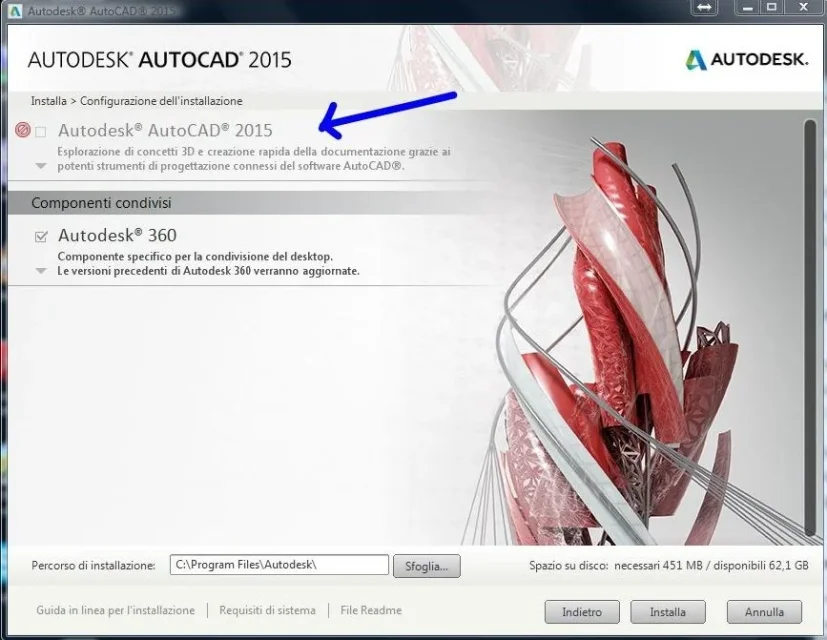
now I am trying to install autocad 2015, after giving the sn and the product key flags become green and the procedure progresses, but when I arrive at the program selection screen to install, it is not clickable and matte.
I tried with previous versions and with another inventor program, even in these cases the problem is identical, in essence despite the formatting does not make me install anything autodesk.
do you have a solution? I attach an image
Thank you all!
I write here after a search where I didn't find anything to do with my case.
I just formatted a pc using the hp recovery disks, deleted all user data so that I have the machine as new.
now I am trying to install autocad 2015, after giving the sn and the product key flags become green and the procedure progresses, but when I arrive at the program selection screen to install, it is not clickable and matte.
I tried with previous versions and with another inventor program, even in these cases the problem is identical, in essence despite the formatting does not make me install anything autodesk.
do you have a solution? I attach an image
Thank you all!
 I tried to uninstall with the utility autodesk and with revo, I deleted the log files, I also followed this guide