
• This forum is the machine-generated translation of www.cad3d.it/forum1 - the Italian design community. Several terms are not translated correctly.

problem installation solid edge st5 academic

  • Thread starter Thread starter PGlowa
  • Start date Start date

PGlowa

Guest
hello to everyone I hope to find a solution to this problem. I downloaded if st5 academic after completing the request and after receiving the email with the link, but you do not install me. by now I have tried twenty times trying everything including by changing the account control settings and starting the installation as administrator etc. But nothing.
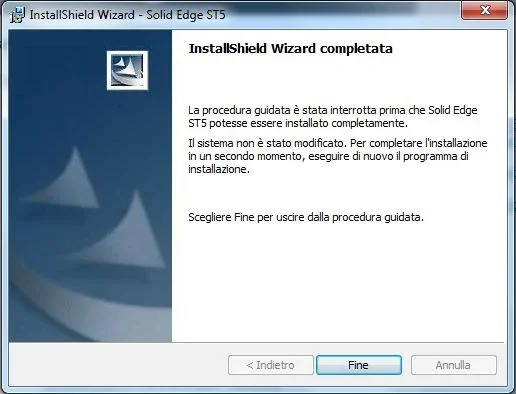
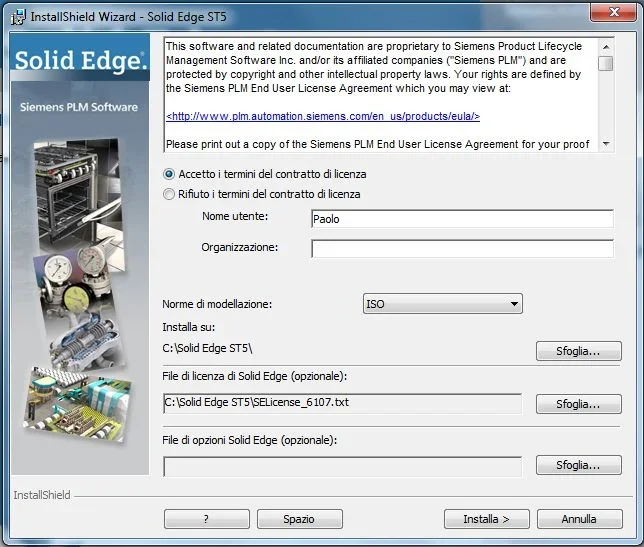
I arrive at the installation screen where asks me the folder where to install it and the path of the license file arrived by mail and when I click install a screen that says the wizard has been interrupted. I attach images of the installation screen where I indicated the paths for installation and the license file and image of the error message.
my pc is an asus a55v with i7 with 8gb of ram and nvidia gt 630m video card from 2gb dedicated with installed win 7 home premium 64 bit.
My only doubt is that the downloaded solid edge file was "solidedgev105italian_32bit" but my operating system is 64-bit.
You know how to help me? ? ?
 

Attachments

  • messaggio errore copia.webp
    messaggio errore copia.webp
    20.9 KB · Views: 23
  • schermata di installazione copia.webp
    schermata di installazione copia.webp
    53.4 KB · Views: 12
my pc is an asus a55v with i7 with 8gb of ram and nvidia gt 630m video card from 2gb dedicated with installed win 7 home premium 64 bit.
My only doubt is that the downloaded solid edge file was "solidedgev105italian_32bit" but my operating system is 64-bit.
You know how to help me? ? ?
Try rename the license file as selicense.dat, but I think the problem is not that...
I would also install in the classic directory c:\program files (x86)\, if you haven't already tried.

Did you turn it off? The only time I saw such a problem was a cpu that didn't support the sse2 intrusions, but I don't think it's your case.
 
try installing it without giving it the license file
at the end of the installation copy the file under the program directory
overwrite what creates installation
 
I tried to leave the folder that puts him i.e. c:\program files (x86)\ but the problem remains....also deactivating the antivirus.
I'll try to rename the license file.
However on the instructions that they give to the installation on win7 64 bits say to install it on a destination folder other than that c:\program files (x86)\ as well as to remove the account control....however I tried to leave it and remove it to leave the folder that he wants or another to remove the antivirus and to let it perform the file as administrator or not but the result is always the same that screen installed.
on the pc of a friend who also has him win7 64 bit installed it quietly after requiring net framework....in doubt I installed alche on my but the result is always the same.. his pc is older than my and less performing. .
I don't really know what I can do... .
 
perhaps your friend has a prefessional version, because the retail version on home set does not install.
if even the academic version follows the same rule there is little to do, if not update the operating system.
 
I tried to leave the folder... .
Did you previously install another version of solid edge? if you try to check in system logs that there is not any data inherent to the previous installation. in which case you do a cleaning and try to reboot.
 
1)then....I tried to rename the license file but the result is the same... Regardless of the folder chosen for installation.
2)even without putting the license file changes nothing.
3)but mine had the professional but he also has the home....with the same antivirus that he has when I installed if I hadn't even disabled.
4)I had no other versions previously installed
I will go on to attempts until new proposals. . .
Thank you. .
 
I throw them: try with another user, if you don't have to create it and give it the administrator privileges.
 
rereading the initial post, the problem maybe is just the sw tite, download the 64bit version!
 
rereading the initial post, the problem maybe is just the sw tite, download the 64bit version!
32-bit version can be installed on 64-bit windows without problems.
the problem is then on the other side.
 
32-bit version can be installed on 64-bit windows without problems.
the problem is then on the other side.
true, but given the strangeness of the error, except to lack some prerequisites that so does not seem, I would say that it is worth trying also this way.
 
hello to everyone I hope to find a solution to this problem. I downloaded if st5 academic after completing the request and after receiving the email with the link, but you do not install me. by now I have tried twenty times trying everything including by changing the account control settings and starting the installation as administrator etc. But nothing.
I arrive at the installation screen where asks me the folder where to install it and the path of the license file arrived by mail and when I click install a screen that says the wizard has been interrupted. I attach images of the installation screen where I indicated the paths for installation and the license file and image of the error message.
my pc is an asus a55v with i7 with 8gb of ram and nvidia gt 630m video card from 2gb dedicated with installed win 7 home premium 64 bit.
My only doubt is that the downloaded solid edge file was "solidedgev105italian_32bit" but my operating system is 64-bit.
You know how to help me? ? ?
in the official notes for the academic license are the minimum requirements for the installation of the sw and are:
minimum system requirements• windows 7 enterprise, ultimate,or professional (32-bit or 64-bit) with service pack 1 • windows vista business or vista enterprise operating system (32-bit or 64-bit) with servicepack 2 (sp1 minimum)your is the home version, so it is not installable, to scan of misunderstandings, check if even installing the sp1 for win7 the problem remains, if even so, I think you should update the operating system.
 
true, but given the strangeness of the error, except to lack some prerequisites that so does not seem, I would say that it is worth trying also this way.
Unfortunately the student version does not exist at 64 bits....
 
hello to all again:
1) I looked at the forum recommended myself as a hunter and found that others also had the same problem that was not solved though
2) solid edge academic license quietly installs on win 7 home....except on my pc apparently.. .
I will look for a few more solutions. ...
Thank you. .
Hi.
 
hello to all again:
1) I looked at the forum recommended myself as a hunter and found that others also had the same problem that was not solved though
2) solid edge academic license quietly installs on win 7 home....except on my pc apparently.. .
I will look for a few more solutions. ...
Thank you. .
Hi.
did you try to install using another user?
 
yes I tried how I tried to search in solid edge key log files but there were those indicated here:

https://bbs.industrysoftware.automation.siemens.com/vbulletin/showthread.php?t=46713It's what's so absurd. .
need to find the installer's log files and go to see which stage of the installation crashes. may also be that installation log files need some option to be generated.

try to clean the temp, start the installation and once you stop back in the temp to see if there is any file that can be an installation log and then look inside and understand something more.

Hi.
 

Forum statistics

Threads
44,997
Messages
339,767
Members
4
Latest member
ibt

Members online

No members online now.
Back
Top