
• This forum is the machine-generated translation of www.cad3d.it/forum1 - the Italian design community. Several terms are not translated correctly.

problem mirroring a writing

  • Thread starter Thread starter billo2404
  • Start date Start date

billo2404

Guest
Hi, guys. Maybe for you is a trivial question, but I'm going away.
In practice I created a writing on the right side and mirroring it around the middle floor (in this design the dx) I find the unre mirrored writing and then written on the contrary.
I would extend the extruded cut.
for the creation of the parts is not a problem because there are the options to choose from.
mirroring functions in one part instead I can't find a solution.
Can you help me?
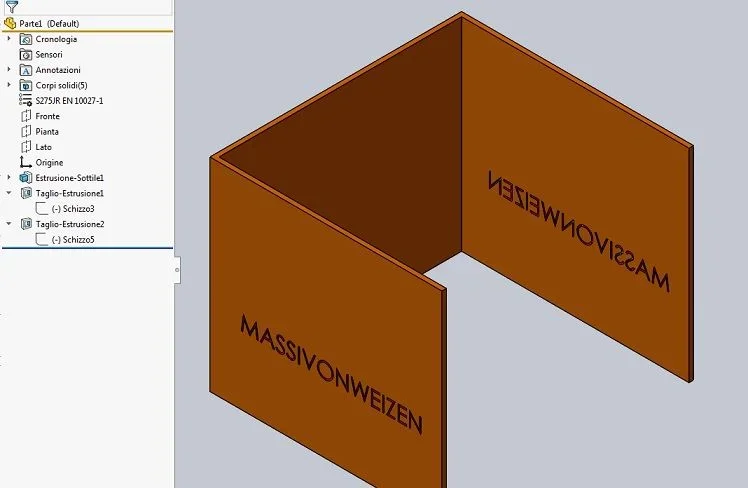
 
apart from that attaching the file is always a good strategy to help those who have to help you, as well as write the version in the profile, the operation that does is correct. do that on a sheet and put it in front of the mirror... so does solidworks.
so the view is correctly mirrored and not flipped as you would like
 
ok, I added the data to the signature anyway I am using the version 2018.
I attached the file, I hope I did it properly.
Maybe I'm used to other software using mirroring getting a different result and interpreting bad, but then how can I get readable writing on the left side?
 
I've been able to do it even if I'm a little snoopy.
I created a plan that cuts half the writing in the vertical sense
I created an axis given by the intersection of the right plan and the new plan
I created a circular repetition of the function that revolves around the axe obtained with 2 elements only.
There are shorter roads, it seems a little bit too smart to do, isn't it?
 
writing the version you saved me and others like me to download a file that they cannot open.
Unless it was implemented in 2018 that type of mirroring finds it only in the together and is defined opposite hand and in the environment part you can not do it. you must make a new sketch; in this case you can instead exploit the sketches and properties of the file to create relationships between one sketch and the otherImmagine.webp
View attachment Parte1.zip
 
I almost killed myself to turn that letter :36_3_4:
turning the sketch is actually the most logical thing, but I have no idea how to do it.
I always wondered if there was a way to copy a pretty complex sketch and reuse it inside the same part or in other parts like a logo or something.
I downloaded your file but I only see a correct sketch5 but I don't understand how you created it.
Is this a complex procedure?
 
the sketch5 is simply a convert entity of the sketch3 pane (just select a line and see that it has relation on the edge), while the writing is linked to a property and is only reversed the sense of the writing.
It is nothing difficult, indeed it is trivial as procedure.
 

Forum statistics

Threads
44,997
Messages
339,767
Members
4
Latest member
ibt

Members online

No members online now.
Back
Top