
• This forum is the machine-generated translation of www.cad3d.it/forum1 - the Italian design community. Several terms are not translated correctly.

problem selection blocks

  • Thread starter Thread starter mirco354
  • Start date Start date

mirco354

Guest
hi to everyone, I would like to ask you something, can you activate a feature that allows you to select blocks even if they are not present in the screen? I better explain, I start selecting blocks, then zoom on a drawing part and click again to finish the selection, the blocks contained outside my autocad screen (where I finish the selection) do not select me, while having them "harve" before zooming,
I hope I've explained well. .

Hello everyone
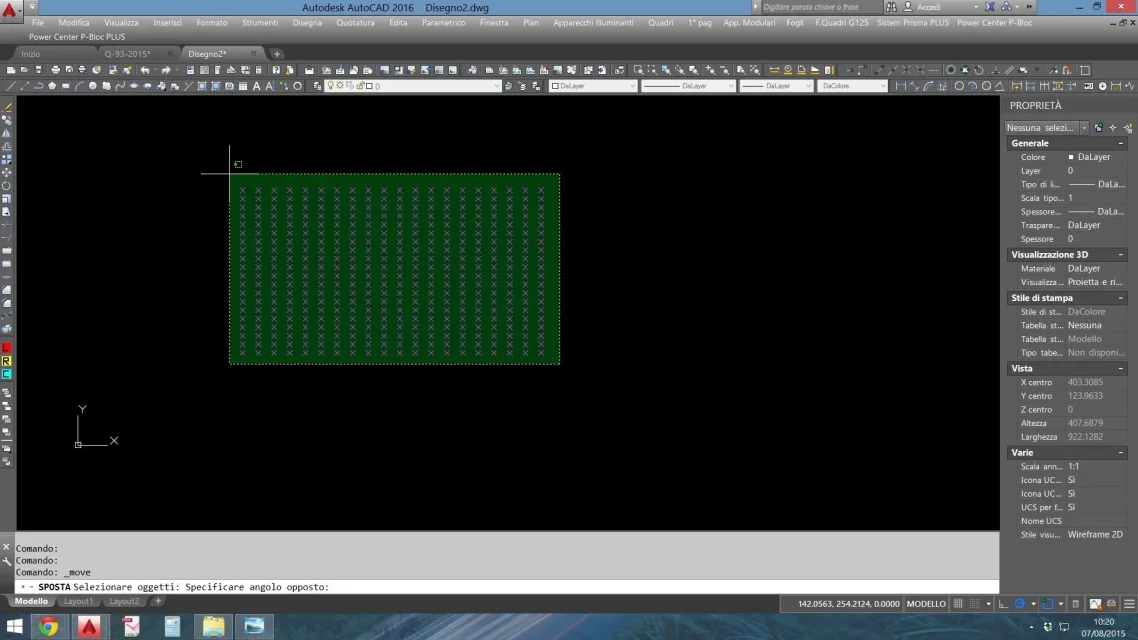
 
each object in autocad remains selected even if not visible in the screen.
to make detailed lists the commands you use in order.
 
each object in autocad remains selected even if not visible in the screen.
to make detailed lists the commands you use in order.
1) I click the "setting" button
2) click to "open" the selection
3) pump on a part of drawing
4) click to "close" selection
5) as seen from the attachments only selects the blocks I have in the screen zommata and not even those outside the screen (selected before zummare :-(

I did it with the previous versions, maybe there's an option to set. .
I don't know why you uploaded them to the contrary.
 

Attachments

  • selezione 1.webp
    selezione 1.webp
    141.1 KB · Views: 1
  • selezione 2.webp
    selezione 2.webp
    124.9 KB · Views: 1
  • selezione 3.webp
    selezione 3.webp
    161.8 KB · Views: 1
Hey, guys.
I'm going crazy.
I passed from autocad mecc..2015 to the version lt2016 cause change job.
I'm "arranged" with everything, the thing I can't do and I don't know if it's possible about changing the blocks.
Can I rename a block inside a design without changing others? . ..before I had the rename block function and the game was made.
I'm going crazy.
Can I?

Forgive me, but I couldn't find posts where the subject was, and since here we talk about blocks... .

Thank you, greeting everyone.
 
it is not a peculiarity of mechanical, as long as it is autocad full simple, also 2012 for example.
but not lt.
 
Perhaps I misunderstood the request probably.
having appointed mechanical thought referred to a problem similar to This is where you can do only with mechanical because the refclose command of autocad saves without possibility to rename the block.
instead it could be that he meant the command rename
even if this phrase
I can rename a block inside a design without changing others
what does that mean?
 
but excuse me... and if he opens the block with the editor blocks and does "save block with name"?
 
I'll explain.
When in a drawing, we hypothesize to have 5 identical blocks, I have to make a change to one block, while the other 4 I want them to stay the same, I was accustomed to entering with modrif, I made my changes, and before closing the block, I could both give it a new point of reference that a new name, in this way, the modified was only referred to the specific block and the other 4 remained the same. I can't do this with lt.
- - - updated - - - -
But excuse me... and if he opens the block with the editor blocks and does "save block with name"?
I never used the editor by habit.
If I save the block with the editor's name, then I'll re-enter it in the drawing, right?
 
when you are inside the building blocks,
you have to give the command _bsaveas
I tried, but in the design the block is not inserted with the modification, I must then insert it from the insert block, where I find the new block created. I thought it could be done automatically, that is, after the change of the block (of which I have other equals within the design), changing the name, put me in the new block leaving the others unchanged.
I'm trying all of them, but I think the lt nn version gives this chance.
Thank you.
 
what you want to do, change the reference block and save it by name at the exit, you do solo with mechanical.
with autocad you have to use other methods, suggested during the thread
 

Forum statistics

Threads
44,997
Messages
339,767
Members
4
Latest member
ibt

Members online

No members online now.
Back
Top