
• This forum is the machine-generated translation of www.cad3d.it/forum1 - the Italian design community. Several terms are not translated correctly.

problem selection lines

  • Thread starter Thread starter ilbona
  • Start date Start date

ilbona

Guest
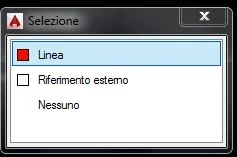
hi I must have activated some selection setting without wanting it. I happen that when with the pointer I approach two nearby lines, I appear a symbol similar to that of copy (ctrl+c) and I open a window that invites me to choose which lines between the nearby ones I intend to select..... I am using autocad lt2015 and windows10 to 64bit.

Is there anyone who can enlighten me?? ? Thank you.
ps attached screenshot with the window that appears to me.
 

Attachments

  • Cattura.webp
    Cattura.webp
    3.9 KB · Views: 1
If I understand your problem, you must remove "cyclical selection", which allows you to select an element when you have more than one overlay.

there is an icon, with a full square and a small "+" on the top left, at the bottom of the center of the autocad screen.

otherwise "selectioncycling".

If I misunderstood me and ignored me.. .

edit: Tristan responded while writing
 
Thank you! It's just the cyclical selection... I must have clicked without wanting it on the icon. I didn't know about the existence of this command. I learned something new today. Thanks again.
 
the cyclic selection is very useful. If you want it you can also let it on and ignore it by continuing to work as if the window did not exist. in this case the window automatically closes.

in the sense that that window does not force the user to make a selection within it, but still offers a possibility of selection through it.
In case you have a visual problem, then you can turn it off.
 

Forum statistics

Threads
44,997
Messages
339,767
Members
4
Latest member
ibt

Members online

No members online now.
Back
Top