nico_c
Guest
Good morning.
I open this discussion as a result of a problem that arises in the pdf printing of autocad drawings containing "solid" restraints.
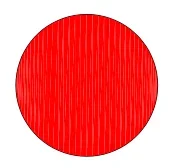
Attached I carry an example related to a simple colored circle of red. in the image on the left there is the screenshot of the autocad window while on the right there is the pdf produced. in pdf appear these white lines that do not disappear even by zooming the figure.
I tried to repeat the press with different printers (microsoft print to pdf, adobe pdf, autocad pdf) but the situation doesn't change as it doesn't change if it is printed on other computers.
of course then when I upload the pdf image in the document (use latex as a program) the result continues to be lined even within the document.
I ask for directions from those who have more experience than me on how to solve this problem.
I open this discussion as a result of a problem that arises in the pdf printing of autocad drawings containing "solid" restraints.
Attached I carry an example related to a simple colored circle of red. in the image on the left there is the screenshot of the autocad window while on the right there is the pdf produced. in pdf appear these white lines that do not disappear even by zooming the figure.
I tried to repeat the press with different printers (microsoft print to pdf, adobe pdf, autocad pdf) but the situation doesn't change as it doesn't change if it is printed on other computers.
of course then when I upload the pdf image in the document (use latex as a program) the result continues to be lined even within the document.
I ask for directions from those who have more experience than me on how to solve this problem.