
• This forum is the machine-generated translation of www.cad3d.it/forum1 - the Italian design community. Several terms are not translated correctly.

problem vba and macro, solidworks 2015

  • Thread starter Thread starter weldox
  • Start date Start date

weldox

Guest
Good morning.

I have a problem with installing sw2015 on win 7 64bit...

the problem is summarized in the first part of this video: (the second part, i.e. "the alleged solution", obviously there is nothing to do with it...maybe it was so easy).

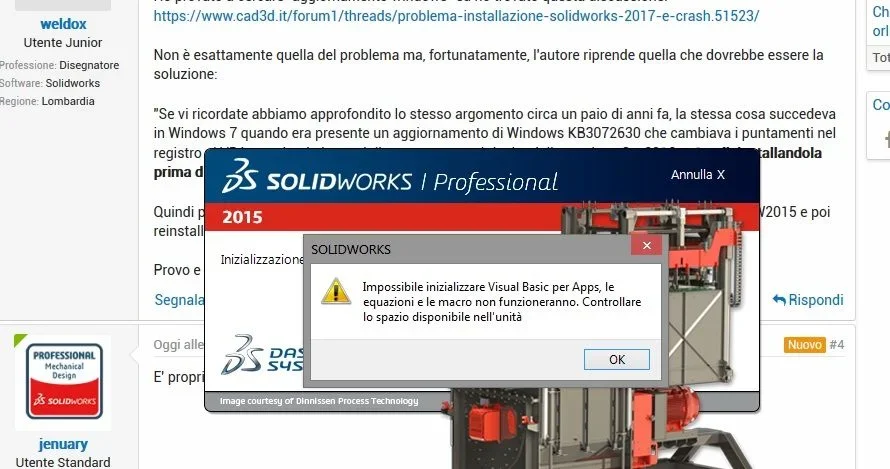
from an error "failed to initialize visual basic for app, equations and macro will not work."

the only solution I found on the web to turn at least solidworks is to uninstall vba 7.1.. .
If I try to reinstall it, the hateful error comes back....can't initialize it.

the problem is that by uninstalling vba I can obviously not use equations and when I need the toolbox parts, they are really volatile for diabetics.

have any of you already faced this situation? You know how to help me?
before opening the discussion I tried to search but I found nothing

Thank you so much!

maurials
 
I think it can depend on an upgrade of windows,
a few years ago I remember that we had faced the problem, although not the same mistake, but always with the vba not working.
try to search in the historian and then to the limit we see on to do.
 
Thank you, jenuary!

I tried to search for "update windows" and found this discussion:https://www.cad3d.it/forum1/threads/problema-installazione-solidworks-2017-e-crash.51523/is not exactly the problem but, fortunately, the author resumes what should be the solution:

"if you remember we've deepened the same topic about a couple of years ago, the same thing happened in windows 7 when there was an update of windows kb3072630 that changed the bets in the vba register by crashing the program, then resolved by the version sw 2016 sp1 or uninstalling it before installing solidworks. "

so I could try to uninstall sw, uninstall the update kb3072630, reinstall sw2015 and then reinstall the update only later.

I try and if it works, I'll end it here!
 
nothing to do...even with updating windows kb3072630 uninstalled gives me the problem.. .
1.webp
 
nothing to do... even repair performed persists the problem.
I can't even reinstall kb3072630 anymore (but it would be the least evil...eheh).
 
I don't know what to say...the assistance will make you format the machine by blaming something, certainly not the solidworks software.
It's true, however, that windows are putting it all together to mess up.
 
I think the only option is to switch to windows 10, I'm evaluating it.
Thanks anyway jenuary!
 
What did the assistance tell you? I ask you because sometimes he solved the problem... sometimes we know more about them?
Consider that from the 2020 solidworks version requires windows 10, maybe it's the right opportunity to make the move, even if this is not the right solution if you stay in 2015
 
What did the assistance tell you? I ask you because sometimes he solved the problem... sometimes we know more about them?
Consider that from the 2020 solidworks version requires windows 10, maybe it's the right opportunity to make the move, even if this is not the right solution if you stay in 2015
In theory the assistance expired at the end of 2018 so I did not contact anyone.

I have two copies, one 2015 and one 2018 but I installed on both machines 2015 for a compatibility issue.

I just installed a 2015 version on a pc with win 10 and didn't have any problems, I think switching to windows 10 is the easiest way. so much is a step however to do.
 

Forum statistics

Threads
44,997
Messages
339,767
Members
4
Latest member
ibt

Members online

No members online now.
Back
Top