
vale79
Guest
Hello everyone
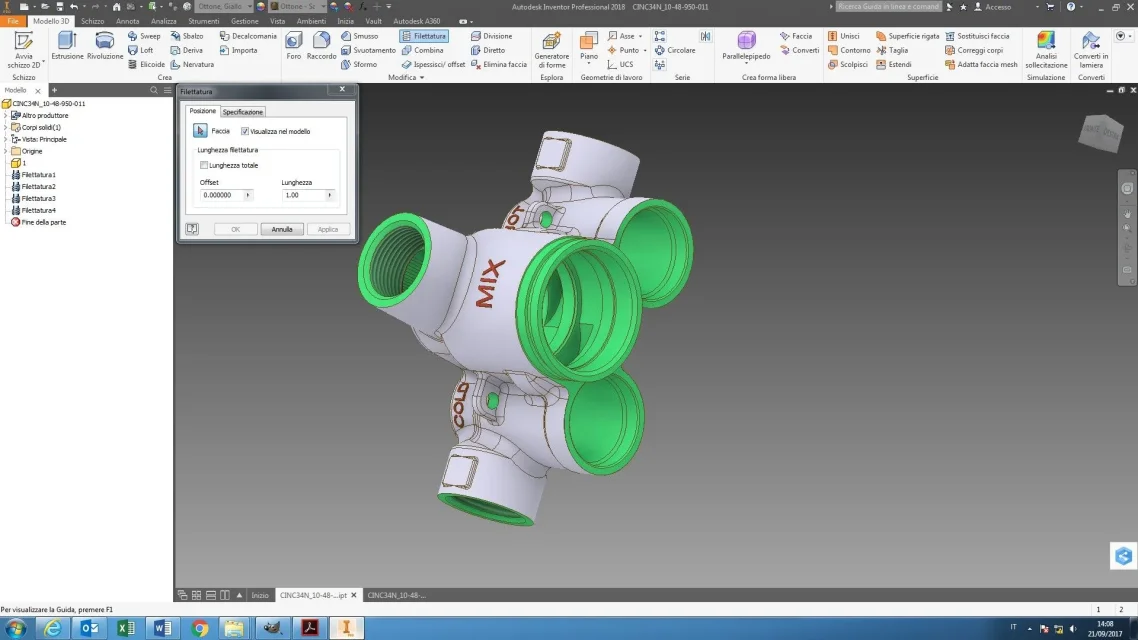
I recently installed inventor 2018 and have this problem, as seen in the pictures:
- in images 1 and 2 you see a tendon of abnormal threads, indicates a length of thread 1 while the thread in object is much longer, and also varying the value or tipping complete thread does not change anything. This is an imported design.
- in pictures 3 and 4 I created a cylinder and as you see the curtain is normal and you can make internal or external threads even partial.
Can someone tell me how to set import options to avoid this problem?
Thank you very much
Hi.
That's right.
I recently installed inventor 2018 and have this problem, as seen in the pictures:
- in images 1 and 2 you see a tendon of abnormal threads, indicates a length of thread 1 while the thread in object is much longer, and also varying the value or tipping complete thread does not change anything. This is an imported design.
- in pictures 3 and 4 I created a cylinder and as you see the curtain is normal and you can make internal or external threads even partial.
Can someone tell me how to set import options to avoid this problem?
Thank you very much
Hi.
That's right.


 and more correct to import the piece well come.