• This forum is the machine-generated translation of www.cad3d.it/forum1 - the Italian design community. Several terms are not translated correctly.

problem with toolbox of sw2012

  • Thread starter Thread starter weldox
  • Start date Start date

weldox

Guest
hi to everyone, I found a problem in migrating from sw2011 to sw2012

It's a pretty serious problem...in practice in the management of toolboxes in sw2012 I realized that at point "2" (hardwareness)...I have serious setup problems.

within a standard...for example din.
then I go to select a part...for example key din 6885.

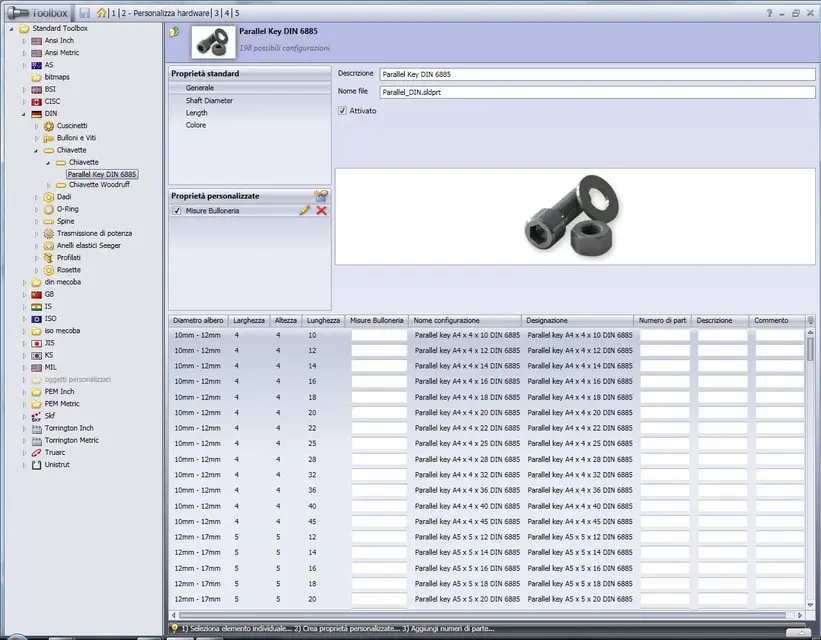
in "shaft diameter" I miss the decimal separators (the point).

like...the first should be:
shaft diameter: 10-12mm
connection radius: 0.16
size: 4
width: 4
height: 4
Order: 1

I've had the connection range since 16!

I have the same errors in the other components of each standard.. .
I mean, a mess.

in generating the toolbox part gives me the error (in the case of the stick the raggettino. . Of course, because you can't make me a radius of 16mm on a 4) stick.

by hand editing the value (by copying it from the data of 2011 I have on the other pc), obviously everything is correct.

doesn't there exist any databases or something to edit or import?
If any... any of you would be so kind to pass me?

I'm also willing to replace the entire "toolbox" folder in "solidworks"! Maybe it's something in there!

I don't really understand the problem... I've already tried to reinstall.
something happened in the update since 2011.boh.

Thank you in advance!
Mauri.
 
hi to everyone, I found a problem in migrating from sw2011 to sw2012

It's a pretty serious problem...in practice in the management of toolboxes in sw2012 I realized that at point "2" (hardwareness)...I have serious setup problems.

within a standard...for example din.
then I go to select a part...for example key din 6885.

in "shaft diameter" I miss the decimal separators (the point).

like...the first should be:
shaft diameter: 10-12mm
connection radius: 0.16
size: 4
width: 4
height: 4
Order: 1

I've had the connection range since 16!

I have the same errors in the other components of each standard.. .
I mean, a mess.

in generating the toolbox part gives me the error (in the case of the stick the raggettino. . Of course, because you can't make me a radius of 16mm on a 4) stick.

by hand editing the value (by copying it from the data of 2011 I have on the other pc), obviously everything is correct.

doesn't there exist any databases or something to edit or import?
If any... any of you would be so kind to pass me?

I'm also willing to replace the entire "toolbox" folder in "solidworks"! Maybe it's something in there!

I don't really understand the problem... I've already tried to reinstall.
something happened in the update since 2011.boh.

Thank you in advance!
Mauri.
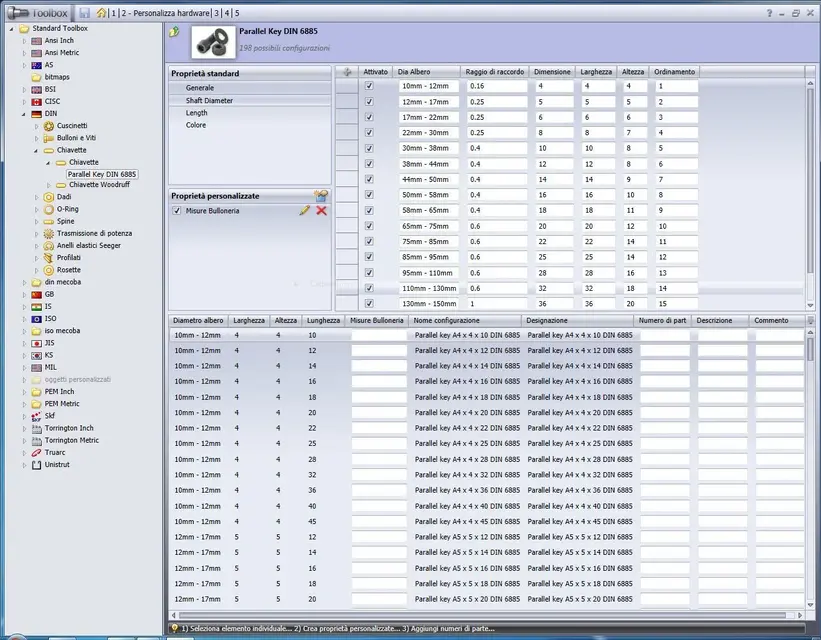
Maybe I didn't understand much, but I see the tb like that, and the ray you're trying to cause I don't see it.
I updated the tb 2011 and kept all the additions we created without problems.
Tables included.
 

Attachments

  • Cattura.webp
    Cattura.webp
    123 KB · Views: 40
If you click on shaft diameter under the heading "standard properties", go to those values I'm referring to.
I honestly don't know what happened... it's the first time I've been through this by updating tb.

ps:thank you for the interest!
 
there is a technical bulletin that declares problems for some languages, including the Italian language, on the passage from tb 2011 to tb 2012.
the problem should be solved with the SP1.
tb 2012 has been rewritten completely and for languages requiring translation, first managed in the database and now in files, have forgotten something that produces go types of error.

I'm sorry, but they're assholes.
I reported the problem with beta 1 and arrived until the sp0, until I got pissed and told him about the incapable, as with all the rx I sent him, the videos, the images, they kept saying it was normal.
 
there is a technical bulletin that declares problems for some languages, including the Italian language, on the passage from tb 2011 to tb 2012.
the problem should be solved with the SP1.
tb 2012 has been rewritten completely and for languages requiring translation, first managed in the database and now in files, have forgotten something that produces go types of error.

I'm sorry, but they're assholes.
I reported the problem with beta 1 and arrived until the sp0, until I got pissed and told him about the incapable, as with all the rx I sent him, the videos, the images, they kept saying it was normal.
I confirm the above: I also have problems w7-64 and tb2011 upgraded to 2012 but not in the component as in the mats for positioning. at every good account the 2012 sp0 I'm just testing for news and performance.

p.s: in the technical alerts we talk about late November at the release of sp 1 to solve the problem.

good work,
dancer
 
I understand soliduser, thanks to the signal!
In the waiting I will manage manually correcting the measurements of the elements that need me ( fortunately I have sw2011 on another pc, so I can compare everything)!

ps: thank you all!

pps: exact also I w7 64bit
 
If you click on shaft diameter under the heading "standard properties", go to those values I'm referring to.
I honestly don't know what happened... it's the first time I've been through this by updating tb.

ps:thank you for the interest!
place the screen image.

Tell me what element that joke is doing to you. . .
 

Attachments

  • Cattura.webp
    Cattura.webp
    151.6 KB · Views: 27
place the screen image.

Tell me what element that joke is doing to you. . .

ad esempio, in questo caso "raggio di raccordo"
vedi dove hai 0.16?
ecco..io ho 16! questo perchè dal passaggio al 2012 non ha riconosciuto il separatore.

ecco ho trovato il technical bullettin che è stato citato:

oct 25, 2011 technical alert for solidworks 2012 toolbox customers regarding problems impacting upgrades from previous versions.

two problems have been identified that can impact some customers upgrading a previous major version's solidworks toolbox installation to 2012 sp0.0. both issues will be resolved in solidworks 2012 sp1.0 which is currently targeted for late november. short-term solutions are being pursued and the respective knowledge base solutions referred to below will be updated as further information becomes available. the sp1.0 solution will prevent the problems for customers that have not yet upgraded and also correct the issues below for customers who have already upgraded to sp0.0.

spr 627126 (toolbox data upgraded on an operating system that uses commas as the decimal symbol will result in unusable toolbox parts.). for more details regarding this problem, please refer to knowledge base solution s-056855.

spr 627178 (toolbox customized part numbers and descriptions are no longer displayed after upgrading to solidworks 2012.) for more details regarding this problem, please refer to knowledge base solution s-056856.


ecco...ho evidenziato il punto che parla dei problemi con i separatori decimali!
attendiamo questo benedetto sp1 ^^
 
Since the installation of the update sp1 gave me serious problems with the cartiglio and with the 2d drawings (it generated a kind of huge square and blocked everything as upsetting the already present quotas, etc...etc.) , I reinstalled the new sp0....chosing to create a new toolbox and not updating the old one (radical solution).
All right now! I can't say if I can use old designs with bolts and screws... I hope so.
In theory, the toolbox parts I saved them in a "part" folder (discuss the word game)...I will let you know how it will behave, for knowledge!

Thank you!
 
The 2012 solidworks sp2ev came out with a theoretical resolution of the problems inherent in toolbox, but after an analysis it seems to me that it is not entirely true.
I ask who owns an office license up to check how much I carry and report to the var, I don't want to be the only one, otherwise I'm afraid we keep these problems.
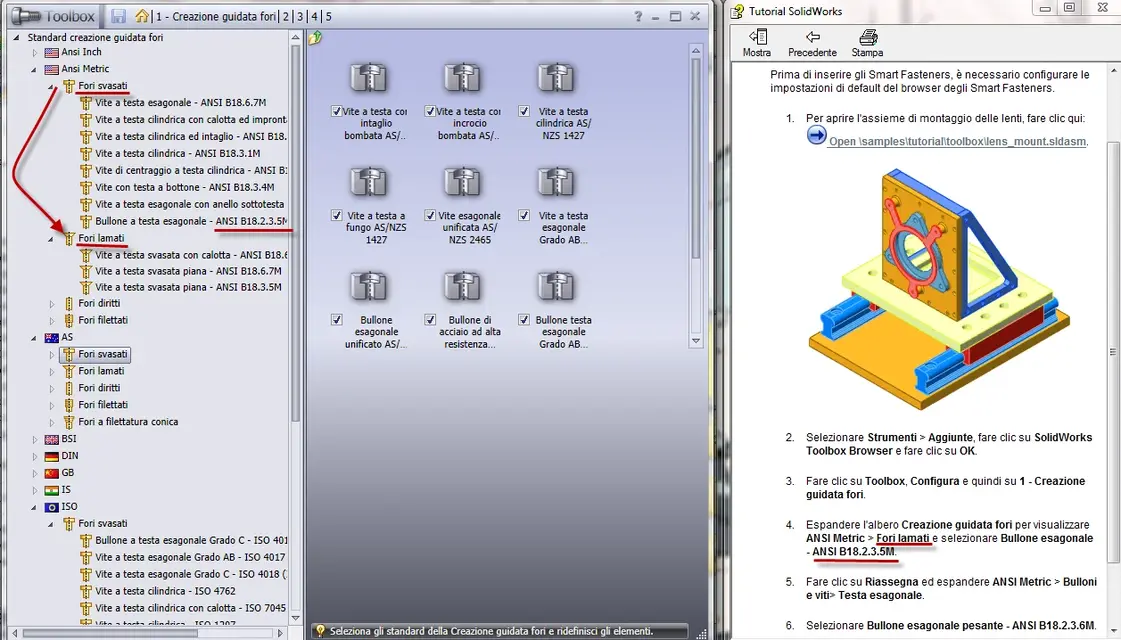
1) follow the toolbox tutorial with sw2012 sp2ev and you will notice that it produces an abnormal result, while with sw2011 no. (video allego sw2011).

2) image t1, the texts must be reversed, the laminated holes are actually the rigged holes and vice versa.

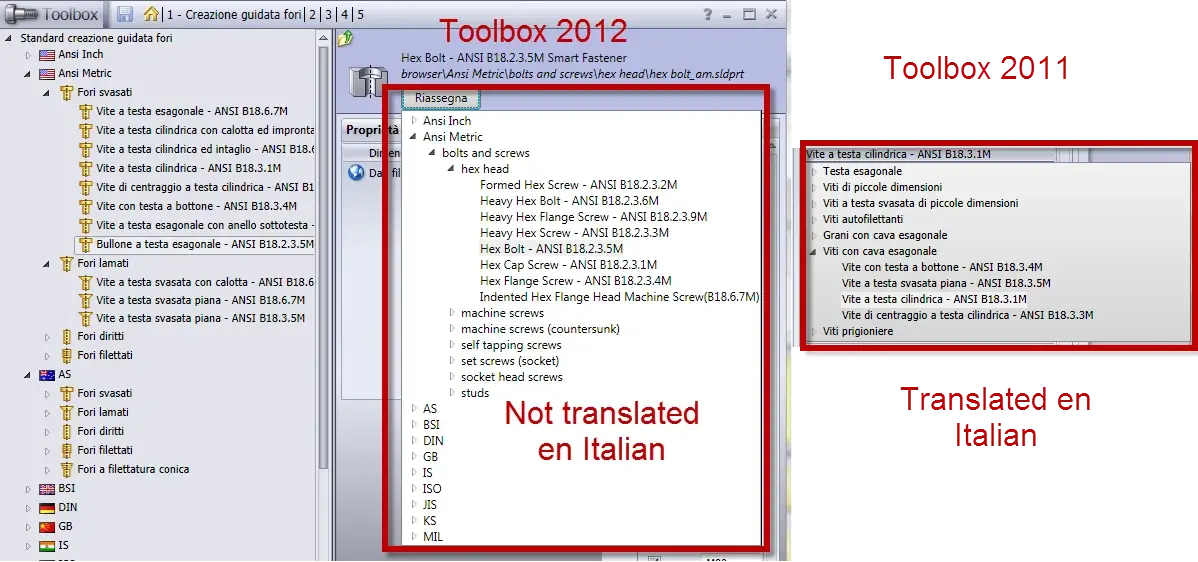
3) t2 image, as you see a part of the toolbox configurator is not yet translated into Italian as it was with sw2011.

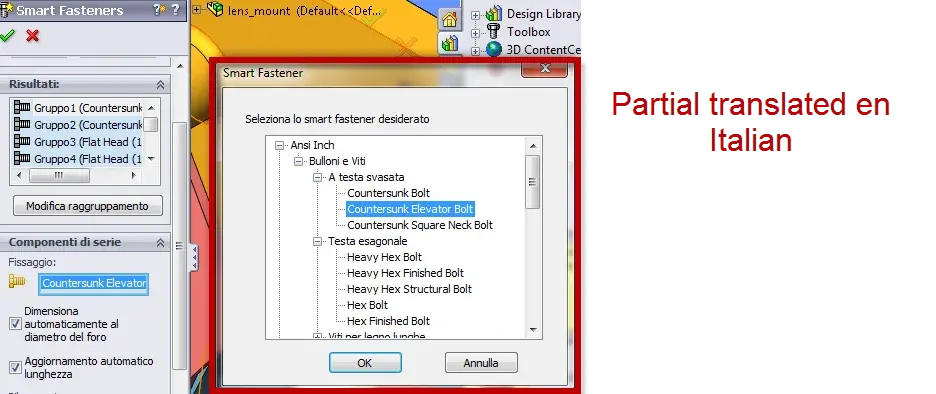
4) image t3, as you see in case of change of the toolbox component, is not translated into Italian, and in my opinion it becomes difficult to choose the right screw in a language that is not ours.

In addition to renewing the request for signalling, I ask those who did so, to report it on this subject so that it has an idea of the number of signalling, because alone I do little to their resolution.
 

Attachments

  • tollbox sw2011.zip
    tollbox sw2011.zip
    4.6 MB · Views: 13
  • T1.webp
    T1.webp
    119.6 KB · Views: 11
  • T2.webp
    T2.webp
    92.9 KB · Views: 10
  • T3.webp
    T3.webp
    44.4 KB · Views: 9
The 2012 solidworks sp2ev came out with a theoretical resolution of the problems inherent in toolbox, but after an analysis it seems to me that it is not entirely true.
I ask who owns an office license up to check how much I carry and report to the var, I don't want to be the only one, otherwise I'm afraid we keep these problems.
1) follow the toolbox tutorial with sw2012 sp2ev and you will notice that it produces an abnormal result, while with sw2011 no. (video allego sw2011).

2) image t1, the texts must be reversed, the laminated holes are actually the rigged holes and vice versa.

3) t2 image, as you see a part of the toolbox configurator is not yet translated into Italian as it was with sw2011.

4) image t3, as you see in case of change of the toolbox component, is not translated into Italian, and in my opinion it becomes difficult to choose the right screw in a language that is not ours.

In addition to renewing the request for signalling, I ask those who did so, to report it on this subject so that it has an idea of the number of signalling, because alone I do little to their resolution.
no update to me:confused:
 
The 2012 solidworks sp2ev came out with a theoretical resolution of the problems inherent in toolbox, but after an analysis it seems to me that it is not entirely true.
I ask who owns an office license up to check how much I carry and report to the var, I don't want to be the only one, otherwise I'm afraid we keep these problems.
1) follow the toolbox tutorial with sw2012 sp2ev and you will notice that it produces an abnormal result, while with sw2011 no. (video allego sw2011).

2) image t1, the texts must be reversed, the laminated holes are actually the rigged holes and vice versa.

3) t2 image, as you see a part of the toolbox configurator is not yet translated into Italian as it was with sw2011.

4) image t3, as you see in case of change of the toolbox component, is not translated into Italian, and in my opinion it becomes difficult to choose the right screw in a language that is not ours.

In addition to renewing the request for signalling, I ask those who did so, to report it on this subject so that it has an idea of the number of signalling, because alone I do little to their resolution.
Thanks on, I downloaded, at home, the sp 2ev, tonight I will try to install and try what you reported.
However the use of tb is really a mess.
at the current state, in the office, when we have to insert a screw, ranella or anything else, to display in the table we choose the size from the property manager and not from the button that comes out at the same time, if not to the next insertion of the same component, but with different measures, it all changes them with the last size chosen.
That's not a funny risk.
 
Thanks on, I downloaded, at home, the sp 2ev, tonight I will try to install and try what you reported.
However the use of tb is really a mess.
at the current state, in the office, when we have to insert a screw, ranella or anything else, to display in the table we choose the size from the property manager and not from the button that comes out at the same time, if not to the next insertion of the same component, but with different measures, it all changes them with the last size chosen.
That's not a funny risk.
A big problem.
Does it bother you to attach a video of how much you describe I try to check?
 
I hope you can understand... .
I am installing sp2ev, if I can do the same test, but I strongly doubt (I hope to wrong) that the tb is customizable as in the past.. .
most problems I have them on iso and din standards (the most used), but not in all components.
from a month I configured the tb so that "creates the parts" in the appropriate
folder copiesdparts (to limit damage), in fact I believe that the new tb does not digeriesca the configurations and when you go to create a variant of the component, ignores the configuration.
I'm not a programmer, but I think they're messing with life.
there took months (in the span of about one year) to configure all the descriptions and various dances that were inserted without any problem in the tables
materials, comfort!
configuring a tb element was a stupidity, exported to excel format, insert the column you were interested in with code, name, custom description and import the new excel file.
to the insertion of that component, in the bom was inserted what you had just set.
Now no, even does not even display its standard descriptions.
Mah.
[youtube]0i4xqt3fl-y[/youtube]
 
Good!

problems at tb, at least those reported in my previous post, seem
solved.
I did a quick test (in the morning in the home pc, try made with tw) and now all the parameters.
the boxes now update with the exact size of the component.
the test I carried out on the pc of the house, in the office I wait the sp2, I do not have time
to install the ev, I have several urgent jobs and every minute is precious to me.
I press, however, that the tb folder is the same as I have in the office, so
If it worked at home, there should be no problem at work.
I have not yet tested previous customizations but I trust that they are now viewable in table considering that now if you add a description
figure on the list.
I'll check out what you wrote before tonight.

Hi.
 
I hope you can understand... .
I am installing sp2ev, if I can do the same test, but I strongly doubt (I hope to wrong) that the tb is customizable as in the past.. .
most problems I have them on iso and din standards (the most used), but not in all components.
from a month I configured the tb so that "creates the parts" in the appropriate
folder copiesdparts (to limit damage), in fact I believe that the new tb does not digeriesca the configurations and when you go to create a variant of the component, ignores the configuration.
I'm not a programmer, but I think they're messing with life.
there took months (in the span of about one year) to configure all the descriptions and various dances that were inserted without any problem in the tables
materials, comfort!
configuring a tb element was a stupidity, exported to excel format, insert the column you were interested in with code, name, custom description and import the new excel file.
to the insertion of that component, in the bom was inserted what you had just set.
Now no, even does not even display its standard descriptions.
Mah.
I know they should be solved already with the sp2ev, but I wanted to try anyway.
zip the screens of all your toolbox settings?
I recommend, report mines (if confirmed). ...when you have time... but report it.
 
@su, I put you this video, you should be clear what happens:
settings created with excel do not work.

Hi.
[youtube]gvbx_z26k50[/youtube]
 

Forum statistics

Threads
44,997
Messages
339,767
Members
4
Latest member
ibt

Members online

No members online now.
Back
Top