
jarjarfix
Guest
Goodness
I never found a solution to one thing, and I always had to go on escamotage.
I'll explain. why when two beams "touch" revit joins them arbitrarily?
Is there a way to avoid this union happening?
until now to prevent the infamous union from happening automatically I keep reading the two beams disconnected but it is not a solution I like because laborious.
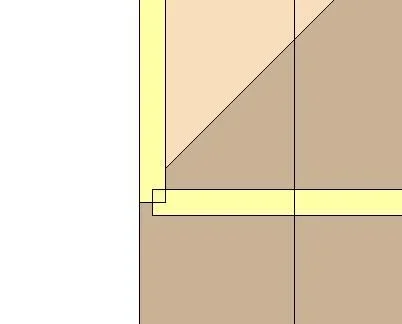
allego 2 screenshots. in this case wooden counters on perimeter walls. In the first picture we see the automatic union of revit while in the second we see how I would like it to be union.
Thank you.

I never found a solution to one thing, and I always had to go on escamotage.
I'll explain. why when two beams "touch" revit joins them arbitrarily?
Is there a way to avoid this union happening?
until now to prevent the infamous union from happening automatically I keep reading the two beams disconnected but it is not a solution I like because laborious.
allego 2 screenshots. in this case wooden counters on perimeter walls. In the first picture we see the automatic union of revit while in the second we see how I would like it to be union.
Thank you.
