
• This forum is the machine-generated translation of www.cad3d.it/forum1 - the Italian design community. Several terms are not translated correctly.

problem with xrif ed esporta layout nel modello

  • Thread starter Thread starter anfaloni
  • Start date Start date

anfaloni

Guest
Hey, guys.

I do not understand why if I work in model space with xrifs inserted with "attach" and imposed the table in layout space with quotations and cartiglio, at the moment when I want to export the layout in the model does not complete the operation. ...

.. first of all I join the xrifs to the drawing, then I make the option export layout in the model....but nothing... does not...

Can you tell me why?
 
Why do you work in this barbaric way?
Model space: design geometry and quotas
layout space: cartilage and windows

otherwise draw everything directly into model space
 
Why do you work in this barbaric way?
Model space: design geometry and quotas
layout space: cartilage and windows

otherwise draw everything directly into model space
hahahah yes I know it would be a countersensitivity, but I have to do it because then the document is issued and it has to be archived and I need to get a whole out of the work file. Let's say that it is convenient for me to work on xrif and the layout space but then after to the customer I have to deliver a classic cad file as it was only made on model space and as from the file on which I work I write various types of document I am more comfortable every time to export layout in the model. I don't understand why you don't do it now... if I join xrifs it's like I have internal blocks to the document.... I don't understand why you don't get any layout from the model. .
 
we start from the beginning:
Did he do this before?
What can be changed in the meantime? updated what? More pc? ... ?
Is the xref on the layout or model?
You mean it doesn't bring you the command? or that doesn't do what you want?

My tests have given me these results (correct me if I have wrong maneuvers):
exporting the drawing layout1 creates a new design2 containing in the model space everything that was in the drawing layout1 and what was in the design model space1 provided contained within the layout window.
if I have a xref in the model space I do without problems export but these in the new design becomes a block; same thing if the xref is in the layout space
 
we start from the beginning:
Did he do this before?
What can be changed in the meantime? updated what? More pc? ... ?
Is the xref on the layout or model?
You mean it doesn't bring you the command? or that doesn't do what you want?

My tests have given me these results (correct me if I have wrong maneuvers):
exporting the drawing layout1 creates a new design2 containing in the model space everything that was in the drawing layout1 and what was in the design model space1 provided contained within the layout window.
if I have a xref in the model space I do without problems export but these in the new design becomes a block; same thing if the xref is in the layout space
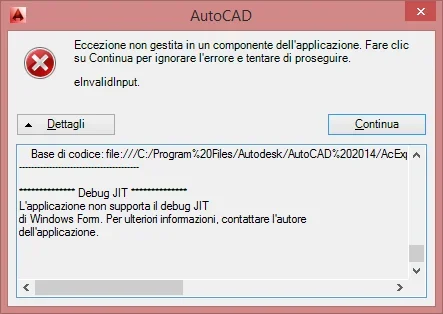
exact, you get a one in model space that includes everything that was in the layout space and what the windows in the layout space make you see. You find them as blocks. I have not changed anything, no update etc...this operation without the xrif combined with the drawing brings it to completion and obviously in the new design that you get you do not see the xrif just because they have not been united. if it proceeds to "unite" the various xrefs in the drawing and subsequently launch the display layout in the model begins to extract but then sends me an error message... I'm sending you an image of the message. to you goes to fulfill without problems?
 
I just entered the xrefs. explains the procedure for doing to join them I try
as soon as I relaunch it, I send you an image of the message
means that it does not always and with all the xrefs, but apparently a case
 
I just entered the xrefs. explains the procedure for doing to join them I try


means that it does not always and with all the xrefs, but apparently a case
Rifesterni command, right click on xref, join. finished the union of xrefs I go to space layout, right click on the icon of the page layout displayed, export layout in the model and via... elaborate and then plant... once he managed, but yesterday he didn't even do one and I don't understand why... I tried a lot of combos but I don't understand who it is to determine him
 
Just tried. No problem.
It turns out that once the xref joins it becomes a block.
Could it be some kind of junk in the xref? if you insert n xref made by you, clean, without billions of entity inside what happens?
 
Just tried. No problem.
It turns out that once the xref joins it becomes a block.
Could it be some kind of junk in the xref? if you insert n xref made by you, clean, without billions of entity inside what happens?
I did night....the speech of the frame.net package 4.2 is already cmq installed in windows 8 and already there is also 3.5 that holds the 2 and is smarcabile from control panel. ..cmq trying to activate it and turn it off nothing changes. I don't know why. is that if I delete all xrifs, the display layout in the model works and... listen to... if I go to insert the xrif again and then to join them the export action goes to good end... why? It is absurd...practically in the starting file with the same loaded xrifs gives me error, if I delete the xrifs and I attack them and then join them then goes to good end...I don't know why. .
 
Of course I think you've tried to combine with both ways: "join" and "please" obtain the same results....

Why don't you put the design so we analyze it?
 
Of course I think you've tried to combine with both ways: "join" and "please" obtain the same results....

Why don't you put the design so we analyze it?
I have always combined with "unisci", never tried to insert....... how do I attach a cad file? I already join the xref but
 
I have always combined with "unisci", never tried to insert....... how do I attach a cad file? I already join the xref but
try with insert, if you do not fit the drawing with the joined xrifs.

to attach a dwg under the area where you write the post there is a "manage attached" button
 
try with insert, if you do not fit the drawing with the joined xrifs.

to attach a dwg under the area where you write the post there is a "manage attached" button
but to use insert on use the right xrif? is type insert block
 

Forum statistics

Threads
44,997
Messages
339,767
Members
4
Latest member
ibt

Members online

No members online now.
Back
Top