Uedra84
Guest
Good evening to all,
I have two issues that I can't figure out how to solve.
I'm expounded.
First of all it is about nx5 (I did not check on the other versions because at the moment I am using this) version 5.0.6.3 with regular license purchased :mixed:.
First problem:
It is one of the settings of through curves mesh. when I type the command to create one in the settings below I have already set a default value 0.0000000 (I believe infinite) on the intersection (see image) that every time I do not remember to set it myself manually e.g. 0.001 the program begins to calculate and hopefully gives me error because most of the times I have to restart the program.
I checked in the preferences under the distance tolerances menu when editing it changed something but nothing.
I tried to change it but the value that is set the find in the mesh through curves in the g0 (position).
so the question...how do I set the intersections so as not to have a value 0.0000000?? Where do I look??? do I have to go to customer defaults?? I honestly tried to take a look but I didn't find anything.
Can someone tell me something? ? ?
Second problem:
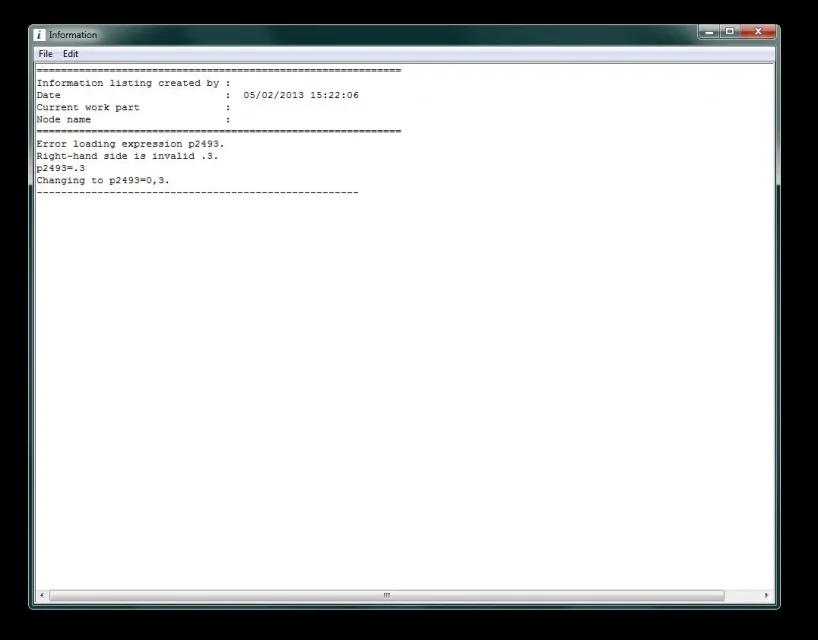
lately I happen to start ug always version previously mentioned and after loading the main axieme with option do not load components I get a message that the expression .0.3. is not valid and that the value will be set with 0.3 (with comma and not with point) see other image.
if I go or try to enter the expression command via or the drop-down menus or via crtl+ and the nx text has stopped working and crashing.
then restart the program and reopening the axieme no longer gives me the error under the expressions. opens the program quietly and I see that the decimal values are indicated by the point (e.g. 0.25 - 0.3).
This happens not always. but every now and then at 8.00 in the morning opening this file together I happen this thing. so if I notice it rebooting ug directly.
So I wonder... is the axieme file that is sputt...corrupt or is a possible nx bug??? Have you ever seen such mistakes? ? ?
Thank you very much
Good evening to all:biggrin:
I have two issues that I can't figure out how to solve.
I'm expounded.
First of all it is about nx5 (I did not check on the other versions because at the moment I am using this) version 5.0.6.3 with regular license purchased :mixed:.
First problem:
It is one of the settings of through curves mesh. when I type the command to create one in the settings below I have already set a default value 0.0000000 (I believe infinite) on the intersection (see image) that every time I do not remember to set it myself manually e.g. 0.001 the program begins to calculate and hopefully gives me error because most of the times I have to restart the program.
I checked in the preferences under the distance tolerances menu when editing it changed something but nothing.
I tried to change it but the value that is set the find in the mesh through curves in the g0 (position).
so the question...how do I set the intersections so as not to have a value 0.0000000?? Where do I look??? do I have to go to customer defaults?? I honestly tried to take a look but I didn't find anything.
Can someone tell me something? ? ?
Second problem:
lately I happen to start ug always version previously mentioned and after loading the main axieme with option do not load components I get a message that the expression .0.3. is not valid and that the value will be set with 0.3 (with comma and not with point) see other image.
if I go or try to enter the expression command via or the drop-down menus or via crtl+ and the nx text has stopped working and crashing.
then restart the program and reopening the axieme no longer gives me the error under the expressions. opens the program quietly and I see that the decimal values are indicated by the point (e.g. 0.25 - 0.3).
This happens not always. but every now and then at 8.00 in the morning opening this file together I happen this thing. so if I notice it rebooting ug directly.
So I wonder... is the axieme file that is sputt...corrupt or is a possible nx bug??? Have you ever seen such mistakes? ? ?
Thank you very much
Good evening to all:biggrin: