francesco_dd
Guest
hi to everyone, I write you to solve two problems on autocad (one on a 2014 version and one on a 2016 version).
1) the quick access bar is there but you do not see. I looked for similar issues on the forum but I couldn't fix it. I tried to restore the initial screen to default imp. but nothing. the bar is there but the buttons do not see, it is however clickable because it is enough to pass over the mouse and a white pane appears with the information. seems more a problem only graphic: I attach a screen to better understand the problem.
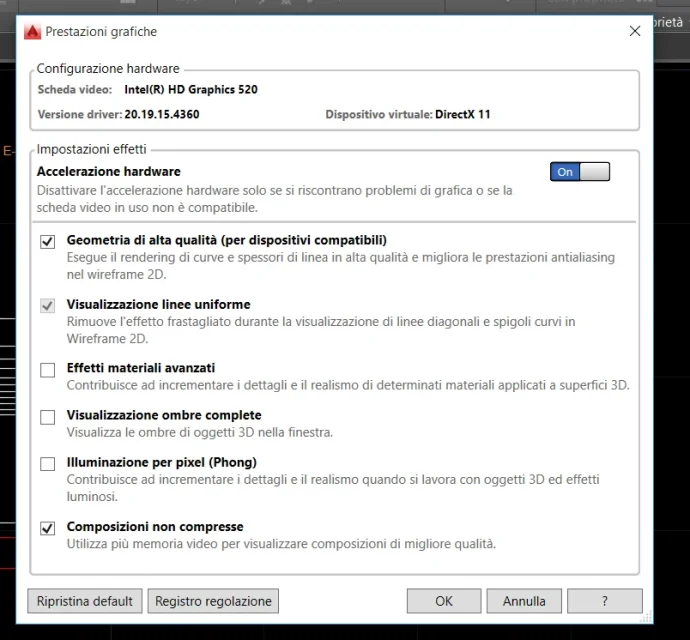
2) the second problem concerns the dedicated video card. I with right-click run with graphic processor -> high-performance nvidia processor. then I go to 3dconfig and see video card: intel hd. how do I use the dedicated video card to autocad? I tried the autodesk solution of the bios (disable the main video card to force the use of the dedicated but I do not have this voice and sincerely I would like to avoid this solution). then I also ask you what are the 3dconfig settings to have higher performance? I am interested for now only in drawing 2d, I kept active: high quality geometry and non-compressed compositions. video card drivers are up to date.
Thank you.
1) the quick access bar is there but you do not see. I looked for similar issues on the forum but I couldn't fix it. I tried to restore the initial screen to default imp. but nothing. the bar is there but the buttons do not see, it is however clickable because it is enough to pass over the mouse and a white pane appears with the information. seems more a problem only graphic: I attach a screen to better understand the problem.
2) the second problem concerns the dedicated video card. I with right-click run with graphic processor -> high-performance nvidia processor. then I go to 3dconfig and see video card: intel hd. how do I use the dedicated video card to autocad? I tried the autodesk solution of the bios (disable the main video card to force the use of the dedicated but I do not have this voice and sincerely I would like to avoid this solution). then I also ask you what are the 3dconfig settings to have higher performance? I am interested for now only in drawing 2d, I kept active: high quality geometry and non-compressed compositions. video card drivers are up to date.
Thank you.