Medea
Guest
Hello.
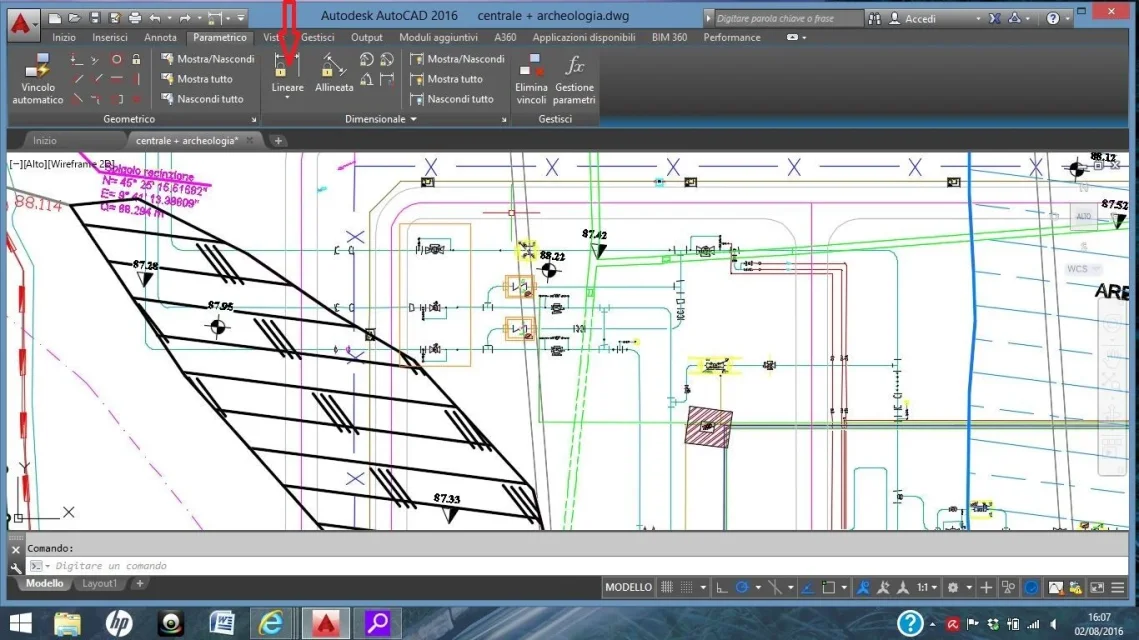
I premetto that are self-taught (I am an archaeologist) but use (also thanks to your advice) autocad for several years now. time ago I installed autocad 2016 and used it without problems until a few days ago... now instead it does not make me use the remote command and a closed lock appears. I show you everything in the photo that I attach you and in which I indicated with a red arrow the lock... how do I unlock it? Can someone please help me? Thank you so much!
I premetto that are self-taught (I am an archaeologist) but use (also thanks to your advice) autocad for several years now. time ago I installed autocad 2016 and used it without problems until a few days ago... now instead it does not make me use the remote command and a closed lock appears. I show you everything in the photo that I attach you and in which I indicated with a red arrow the lock... how do I unlock it? Can someone please help me? Thank you so much!