• This forum is the machine-generated translation of www.cad3d.it/forum1 - the Italian design community. Several terms are not translated correctly.

problems with sections (pro display tax)

  • Thread starter Thread starter brikki86
  • Start date Start date

brikki86

Guest
Good morning to all, it's my first post... I introduce myself, I'm drunk and I'd have problems with the command in question.

in my current work place I set as a keyboard fast command the string "depth display" but microstation does not do what I would like....where I worked before, always with microstation v8 they had set me the same command but it worked differently: I did not see the "depth lines" of the view and I could make sections even of a few mm while now my "depth display" goes to spans.... to underline the difference

with depth display first click the command on the view to which I want to apply the change and after clicking the 2 section points on the view perpendicular to the first;

in the command I used instead with the other company before I did the 2 clicks of depth and then I chose on which view to make the change active.. .

I know that everything is explained in a confusing way but I hope you can help me find the right string of command.
thank you all... .
 
I need to answer you later, that the command works as it works now, I answer you immediately.

It's right.

microstation is so default, first view and then 2 section points.
where you worked before they had definitely set up a customization that reverses the operation of the command.
you have re-set such customization even on this pc, but you must have made a mistake.
It is not a serious thing, however, as long as you get used to this new standard, or is it really annoying for you?
the alternative is to correct customization properly.
Hi.
 
can be that in the company you used pds that compared to pure microstation has this "inverted" comendo. ..:rolleyes:
 
It is true, but if you are in pds rightly.
when you go out and go micro, the command returns "normal", unless they had customised to avoid this.
in this way the command was equal in both pds and micro, and there were no defeats.
Hi.
 
First of all thank you for the prompt answers! we used plantspace and it is not a problem for me to do a procedure before another, it is that where I work now I have to make 3d of batteries with relative circuits and I would need the section command to work always and also for size of a few mm.... instead at the moment I can make sections only of large portions and therefore, to see in the various views the necessary (for example only electrical connections or only circuits), I have to overcome with the levels on/off.
often to see only the high part of the battery I have to do the section with one of the 2 points much higher than the object, thus not being able to select the part that interests me... .
I don't know if it's just some setting that breaks my boxes or if it's me wrong... .
again thanks for the help... :smile:
 
the bad operation that laments for accuracy of the viewing depth could depend on two things:
1) the object you are working on is too far from the global origin of axes;
2) the set work resolution is too high.

I take care of architectural design and take into account that with a "solid" work of 4,28 km. and a resolution of 1,000 per millimeter I can quietly set a display depth of a tenth of millimeter.

Moreover the display depth can be easily set with numerical values as well as by graphics. If you don't know how to set points 1 and 2 or the numerical setting ask, I'll see if I can explain them.

Hi.
 
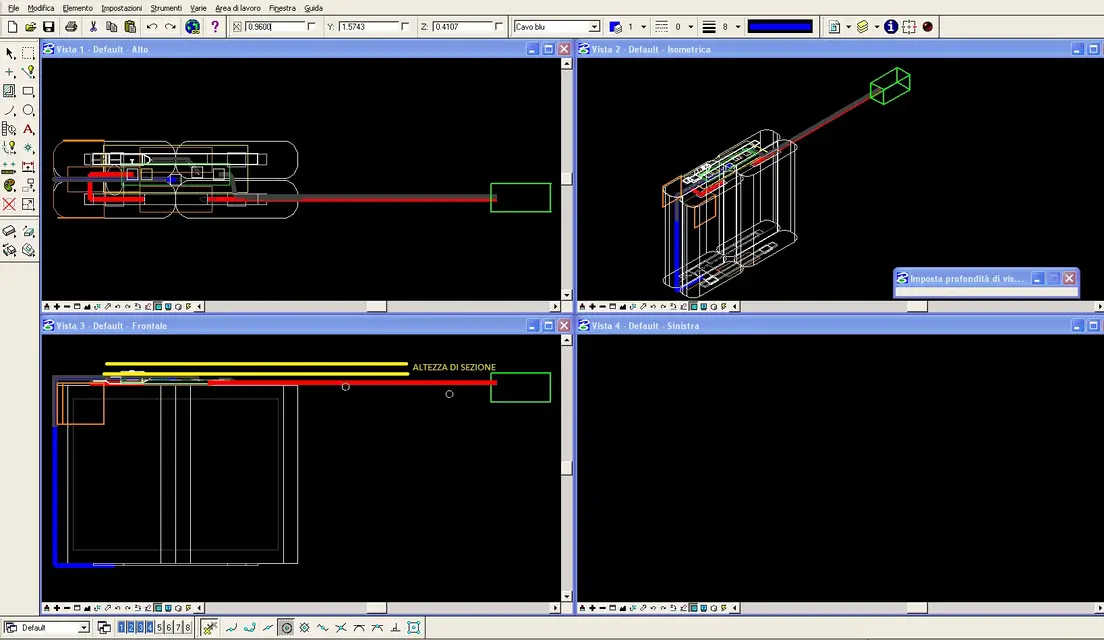
hi, I moved the object near the triad and I improved the display by mm as you recommended me but my dear microstation does the same thing you want...I did an image to make you understand what I mean...I hope I have attached the image rightly otherwise I try again. the signs in yellow are the sections I would like to do but the top view does not change anything if I imposed those 2 points; changes only if one of the two clicks much higher than the object....
 

Attachments

  • Immagine.webp
    Immagine.webp
    67.6 KB · Views: 14
If you can (or you want) post the dgn file (or any other in which the malfunction occurs) so I will see if you can tell me where the problem is.

Hi.
 
I tried but it doesn't make me put it... how do you do it?

ah, then how do you, in a solid, make the contours of another color? for example a solid light grey with homogeneous display with black contour? I would need to give more contrast to the colors... thank you!!!!:wink:
 
First of all thank you for the prompt answers! we used plantspace and it is not a problem for me to do a procedure before another, it is that where I work now I have to make 3d of batteries with relative circuits and I would need the section command to work always and also for size of a few mm....

I don't know if it's just some setting that breaks my boxes or if it's me wrong... .
again thanks for the help... :smile:
Please, I have no + had control, and where I am now I have no micro.
I just want to make a statement that there was the sw pds that suggested you marco, and that then I resumed, doesn't mean that there was plantspace :biggrin:.

pds is an intergraph software or:
plant
design design design
system

plantspace is another software, and it is from bentley

that then have points in common maybe this is undoubted, like e.g. the reverse of that command:wink:
I will try/try, if possible to answer the question of the depth of section.
Hi.
 
I tried but it doesn't make me put it... how do you do it?

ah, then how do you, in a solid, make the contours of another color? for example a solid light grey with homogeneous display with black contour? I would need to give more contrast to the colors... thank you!!!!:wink:
and I will try/try to answer also this question about colors... .
to attach a file you must scroll the screen and you will find immediately below (in additional options) the attached management button.
If you don't see it when you write the post try first to go in advanced mode, so you're sure it should be there.
Note, dgn files are not accepted as attachments..... so you have to zip it.
Hi.
 
if you can upgrade to v8i microstation, in the window bar, a button with 12 preset display styles; each of these is freely editable and saveable in a new style for a virtually unlimited customization (including what you would like).

for the v8 version frankly I do not remember since they are now four years that I do not use it anymore (the last update, in fact, is of 2007).
 
I tried but it doesn't make me put it... how do you do it?

ah, then how do you, in a solid, make the contours of another color? for example a solid light grey with homogeneous display with black contour? I would need to give more contrast to the colors... thank you!!!!:wink:
I guess you're not referring to the change view display mode?
when clikki on the bottom bar (lightning), a dialog box comes out that allows you to make a fast render/shading and to enhance the sides.
you have to check the boxes below though.
from graphic acceleration......
Hi.
 
As for your other brikki problem, did you scourge in the box locks la depht lock?
Hi.
hi number 1...I didn't understand if I set out or not the command you say...cmq I will try to switch to v8i because now with windows 7 it doesn't take me some commands of the v8 and I'm working on a virtual machine that simulates xp...I don't want this to trouble too....:frown:
 
unfortunately neither v8 nor v8xm are certified for windows 7; then either go back to sight or go to v8i. the second hypothesis is certainly the best; Meanwhile try to post the file.
 
hello moby, but the v8i (to understand the version of 2008) is compatible with windows 7 right?


!!!!!!!!!!!! the command I needed was depth display prim!!!!! ! !

Fortunately I found it!!! :biggrin:
 
Yes, it is certified for windows 7. in v8i you will find a great deal of changes, especially for surface modeling, rendering and also for solid modeling.

Hi.
 
hi number 1...I didn't understand if I set out or not the command you say...cmq I will try to switch to v8i because now with windows 7 it doesn't take me some commands of the v8 and I'm working on a virtual machine that simulates xp...I don't want this to trouble too....:frown:
Of course it can give problems working in emulation, as for the command you have to try to tick it, clikki on the pad down and choose full you get out the locks dialog box.
but then if you say you already solved, better :biggrin:

remove me a curiosity I work autocad through keyboard and icons, but to micro use almost only icons.
I think you're almost always using the keyboard with micro, don't you?
if so it could be useful to bring the pgp file of autocad on micro, so that you work always and only with the keys, besides equal.
Hi.
 
Of course it can give problems working in emulation, as for the command you have to try to tick it, clikki on the pad down and choose full you get out the locks dialog box.
but then if you say you already solved, better :biggrin:

remove me a curiosity I work autocad through keyboard and icons, but to micro use almost only icons.
I think you're almost always using the keyboard with micro, don't you?
if so it could be useful to bring the pgp file of autocad on micro, so that you work always and only with the keys, besides equal.
Hi.
hi number 1, no, I don't use a lot of the keyboard for the controls... I'm set just a few keys to rotate the views, open the referring files... only a few things, the rest I do everything with the video buttons...however thanks to the suggestion!! I solved because that command string is what I actually used before... now I just have to learn well the renders!!! =) and understand if I can make a gray solid, for example, with the contour of another color... .
Anyway really again thanks to everyone, when I wrote I never imagined so much participation....in other forums where I asked for help (other topics) nobody answered me! ! ! ! ! !I hope to get rid of myself with some knowledge...even if I don't think I can, you are all very good!!! ! !
Hello! ! !
 

Forum statistics

Threads
44,997
Messages
339,767
Members
4
Latest member
ibt

Members online

No members online now.
Back
Top