• This forum is the machine-generated translation of www.cad3d.it/forum1 - the Italian design community. Several terms are not translated correctly.

project line on solid cubic to create grooves

  • Thread starter Thread starter lalla
  • Start date Start date
the same thing you can do in a different way
create plans by offsetting your plan
and then make an intersection between the floors and the surface
( joint + extract) of the solid of your interest. .
to get good curves
You could eventually smooth the curves.
to the
how to smooth the curves?
 
how to smooth the curves?
Hi.
even if the smoothing of curves and surfaces is a different "a little" process, I believe the smooth command ( near join/union).
http://catiadoc.free.fr/online/sdgug_c2/images/dbcurvesmoothnls.giftypically it is used to simplify the curves.

in particular:
1) deviation should be at least 0.001 if you require that the smoothed curve is near the curve (and therefore all geometries) that generated it.
better 0.0008 or similar.
2) should be in curvature to eliminate some points of discontinuity of the curve.
3) topology simplification flagged

use support geometry can serve if we talk about a plan. If, on the other hand, use a surface with "mill edges" , the result will be rough, like the curve from which you left.

In my opinion, however, between a thousand commands and automations, which can be useful once we have defined what we want, we have lost (or at least I had lost) the object that is being done.
or:
1) what function should these "instructions" have on the surface ? must, for example, accommodate an o-ring or a circular rubber thread, or do they have "only" aesthetic function?
2) how is it printed/produced?

When I define points 1) and 2) then, at least personally, I would talk about surfaces and then automation.

ps: at the aesthetic level, did someone try to see what happens at the intersection between circular sweep and "base" surface when "pass" on the fillets?
 
and friends,
As promised, taking advantage of various time cuts, I put this example to you,
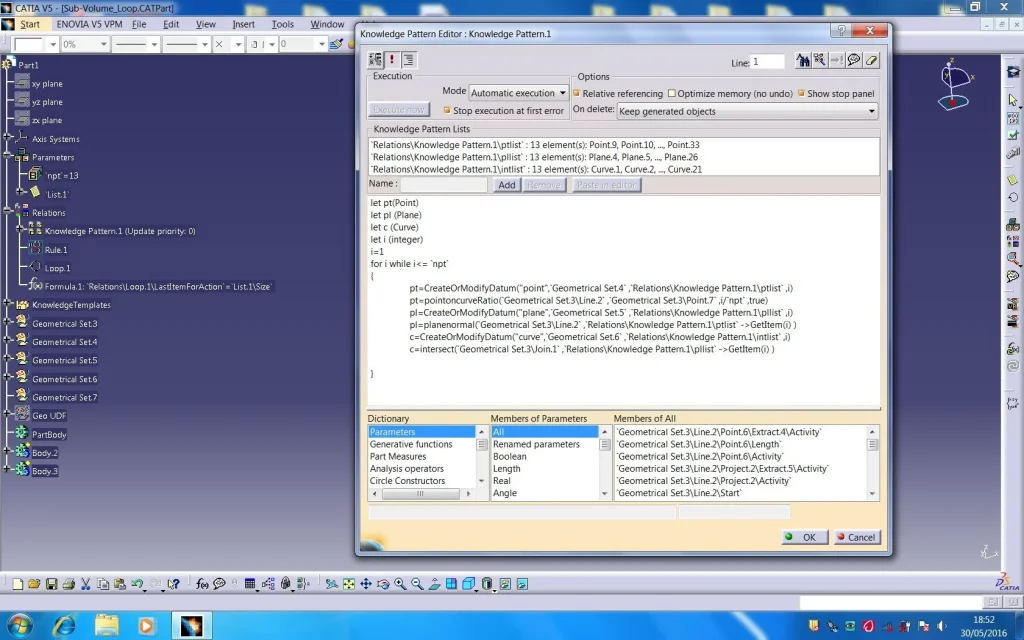
applied to our cube that, it is a "automatization ", carried out
through a (udf) , some scripts ( knowlwdge pattern ) a (rule) one (list) and a (loop) knowledge advisor ,
to create an editable "number" of volume subtracts -

so you should be in possession of the two mods.
knowledge pattern and knowledge advisor, and version v5 21 of catia-

I press that the accompanying notes for a partial understanding are a bit heavy and long.... .
I don't want to be bored.... .

1- I created in a geom group. a sweep (center and radius)mod. gsd,
construction inputs are a circle and a radius;

2-I solidified in a body the surface, I created a new body, and through
I put it in the last one.

3-I created a "udf " calling it " subvoludf "
inputs are circle = curves
and the value of the radius published 4 mm = radius

4- Saved and updated the udf ",ho, then created in a geom group. a line
normal to the face of the cut cube that crossed it entirely; a
extraction of the faces of the cube( joint); a guide parameter (integer) calling it "npt"
(equivalent to variable repetitions)
and three new geometric groups, in which variables, points, plans and intersections will be allocated,
that serve for the loop of the "udf"

5- I then went to the knowledge pattern module to create the script
which, through the appropriate syntax, has the final purpose of creating a variable number of intersection curves
in our cube
at the end of the operation we can see, in the knowledge nodes under/ reports/ lists created;
and in geometri groups the grouped data belonging to these last-

6- I had to create a new list (know advisor)
and through a rule(know advisor) I had to attribute these intersections the "type"
curves (like the "type" of the input of the "udf")

7- with loop (know advisor) I created the last script, and through
the appropriate syntax I have declared the inputs, the variables, and the contexts of the instancy-

8- the result is that in the body declared in the script I will group my "udf"

9- at the end with a simple remove of this body from that containing the initial geometry
I have the result sought -

nb- to open the file in your computer and you need to change a part of the first line of the
loop- script (eliminating all that enclosed between symbols ")subito after import,poi
right click will appear (fly-out) click on" file path" reassign the new path (clicking the exact folder
of the file, in your computer)-
you could quietly open the file go to the loop node (dx key (deactivate) run the change , above described,
and once finished reactivating the loop....
in the definition are available a variety of inputs to vary , n°repartitions , rays of the sweep , etc. etc.

Good luck. .

Finally, it should be said that the distribution I used is points on curve( ratio) but any use can be made.
other way to e.g. points on curve (length) , logically varying guide parameters
Moreover, there is also a possible expansion of the definition posted, i.e. creating a power copy containing the entire loop,
and that allows the instancy also on contexts other than the original, but I believe that, for now, this is enough....
However, on your request, not immediately, always for time problems,
I could also send this further definition if you want -


to the
SubVolUDF-Loop-1.webpSubVolUDF-Loop-2.webpSubVolUDF-Loop-3.webp
 

Attachments

first of all thanks for the proposed solution!

want to share automation of this type, consisting of udf, script and knowledge rules, increases the (already high) know how of the forum, then again congratulations!

for version incompatibility, I can't open the file, but your description is so accurate that I will try to remake the various steps and (if I can), I will post everything in r19 (also for lalla).

the further definition, evil does not, of course when you have time!

Good weekend.

Hi.

years ago
 
Hello,

I stuck to the loop: between inputs, name, context, from - to, and then the editor, are in difficulty filling out the fields.

I'll send you a picture of where I'm carved when you can send me image of your loop.

Thank you.
 

Attachments

  • Capture_014.webp
    Capture_014.webp
    133.1 KB · Views: 6
gianni here are the screenshots1-KnowPattern.webp2-Rule.webp3-Loop.webpI hope you're useful... .
if you need more available
to the
 
Hello,

I'm getting huge muscles, but I'm not going ahead. .

apart from the fact that I'm doing everything "a parrot", I understand very little (the programming language without the basics, a list of functions and syntax rules, is arduous), now I got stuck in the pattern list that does not see the points (0 elements),
then in the line for i while i<= `npt` that gives me error.

what comes between the scratches, I imagine you have to select and insert into the editor, but I don't know how, and that it refers to programming the elements that are taken from the lists and/or geometric groups, but the fog is thick!

Hi.
 

Attachments

  • 1.webp
    1.webp
    150.5 KB · Views: 4
I know it's not easy, but don't be discouraged. . .
I see from an attached image that you created
lists in the parameter node. . .
I don't know how, I think by selecting curves and points
grouped in various geometric groups... Is that so? ?
the ktp procedure provides that the lists and outputs
are generated with a script...
see my first image
to follow the rule to associate wire with curves
and last the loop to start the udf-
Associations in the table loop .. as you can see from the posted image are few

1-you must recall the list, which you will have generated under the ktp node, which groups the care
and rename it, whatever you want. .
2-You must declare the context, or where you want them to be inserted
le udf (body or gsd)
3- you must associate in the second the number of occurrences from 1 to ... adding formula in the blank field, and select
size() of the first selected list, the one that groups the curves-
4- the rest you see in the attached image
attention ------ you must accurately insert the input names as well as you have appointed them
in the creation of the udf

to the
 
Hello,

No, I don't forget!

the exercise stimulates me and I also care if (for the moment) I can not find practical applications in my type of work, where the power copy (or the trivial copy and paste of a set of features) is usually enough.

thanks to the indications, but "I pull down the lock" for 2 weeks, so I will take them back to return from the holiday.

Hi.

years ago
 
thank you very much, forgive me but I have no longer received notifications of the discussion and I have no way to respond for time. the system that you propose seems really well done (as far as I have to put on it, it is very engineering for my ability, I must try to understand it) for other to feel that gianni struggle does not encourage me!ahahahahah
Thank you very much for your time!
 
Hello alpole,

returned from the holiday, I tried still some (negative) approach to your udf, then I took advantage of an acquaintance who has the r21 but opened your file, but I did not even manage a change of input or parameters. .

Any suggestions?

Thank you.

Hi.

years ago
 
Gianni, welcome back to the "chiodo"

the parameters on which you can act are:
1-
(npt)-( integer) under the parameter node
varying this number you will vary the points created on the curve,
the planes, and therefore the n° of the sweeping curves....

2-
the "radius" parameter currently set to mm4 if not erro
that then returns the thickness if we want to call it
grooves. . .
Now if you want to change them all you have to go directly to the loop script
and change the value, es 3 - 5- 7 mm etc. etc. ,
otherwise you could go under the node where the udfs were installed
and act on each single (udf) by modifying only a few, if you expand theudf
you will find the editable value of the radius and, near, you will see another node (boolean) true/false
modifying the latter and how if you turn off the feature temporarily eliminating the result
good deepening
to the
 
thanks to the

Now I'm trying, while I'm sending you a proof that I'm doing about the ccz problem, the normal lines at the curve. .

I think there's a mistake in the syntax: It creates the udfs in sequence but they are a loop of the same point on the curve.

Can you figure out what I did?

Thank you.

Hi.

years ago
 

Attachments

Hello,

I found where the problem is: in the loop I had exchanged the position as it was an instruction, instead it is the name of where the loop starts.

Thank you.

Hi.

years ago
 

Attachments

Hello,

with your instructions I managed to change the parameters.

now the loop is clear to me, while there is still smoke on:

rule (how does it work? )

knowledge pattern (how does it work? )

and why are your lists not editable?

Thank you.

Hi.
 
ok gianni, the lists are not editable
because they are created within the knowledge node. .
if you open the knot you will see the list pointing directly
to the gsd where the elements are collected (datum)-
the correct way to edit the lists,
and to vary the parameter from which they depend, in this case "npt" if not erro-

the created rule served me to convert data
in a new list that converted the latter
in curves (like the "type" of the "udf" input)
 

Forum statistics

Threads
44,997
Messages
339,767
Members
4
Latest member
ibt

Members online

No members online now.
Back
Top