
• This forum is the machine-generated translation of www.cad3d.it/forum1 - the Italian design community. Several terms are not translated correctly.

publish pdf with multiple layouts in a unique file with various sheets

  • Thread starter Thread starter strudel
  • Start date Start date

strudel

Guest
Hello everyone,
problem: I have a file with 10 layouts to print in pdf and (from what I know) I can use batch printing in 2 mod by changing the "publish on" setting:

- pdf: it would be convenient though, I don't know why, sometimes it gives me a problem of character recognition, in the stamp of the company in a block of the cartiglio sometimes, not always, does not recognize an arial font, I say sometimes in the sense that, same starting file, today recognizes it and the correct press, tomorrow does not recognize it and print all dots;

- plotter defined in the page settings: first imposed the page type " horizontal pdf" or "pdf vert" with adobe print device, first or nitro or others, then in batch printing I set all the settings, only that even here, sometimes it touches me to save a file for each layout and then put them together, sometimes I automatically print everything in a single file and I don't know why, even in this case the starting dwt is always the same.

help me I would like to print pdf in a file with multiple pages without having to combine 10 files in one or do other additional operations.

ps in batch printing options is always set "multiple file"
 
Hello everyone,
problem: I have a file with 10 layouts to print in pdf and (from what I know) I can use batch printing in 2 mod by changing the "publish on" setting:

- pdf: it would be convenient though, I don't know why, sometimes it gives me a problem of character recognition, in the stamp of the company in a block of the cartiglio sometimes, not always, does not recognize an arial font, I say sometimes in the sense that, same starting file, today recognizes it and the correct press, tomorrow does not recognize it and print all dots;

- plotter defined in the page settings: first imposed the page type " horizontal pdf" or "pdf vert" with adobe print device, first or nitro or others, then in batch printing I set all the settings, only that even here, sometimes it touches me to save a file for each layout and then put them together, sometimes I automatically print everything in a single file and I don't know why, even in this case the starting dwt is always the same.

help me I would like to print pdf in a file with multiple pages without having to combine 10 files in one or do other additional operations.

ps in batch printing options is always set "multiple file"
if you can't print a file consisting of multiple pages the problem is in the print settings. but what kind of paper did you make? it is necessary to give the correct format also according to the printer you use.
 
Paper format? mean the size of the sheet type a3 a4 etc or other
if it is so usually mold depending on the size of the drawing in a2 a3 or a4 but the problems me give them both that they are all a3 and that the sheets are mixed
 
help me I would like to print pdf in a file with multiple pages without having to combine 10 files in one or do other additional operations.
then maybe I didn't understand what the problem is...:confused: what do you intend to print with multiple pages? What size are the pages?
 
the .dwg file is normally composed of the "model" tab where I make all the drawings, and from the "layout" tabs that, in my case are often 10 or more each different.
to my customers I must send a kind of booklet in pdf format where in a single file there are several pages and, on each page, there is one of the layouts of the dwg.
if you use the "batch print" command opens a window where all tabs of your dwg file are automatically uploaded, set the options as I already explained before and he prints all layouts in pdf. Only that, sometimes for each layout you open the window save by name and you have to tell him the name by which to save it and where (you have to do it 1 time for each layout); while other times you print directly all layouts in a single pdf with various pages, a page for each layout.
all this depends on some autocad setting, as any pdf printing program that I use, always poses the same problem, it does not depend on updates or anything but on a damn setting that I can't locate.
I don't know if you've ever used such commands, but if you did, it shouldn't be hard to understand what I mean.
 
the .dwg file is normally composed of the "model" tab where I make all the drawings, and from the "layout" tabs that, in my case are often 10 or more each different.
to my customers I must send a kind of booklet in pdf format where in a single file there are several pages and, on each page, there is one of the layouts of the dwg.
if you use the "batch print" command opens a window where all tabs of your dwg file are automatically uploaded, set the options as I already explained before and he prints all layouts in pdf. Only that, sometimes for each layout you open the window save by name and you have to tell him the name by which to save it and where (you have to do it 1 time for each layout); while other times you print directly all layouts in a single pdf with various pages, a page for each layout.
all this depends on some autocad setting, as any pdf printing program that I use, always poses the same problem, it does not depend on updates or anything but on a damn setting that I can't locate.
I don't know if you've ever used such commands, but if you did, it shouldn't be hard to understand what I mean.
I found the solution (at least I think) to your problem. once given the batch printing command you have to click on publishing options and from options go to the general dwf/pdf options section and type put multiple sheets files. In theory it should work. :wink:
 
I'm sorry but I've always set more sheets to myself:
- that setting works correctly only if "publish on" is set on pdf (the autocad) which, however, sometimes does not recognize me certain characters and changes them with dots (........) -> if you can solve this for me it would already be perfect (it seems that somewhere you can set the font copying method
- if "publish on" is set on "plotter defined in the print settings" then the multi-sheet file command I think is canceled through some other setting that should always depend on autocad because using as I told you various devices type first, nitro and other 2 o3 of which I do not remember the name and always keeping them with the same settings, cmq sometimes does a multiple-sheet file, sometimes not.
 
I'm sorry but I've always set more sheets to myself:
- that setting works correctly only if "publish on" is set on pdf (the autocad) which, however, sometimes does not recognize me certain characters and changes them with dots (........) -> if you can solve this for me it would already be perfect (it seems that somewhere you can set the font copying method
- if "publish on" is set on "plotter defined in the print settings" then the multi-sheet file command I think is canceled through some other setting that should always depend on autocad because using as I told you various devices type first, nitro and other 2 o3 of which I do not remember the name and always keeping them with the same settings, cmq sometimes does a multiple-sheet file, sometimes not.
1-can be that the pdf autocad does not recognize the type of font you used. in this case select the printer and go to property> tab setting devices and documents> select custom properties> click below on the custom ownership button in font management click on acquire all.
2- in the second case try to see in the settings of the plotter or printers. I doubt it is a setting that depends on autocad, also because it would be strange that once you print in one file and other times in multiple files... :finger:
 
I solved with acquires all, it is also more convenient; but for pure curiosity I would like to sooner or later also solve the speech of the press to several sheets, it made me mad and I lost a mountain of time to come out, every time I worked I told me "you now it works" but the press after with maybe 25 layout seemed to find me in the assembly chain to press a button for half an hour.
cmq thanks a lot of advice.
 
Hi.
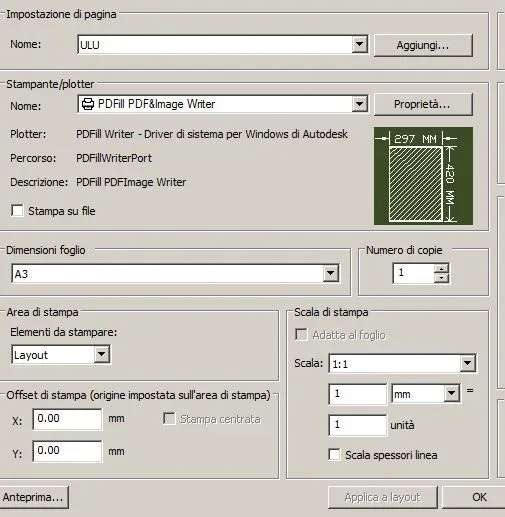
when you go to page setting you have to assign a page setting (in my example ulu) to all layouts.
at this point when public launches will automatically create a single pdf file containing all layouts.
I hope to have been clear and above all useful
sympathetic
autocad pdf.webp
 

Forum statistics

Threads
44,997
Messages
339,767
Members
4
Latest member
ibt

Members online

No members online now.
Back
Top