
• This forum is the machine-generated translation of www.cad3d.it/forum1 - the Italian design community. Several terms are not translated correctly.

pumping problem

  • Thread starter Thread starter marza10
  • Start date Start date

marza10

Guest
Good morning to all,
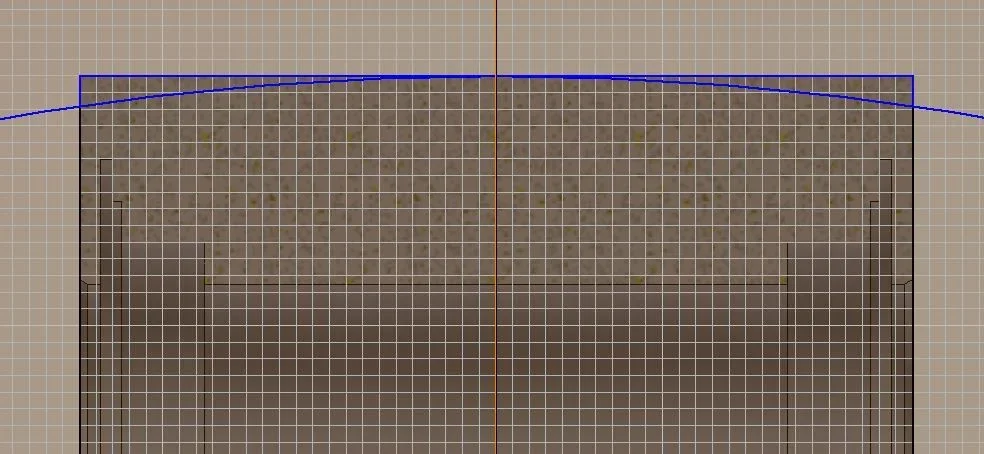
I have a trivial problem with a bombing to revolutionize axially on a ring.
I need to first create the unflatted profile and then perform a negative revolution by removing material, the problem is that once the sketch is drawn, it cannot find the profile as if it was not a closed profile and therefore obviously I can not complete the revolution.
the situation is what I attach to the figure
the profile is tangent in the middle point
the same also occurs by cutting the excess part of the circle
 

Attachments

  • Cattura.webp
    Cattura.webp
    50.7 KB · Views: 10
the revolution you should do with half profile around the axis, if I understood the figure
 
the figure must be closed
thanks stefano I will use this technique... although I still don't understand why it doesn't see my profile as closed, in the end I projected the geometries and I gave the colinear and I cut the excess of the curves...bo mystery:d
 
did you try the "closed line" command by clicking with the dx mouse on one side?
Usually errors repair so fast.
greetings
 
did you try the "closed line" command by clicking with the dx mouse on one side?
Usually errors repair so fast.
greetings
I never knew that command.

I see the dialog box that says to select the beginning/end of the curve to close, but then I can't select anything.

Would you have any suggestions to help me understand that?
 
I never knew that command.

I see the dialog box that says to select the beginning/end of the curve to close, but then I can't select anything.

Would you have any suggestions to help me understand that?
strange, the closed line command is a diagnosis and repair tool of an alleged closed profile.
you simply have to choose with the dx one line or arch or another any entity that composes your profile, and then follow to choose the other adjacent entities.
if there is a curve not bound to the previous, if there is more constraints on the same place, or other defects on the profile, the command proposes to repair them by adding what is missing (or removing if appropriate).
I often use it, especially when, once I come out of the sketch, do the bizzes to identify the profile for subsequent processing
 
did you try the "closed line" command by clicking with the dx mouse on one side?
Usually errors repair so fast.
greetings
Thank you. I don't know for what reason but he saw the lines as detached, I forgot some bond or anything, but now I've solved it! !
 

Forum statistics

Threads
44,997
Messages
339,767
Members
4
Latest member
ibt

Members online

No members online now.
Back
Top