• This forum is the machine-generated translation of www.cad3d.it/forum1 - the Italian design community. Several terms are not translated correctly.

put in the table

  • Thread starter Thread starter MaiMollare
  • Start date Start date

MaiMollare

Guest
Good day to all
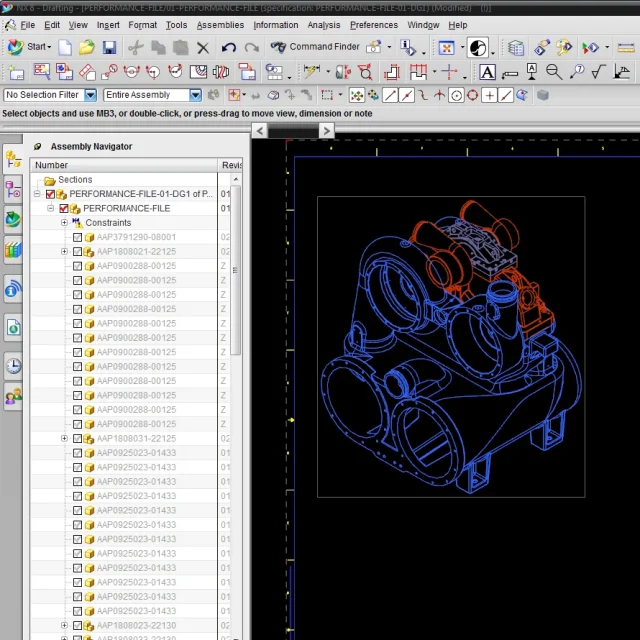
I have a problem with a table, I can't see the components of a set in its table. in the model, in the model tree, I see all the highlighted components. in the table I see them blanked and embossed only the body linked with wave geometry linker.
I think it's a reference group issue, but I don't know how to operate.
Can someone please help me?
- - - updated - - - -I forgot I have the release 8
 

Attachments

  • d1.webp
    d1.webp
    109.1 KB · Views: 3
  • d2.webp
    d2.webp
    115.6 KB · Views: 2
then I go to the eye, however try like this:
- open the table
- press 'm' to switch to the model
- Now in 8 I don't know, you should change 'reference set'.
then board 'assiemi' \ 'replace reference set' (discussed but I have the version in Italian)
- selections in the navigator the components that do not appear in the table
- automatic reference sets, i.e. created automatically by nx are:
solid, empty, entire part

-probably the components you do not see are either on empty or on a reference set
Excluding, then select, example, solid.
-ctrl+shift+d back to the table, you should see what you missed

Let us know
 
thank you so much doc, I have to say that nug on certain things is not at all intuitive, however we go ahead:redface:
 
thank you so much doc, I have to say that nug on certain things is not at all intuitive, however we go ahead:redface:
Look at nothing. is tremendous, especially if you come from other software more
simple.

I never studied reference sets, just because I don't use them.

Then one day I found myself in your own situation:-)
and I was obligated to study them. Unfortunately, it is so

hello to the next
 

Forum statistics

Threads
44,997
Messages
339,767
Members
4
Latest member
ibt

Members online

No members online now.
Back
Top