• This forum is the machine-generated translation of www.cad3d.it/forum1 - the Italian design community. Several terms are not translated correctly.

quality visualization curved beam

  • Thread starter Thread starter drake
  • Start date Start date

drake

Guest
Bye to all,
I have a problem about the quality of displaying a curved beam. I would like to point out that in practice I have never had such a need not taking care of "curve" elements, so I don't know what else to do more than I have already done.
I am modeling a wooden beam with circular curvature and at the time of inserting the secondary beams I realized that I have a visual problem that does not allow me to overlap the curves even if perfectly equal.
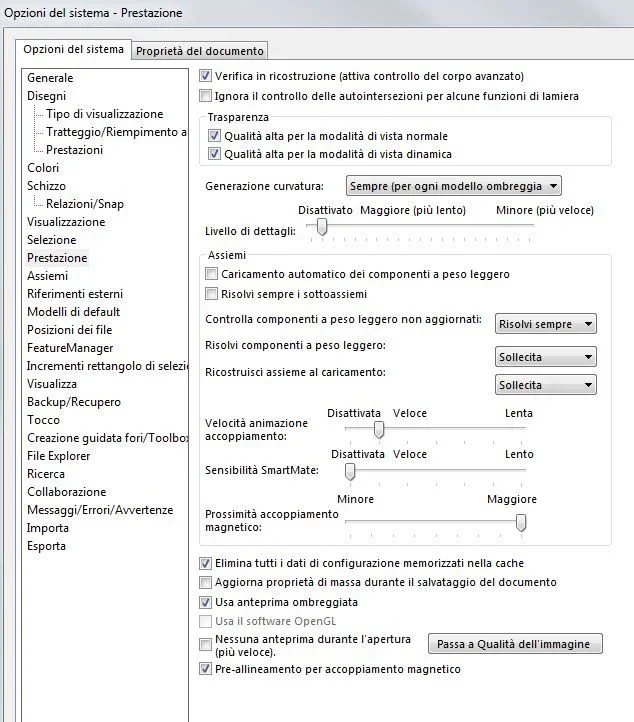
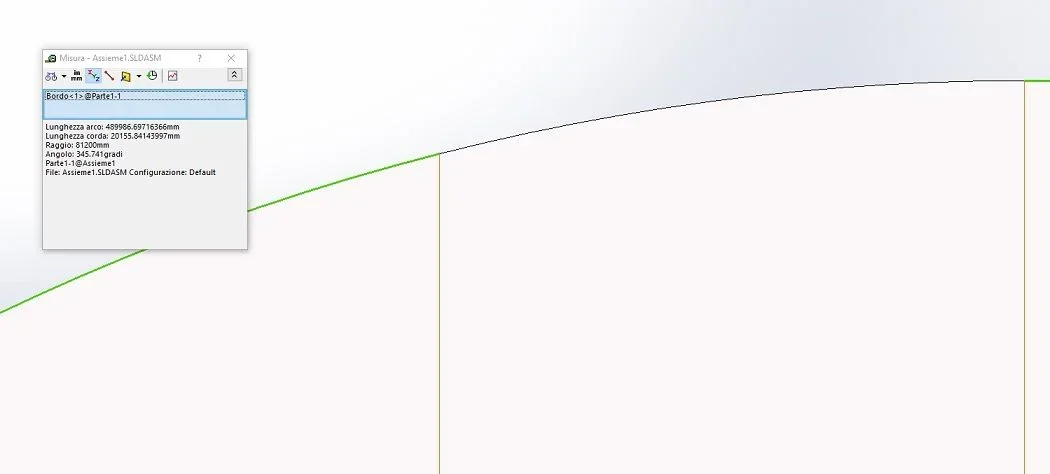
in the following image I will show you the problem1.webpas you can see there is no perfect overlap, although the sketch line is perfect.
the graphic settings of the drawing are as follows:2.webp3.webpthe problem is that in drawing stage I can not accept to print a drawing so, it is not presentable. the incorrect display I can accept it in the model phase and in the setting stage, but at the time of the drafting of the definitive boards no! how can I do to solve the problem? Thank you.
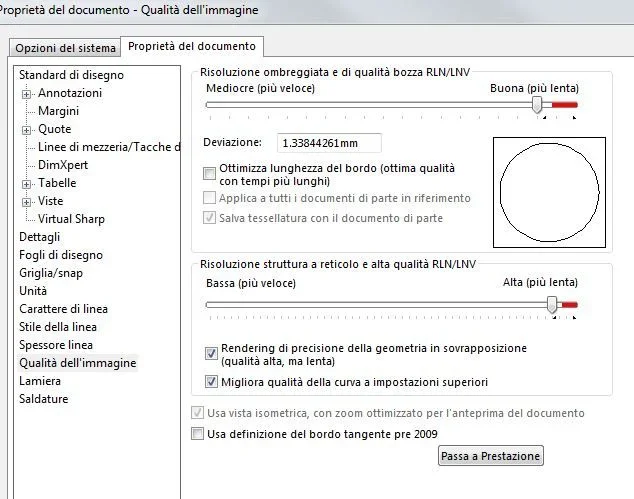
 
if it is a set, check the graphics quality on all components and put it to the maximum. this could generate the precision difference between the two curves
put the tick to optimize edge length.
You will lose in performance and may slow pattern manipulation, but if you need it to get the final print imposed only at the end.
 
I did what you said, but nothing changes. It's in the environment together, the image you post. I reopened the various components and set everything to maximum. then I changed the axieme and design settings, but it's always the same. I noticed the problem x why modeling, I thought I had wronged the shape of the components, instead they were right being just a visual problem. I'm modeling a cover, not a small object, so the defect probably can camouflage, but not on everything I believe. I'm modeling together with colleagues who don't know sw and as soon as they saw the monitor model they immediately stumbled the nose, rightly I say. I told them it was just a question of resolution that I set to speed up the model, so I hope I don't have to apologize when I finish the job. I was actually trying to convince them of the goodness of the software, but I don't think it's necessary to insist any further, they've already changed their minds...
the curve in question is a simple circumference, I dare not imagine if it was a much more complicated one! I would not want sw to go into crisis with very large objects compared to what should be its modeling stand, I talk about a radius of 81200 mm.
I ask who uses sw to shape curved objects, how do you avoid this problem?
 
I'm pretty good with that radius.
I attach you image and assimilate. of course I have simplified and maybe your model is more complex.
What I think is strange is that in your first image there is no activation applies to all parts in reference (it would be necessary to adapt the quality of the parts to that of the automatic assembly without having to handle them individually). that voice is disabled, usually, only in partsImmagine.webp
 

Attachments

in fact your model looks better. My model is not at all complicated, except for basic sketches that have many relationships and equations, but I don't think they can influence the graphics quality. in the settings I posted before I was in the table, not in the axieme and then the check is not there. Ultimately I attach an image with two classic views of detail that you can have in a table to show how knots are made.Cattura.webpthe scale is 1:5 and the design seems wrong, it is not presentable according to me...I will try to feel the assistance and see what they will tell me... Thank you!
 
I attach the exports of that table in pdf and dwg. the dwg is perfect, the pdf does not look. I didn't print it, but I think it's superfluous. There is objectively a problem of graphics, which I hope will solve... although I am a little doubtful. . .
 

Attachments

gentlemen relaunch the discussion because I would have peace to interface with who of you uses sw with curved objects... I can't think that sw has these visualization problems. as it is a mechanical cad and here you are almost all belonging to that world, you will definitely use it with objects a little more "complex". How do you solve the problem? or you don't show up and "just me" case. .
I have done all the possible and imaginable evidence, heard assistance and found that there is a problem. so as we talk about a cad 3d crate specifically to draw complicated objects, I ask you if you give me your experiences. Thank you.
 
I also found that problem; But it doesn't bother me so far.
I didn't give him much weight as I know it is a visualization problem; It is clear that if there was not better... but lately with solid.....I can't say satisfied I can say content with the software....it is certain you could migrate to another software but with which headaches..... .
 
they opened a sr...every after my reports open one!
However you are only a matter of graphics but if one wants to continue to represent the tables in the same way that you do with straight beams this is a big limit. However when I was modeling and seeing what I posted to you, I thought I was wrong to create the model and this poratato away a little time because I went back to control it. the model was simple, but if it had been complex, with a structure that followed a particular curve or surface would have been pains! so I can accept it, because precisely I am not my daily bread the "curves", but I do not know who instead uses it just x this type of models... .
 

Forum statistics

Threads
44,997
Messages
339,767
Members
4
Latest member
ibt

Members online

No members online now.
Back
Top