• This forum is the machine-generated translation of www.cad3d.it/forum1 - the Italian design community. Several terms are not translated correctly.

quotation diameter drawing

  • Thread starter Thread starter driver
  • Start date Start date

driver

Guest
Bye to all,

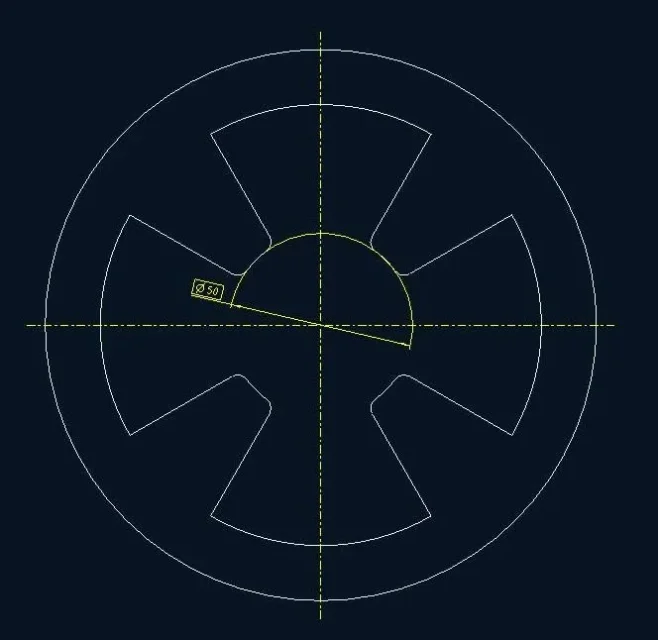
do you succeed in drawing pro/e to insert the share of a diameter as in the attached image? or with the quota that follows the profile of the reference circumference through an "auxiliary" line. I hope I explained.

Thank you.
img1.webp
 
Bye!

If I understand correctly, you should solve by clicking twice on the circumference arc you want to quote.
 
Bye!

If I understand correctly, you should solve by clicking twice on the circumference arc you want to quote.
exact, so doing instead of making the quotation as radius (rxx) is quoted as diameter.
However also using the "flip arrows" (click dx on the newly generated quota) I can not find the system to make the quota as in the image. . .
 
you are right, sorry but I return today from the holidays, and I am very slow :frown:....after clicking dx on the newly generated quota (as you rightly said) you must select "show as linear" (I have menus in Italian). .
 
you are right, sorry but I return today from the holidays, and I am very slow :frown:....after clicking dx on the newly generated quota (as you rightly said) you must select "show as linear" (I have menus in Italian). .
I had also tried this option but it doesn't make it as in the image even on this street...

thanks for the support!
 
Can you show us at the moment how you see that quota? to understand the starting point
 
So excuse me, could you send me a step or an iges of your model? so I try to fly it too, just to see if it is a problem of settings of the *.dtl.

always if you can of course. . .
:smile:

I meanwhile managed to get this, trying to reproduce something I saw.
 

Attachments

  • Diametro su circonferenza parziale.webp
    Diametro su circonferenza parziale.webp
    24.2 KB · Views: 19
for me it is right there that you will go to parare:wink:
I'd bet on it.
Bye-bye!
It could be, even if looking a bit I didn't find any variable that seems to be about that graphic behavior.
But I might not have found it, did you see anything?
 
to the eye comes to mind default_diadim_text_orientation parallel_to_and_above_leader.
for the square around the value then you only have to edit the properties of the quota and in the window display view just click your baseBut here we are not seers! If driver doesn't make us understand better it's hard...
 
to the eye comes to mind default_diadim_text_orientation parallel_to_and_above_leader.
for the square around the value then you only have to edit the properties of the quota and in the window display view just click your base
Yes, that yes, I was actually referring to something that would control the extension of the edge of the circumference arc (at least I did).
Anyway, as you say, we wait!! :smile:
 
Yes, that's exactly what I was looking for!
to edit "default_diadim_text_orientation parallel_to_and_above_leader" instead? ?

Thank you very much, very kind!
 
select the quota, right button, property....
the values of the drop-down menu that I have highlighted are those that you find associated with the variable that indicated you calacc ((PHP 4 = 4.1.0)).

if you always want this type of text orientation, then enter the drawing configuration file (*.dtl), and change the voice (PHP 4 = 4.1.0) setting the value on parallel_to_and_above_leader. then remember to save the dtl file.

Bye!
 

Attachments

  • QUOTA.webp
    QUOTA.webp
    44.9 KB · Views: 10

Forum statistics

Threads
44,997
Messages
339,767
Members
4
Latest member
ibt

Members online

No members online now.
Back
Top