• This forum is the machine-generated translation of www.cad3d.it/forum1 - the Italian design community. Several terms are not translated correctly.

read string autocad in vba

  • Thread starter Thread starter cata850
  • Start date Start date

cata850

Guest
Hello everyone I wanted to ask you a question as I read from a vb application a string of an autocad file? ?
I hope to be clear, for now I am trying to use the methods
acadselectionset and acadtext but what escapes me...:confused:
 
Hello everyone I wanted to ask you a question as I read from a vb application a string of an autocad file? ?
I hope to be clear, for now I am trying to use the methods
acadselectionset and acadtext but what escapes me...:confused:
:confused: no clear no.. What do you mean to read a string? .

find a text in the drawing and detect its string value?

with this selection a text and pick the value string.... I don't know if that's what you were asking

Sorry the syntax but I drizzled qlc ready and adapted to the very....
public sub test_to_string()

dim filtertype(0) as integer
dim filterdata(0) as variant

dim sset as acadselectionset
dim element as acadtext

on error resume next
' delete the selection set if it exists
if not isnull(thisdrawing.selectionsets.item("element")) then
set sset = thisdrawing.selectionsets.item("element")
sset.delete
end if


set sset = thisdrawing.selectionsets.add("element")


filtertype(0) = 0
filterdata(0) = "text"

sset.selectonscreen filtertype, filterdata


for each element in sset
msgbox (element.textstring)
next element

end sub
 
:confused: no clear no.. What do you mean to read a string? .

find a text in the drawing and detect its string value?

with this selection a text and pick the value string.... I don't know if that's what you were asking

Sorry the syntax but I drizzled qlc ready and adapted to the very....
public sub test_to_string()

dim filtertype(0) as integer
dim filterdata(0) as variant

dim sset as acadselectionset
dim element as acadtext

on error resume next
' delete the selection set if it exists
if not isnull(thisdrawing.selectionsets.item("element")) then
set sset = thisdrawing.selectionsets.item("element")
sset.delete
end if


set sset = thisdrawing.selectionsets.add("element")


filtertype(0) = 0
filterdata(0) = "text"

sset.selectonscreen filtertype, filterdata


for each element in sset
msgbox (element.textstring)
next element

end sub
you are what I needed, take the value of a string from a sheet cad...
But I have a problem, thisdrawing does not make me do it, in the sense that copied and pasted your code tells me that thisdrawing is not a definite variable. . .
I'll have to import what? ? ?

p.s.I don't know if it can change anything but the program is not a macro of the cad but it's just an application to itself...
 
you are what I needed, take the value of a string from a sheet cad...
But I have a problem, thisdrawing does not make me do it, in the sense that copied and pasted your code tells me that thisdrawing is not a definite variable. . .
I'll have to import what? ? ?

p.s.I don't know if it can change anything but the program is not a macro of the cad but it's just an application to itself...

bhè ovviamente si... se non utilizzi il vba di autocad, devi incorporare le librerie di autocad nel tuo progetto se hai autpocad installato... ovviamente se devi poi distribuire l'applicazione devi distribuire anche le librerie o cmq devo essere installate.


in alternativa alle librerie io avevo utilizzato tempo fa una cosa del genere

public function connect() as boolean
dim acadrunning as boolean
on error goto err_control
acadrunning = isautocadopen()
if acadrunning then
set acad = getobject(, "autocad.application")
else
set acad = createobject("autocad.application")
end if
acad.visible = true
'set thisdrawing = objacad.activedocument
connect = true
exit_here:
exit function
err_control:
msgbox err.description
resume exit_here
end function

function isautocadopen() as boolean
on error resume next
set acad = getobject(, "autocad.application.16")
isautocadopen = (err.number = 0)
set acad = nothing
err.clear
end function


public acad as object
private sub commandbutton1_click()

call connect
set acad = getobject(, "autocad.application.16")
set thisdrawing = acad.activedocument
acad.visible = true

thisdrawing.sendcommand ("_pline" & vbcr & stringa & vbcr)
end sub
 
for now the problem of distribution is not there,
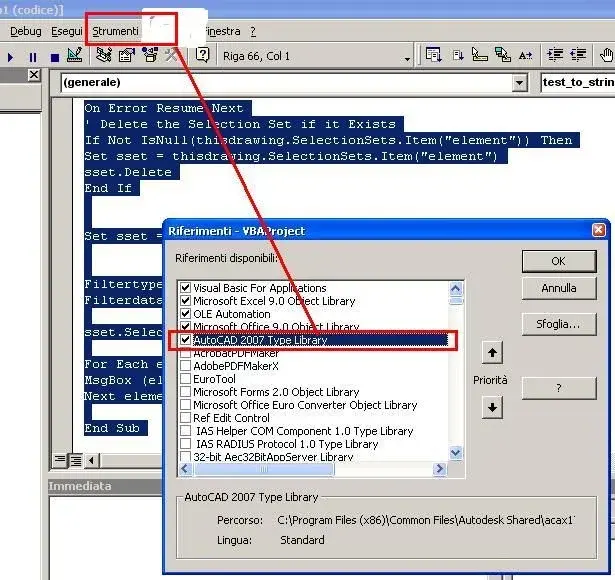
I have already imported autocad libraries, from "prject/references...."
But that thisdrawing just doesn't see me...
I tried to use your code as well but always the same problem: "variable not define"
Where am I wrong? ? ?
 
for now the problem of distribution is not there,
I have already imported autocad libraries, from "prject/references...."
But that thisdrawing just doesn't see me...
I tried to use your code as well but always the same problem: "variable not define"
Where am I wrong? ? ?
I don't know. or attach the code otherwise so it is difficult to understand what is wrong...
 
Code:
option explicit
   
    private type browseinfo
        howner as long
        pidlroot as long
        pszdisplayname as string
        lpsztitle as string
        ulflags as long
        lpfn as long
       lparam as long
       iimage as long
   end type
  
   private const bif_returnonlyfsdirs = &h1
   private declare function shbrowseforfolder lib "shell32.dll" alias "shbrowseforfoldera" (lpbrowseinfo as browseinfo) as long
   private declare function shgetpathfromidlist lib "shell32.dll" alias "shgetpathfromidlista" (byval pidl as long, byval pszpath as string) as long
   private declare sub cotaskmemfree lib "ole32.dll" (byval pv as long)
   
public function centrale()

dim prova as string, myname as variant
dim acadapp as new acadapplication
dim fso as variant, f as filesystemobject
set fso = createobject("scripting.filesystemobject")
set f = new filesystemobject

dim folder as variant, files as variant, file as variant, vet() as string
dim i as integer, counter as integer
dim cart as acaddocument, selection as acadselectionset
dim text as acadtext
set cart = new acaddocument

set selection = cart.selectionsets.add("testo")

call l03_browsefolder(prova, "")

set folder = f.getfolder(prova)
set files = folder.files
counter = files.count
redim vet(counter)
i = 0
for each file in files
        
    if instr(1, file.name, ".dwg") <> 0 then
    vet(i) = file.name
    i = i + 1
    end if
next file

dim filtertype(0) as integer
dim filterdata(0) as variant

filtertype(0) = 0
filterdata(0) = "text"
acadapp.visible = true
acadapp.documents.open (prova & "\" & vet(1))
dim var(10) as variant
var(0) = 1

call test_to_string

end function
public function l03_browsefolder(path as string, titolo as string)
dim browseinfo as browseinfo, lpidlist as long
dim sbuffer as string

with browseinfo
    .howner = 0&
    '.iimage = 3
    '.lparam = lstrcat("cerca directory tipici", "")
    '.lpfncallback
    .lpsztitle = titolo 'lstrcat("cerca directory tipici", "")
    '.pidlroot =
    .pszdisplayname = titolo
    .ulflags = 3 '198
end with
lpidlist = shbrowseforfolder(browseinfo)
if (lpidlist) then
  sbuffer = space(2600)
  shgetpathfromidlist lpidlist, sbuffer
  sbuffer = left(sbuffer, instr(sbuffer, vbnullchar) - 1)
end if
path = sbuffer

end function
Here's code, the test_to_string function is what you wrote
 
look I have problems with 32-bit libraries because I have 64bit xp so they are not always compatible.... but I recommend you start from the basic thing.... communication with autocad

I did a test with excel (from his vba)
public function connect() as boolean
dim acadrunning as boolean
on error goto err_control
acadrunning = isautocadopen()
if acadrunning then
set acad = getobject(, "autocad.application")
else
set acad = createobject("autocad.application")
end if
acad.visible = true
'set thisdrawing = objacad.activedocument
connect = true
exit_here:
exit function
err_control:
msgbox err.description
resume exit_here
end function

function isautocadopen() as boolean
on error resume next
set acad = getobject(, "autocad.application")
isautocadopen = (err.number = 0)
set acad = nothing
err.clear
end function

public sub test_to_string()

call connect

set acad = getobject(, "autocad.application")
set thisdrawing = acad.activedocument
acad.visible = true

thisdrawing.sendcommand ("_text" & vbcr & "0,0,0" & vbcr & "0" & vbcr & "prova lettura testo" & vbcr & vbcr)

dim filtertype(0) as integer
dim filterdata(0) as variant

dim sset as acadselectionset
dim element as acadtext

on error resume next
' delete the selection set if it exists
if not isnull(thisdrawing.selectionsets.item("element")) then
set sset = thisdrawing.selectionsets.item("element")
sset.delete
end if


set sset = thisdrawing.selectionsets.add("element")


filtertype(0) = 0
filterdata(0) = "text"

sset.select acselectionsetall, , , filtertype, filterdata

for each element in sset
msgbox (element.textstring)
next element

end sub
copy the code into a module and run the macro test_to_string

as references you need to connect autoca 200x or 2010 type library... It has to work... should write a text "try text" and then in excel should return a msgbox with the bed text.

if it does not work according to me there is qlc that does not go in autocad or in qlc activex, it already happened.
 

Attachments

  • untitled.webp
    untitled.webp
    56.3 KB · Views: 20
ok, then the code works, run it with vb6 does not exactly what you said i.e. opens me a cad sheet makes me write a string and then the box comes up with the message. ..but it works, on thisdrawing does not stop, now I try to integrate it into my code I let you know thank you very much.. .
p.s. the autocad library is installed.
 
ok, then the code works, run it with vb6 does not exactly what you said i.e. opens me a cad sheet makes me write a string and then the box comes up with the message. ..but it works, on thisdrawing does not stop, now I try to integrate it into my code I let you know thank you very much.. .
p.s. the autocad library is installed.
you probably have to set the dtexted variable to 1 otherwise does not write the text but asks you the string.. .

cmq the important thing is that it works.... it was just an example.. .
 
Okay I've done some evidence, now the problem is this
I should open a certain file and save the text in a variable and process it. . .
the problem that your code cannot integrate it (because I'm incapable of course)
I open the file like this:
Code:
dim acadapp as new acadapplication
acadapp.visible = true
acadapp.documents.open(prova & "\" & vet(1))
How do I integrate it into your code? ?
 
as before I used the vba of excle because I have no dedicated vb development environment... So I support your vba... but it works

opens the specified file. ..draws all text and inserts it into an array in excel fields. .

replace the array with your carrier and I think it's made

public sub test_to_string()

call

set acad = getobject(, "autocad.application")
acad.visible = true
acad.documents.open ("c:\prova") 'Your path

set thisdrawing = acad.activedocument

dim filtertype(0) as integer
dim filterdata(0) as variant

dim sset as acadselectionset
dim element as acadtext

on error resume next
' delete the selection set if it exists
if not isnull(thisdrawing.selectionsets.item("element")) then
set sset = thisdrawing.selectionsets.item("element")
sset.delete
end if


set sset = thisdrawing.selectionsets.add("element")


filtertype(0) = 0
filterdata(0) = "text"

sset.select acselectionsetall, , , filtertype, filterdata

dim i as integer
i = 1

for each element in sset
worksheets("foglio1").cells(i, 1).value = element.textstring Your carrieri = i + 1
Next element

end sub
 
works beautifully! ! !
Thank you! ! !
I ask you one last thing, you could comment on some instructions,
Maybe the most important ones to understand what they do. .
so you understand the commands and you can do it yourself. .. always if you have time
 
public sub test_to_string()

call
'create autocad object
set acad = getobject(, "autocad.application")
'resets the visible application status
acad.visible = true
'open a document
acad.documents.open ("c:\prova") 'your route

'set thisdrawing object as the open dwg current
set thisdrawing = acad.activedocument

'Declaration filters
dim filter(0) as integer
dim filterdata(0) as variant

'Declaration selection set
dim sset as acadselectionset

'Declaration selected object
dim element as acadtext

on error resume next
'elimina selection set if existing
if not isnull(thisdrawing.selectionsets.item("element") then
set sset = thisdrawing.selectionsets.item("element")
sset.delete
end if

'creates a new selection
set sset = thisdrawing.selectionsets.add("element")

'Setting the selection filter on object "text"
filtertype(0) = 0
filterdata(0) = "text"

'follows the selection on the whole design with the filter
, filtertype, filterdata

dim i as integer
I = 1

'reading selection
for each element in sset 'for each element(text) in the selection group(sset)
accumulations("foil1").cells(i, 1).value = element.textstring 'writes in cell excel value
i = i + 1
next element 'prossimo element (text) in the selection group

end
 
shape I wanted to say thank you! because the code you entered in the first post came back very useful to extract texts from the drawing and put them on an excel file.

Hi.

Christian Christian
 

Forum statistics

Threads
44,997
Messages
339,767
Members
4
Latest member
ibt

Members online

No members online now.
Back
Top