enrico1979
Guest
Bye, guys.
Are you okay? ?
I am learning the classic of ansys and I am using the version of the v12 simply because I have available many tutorials related to it (which provide elements such as the beam3 that the version available in the v14 does not preview, for reasons that I will be able to understand once acquired a minimum of dexterity with the software).
Now I want to study a shelf beam and the tut recommends me a beam3c.
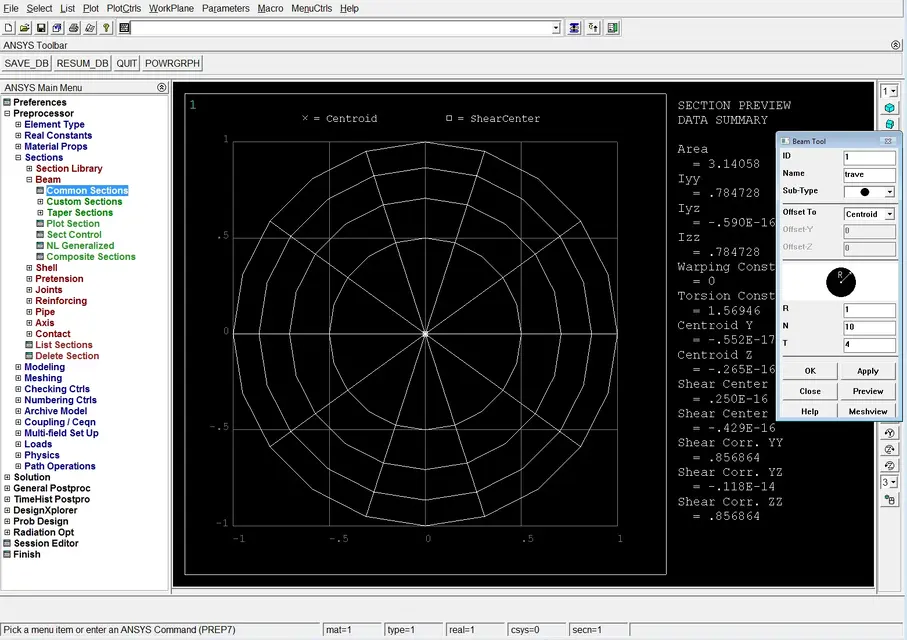
Let us hypothesize that it is lazy and that I do not want to calculate the inertia mom that is required in real costant. from the guides I read as inserting the section the software automatically calculates such moments of inertia and then I thought to insert sections>beam>common sections and give the geometric characteristics of the section (the part relative to the offset allows me to define the position of the origin of the reference system, right?????????????????????????????????????????????????????????????????
I am mistaken and the warning speaks of a lack of real costs.
What's wrong? ?
Is it not possible to replace the insertion of real costants with the sections (which seems to me to be something far more reasonable)?
thank you in advance and apologize if I answer questions, but I just want to learn my job well.
Are you okay? ?
I am learning the classic of ansys and I am using the version of the v12 simply because I have available many tutorials related to it (which provide elements such as the beam3 that the version available in the v14 does not preview, for reasons that I will be able to understand once acquired a minimum of dexterity with the software).
Now I want to study a shelf beam and the tut recommends me a beam3c.
Let us hypothesize that it is lazy and that I do not want to calculate the inertia mom that is required in real costant. from the guides I read as inserting the section the software automatically calculates such moments of inertia and then I thought to insert sections>beam>common sections and give the geometric characteristics of the section (the part relative to the offset allows me to define the position of the origin of the reference system, right?????????????????????????????????????????????????????????????????
I am mistaken and the warning speaks of a lack of real costs.
What's wrong? ?
Is it not possible to replace the insertion of real costants with the sections (which seems to me to be something far more reasonable)?
thank you in advance and apologize if I answer questions, but I just want to learn my job well.