f.bombelli
Guest
Hi, I'll go back and ask for your help for something strange that I don't understand:
I know that to recall the value of a quota in a table (which is in the drawing) you use the string "&d346" where "d346" is the name that pro-e from to the quota.
but if I change the name of the quota in 3d (e.g. x1), the program no longer recognizes me the quota using the string "&d346" or "&x1".
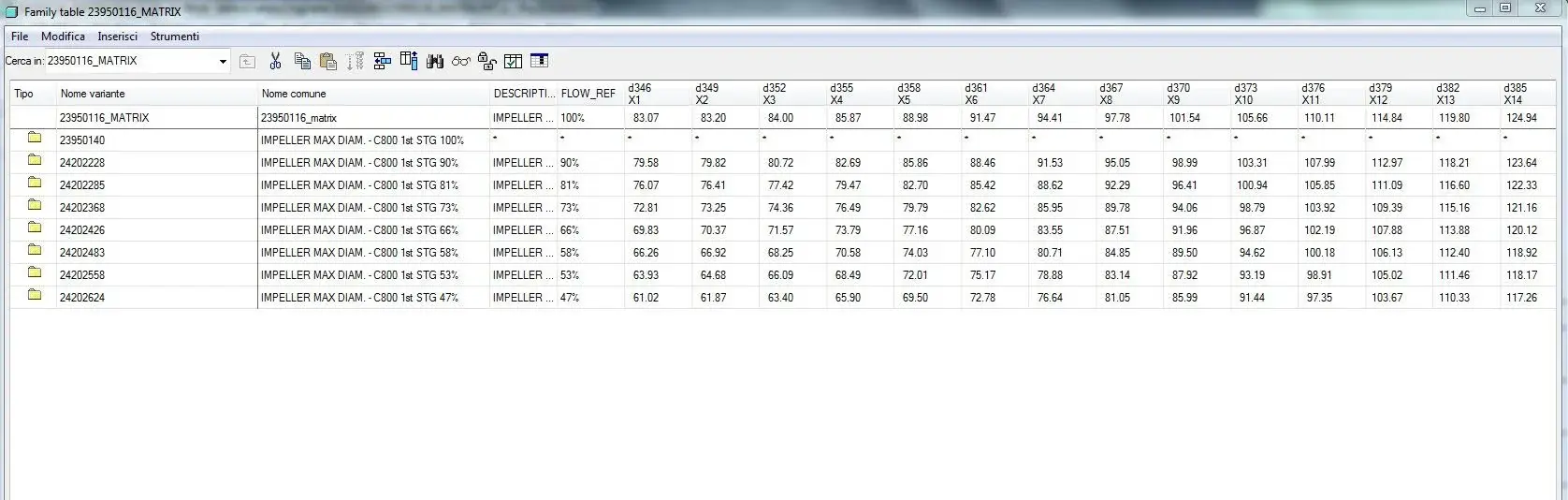
for greater clarity I explain to you the purpose: I have a curve formed by n points, I renamed all the names of the coordinates of the points with e.g. x1, y1, z1, x2, y2, z2, I put the coordinates of the points in family table so I change the curves easily. Now I wanted to, in the table, create a table that recalls the coordinates of the points automatically but with the strings above does not.
Is there another string you have to use in this case?
I realized that the problem is not so much the having renamed the quota, as the fact that that that quota is a family table parameter. if it wasn't I saw that in addition to the usual string you have to add ":0"
Thank you.
Hi.
I know that to recall the value of a quota in a table (which is in the drawing) you use the string "&d346" where "d346" is the name that pro-e from to the quota.
but if I change the name of the quota in 3d (e.g. x1), the program no longer recognizes me the quota using the string "&d346" or "&x1".
for greater clarity I explain to you the purpose: I have a curve formed by n points, I renamed all the names of the coordinates of the points with e.g. x1, y1, z1, x2, y2, z2, I put the coordinates of the points in family table so I change the curves easily. Now I wanted to, in the table, create a table that recalls the coordinates of the points automatically but with the strings above does not.
Is there another string you have to use in this case?
I realized that the problem is not so much the having renamed the quota, as the fact that that that quota is a family table parameter. if it wasn't I saw that in addition to the usual string you have to add ":0"
Thank you.
Hi.