
• This forum is the machine-generated translation of www.cad3d.it/forum1 - the Italian design community. Several terms are not translated correctly.

rectangle encumbrance piece

  • Thread starter Thread starter TheGio
  • Start date Start date

TheGio

Guest
Hello everyone

I've been questioning it before, but I never asked myself the question.
sometimes when selecting a sw component shows in ochre of the lines that form a parallelepiped corresponding to the ingots of the piece.
Why? What is it?
..but above all.. How do you turn off?
I have to export an image and I don't want you to see it.

thanks to all
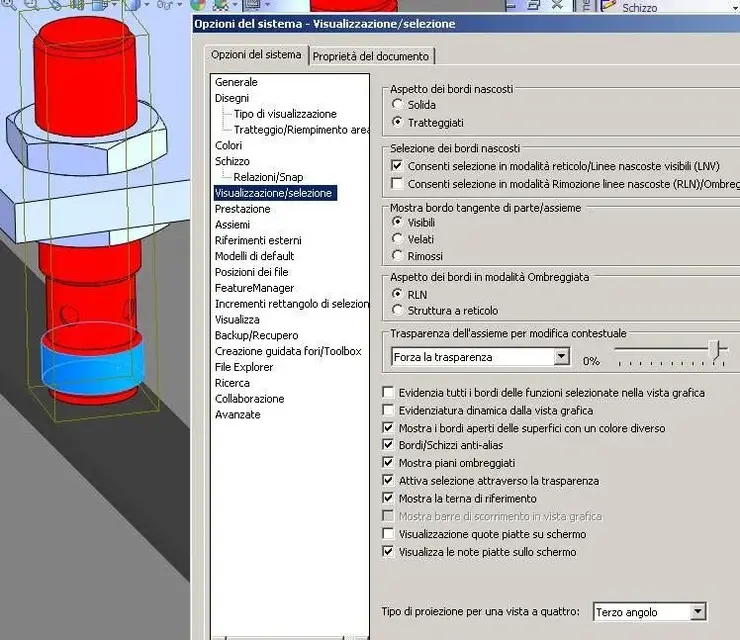
 
Hi.
I tried to uncheck as you say but the "problem" persists.
igo image for clarity

Thank you.
 

Attachments

  • Immagine.webp
    Immagine.webp
    71.4 KB · Views: 22
I have to export an image and I don't want you to see it.
thanks to all
uhmm why to export an image you have to select a part?
you could select the part and then with the right click select "inverts selection",
or you could "color" the rest with a unique color and keep it in a configuration,
or ... just export, without selecting anything ...
 
... or use "island"... or set transparency for everyone except the one to be highlighted. . I mean, there's food, drink, or skip the meal. :biggrin:
 
Of solutions to export an image with a highlighted part there is infinity. :-)
....when I was there, I just wanted to figure out what that sideboard was and why I sometimes see it and sometimes not.
Anyway. I'll sleep the same! !

Hi.
 

Forum statistics

Threads
44,997
Messages
339,767
Members
4
Latest member
ibt

Members online

No members online now.
Back
Top