
• This forum is the machine-generated translation of www.cad3d.it/forum1 - the Italian design community. Several terms are not translated correctly.

reference to together with multiple configurations

  • Thread starter Thread starter paolino
  • Start date Start date

paolino

Guest
Hello, everyone.
I am in this situation:
a part contains a function with a reference in the set to a set. The axieme has two configurations. I would like the part function to refer to only one of the axieme configurations, and then the part did not change when I go to view the other configuration. . .
is it possible?

I hope I've been able to explain, thank you in advance to those who want to make a suggestion!
(us swx 2009 sp5)
 
Hello, everyone.
I am in this situation:
a part contains a function with a reference in the set to a set. The axieme has two configurations. I would like the part function to refer to only one of the axieme configurations, and then the part did not change when I go to view the other configuration. . .
is it possible?

I hope I've been able to explain, thank you in advance to those who want to make a suggestion!
(us swx 2009 sp5)
in the general axieme you have to create two configurations in which you config the parameters. so you will have a configuration linked by equation and the other not, just like everything else.
 
Hello, everyone.
I am in this situation:
a part contains a function with a reference in the set to a set. The axieme has two configurations. I would like the part function to refer to only one of the axieme configurations, and then the part did not change when I go to view the other configuration. . .
is it possible?

I hope I've been able to explain, thank you in advance to those who want to make a suggestion!
(us swx 2009 sp5)
the asm and the part part must be configured so as to create a situation like this:
asm(config1)+part(config1)
asm(config2)+part(config2)

in the part(config1) you must suspend the feature that interests you and in the part(config2) you have activated it
in the axiom asm(config1) go to choose as active configuration of the part the config1 and in the asm(config2) axieme choose the config2.
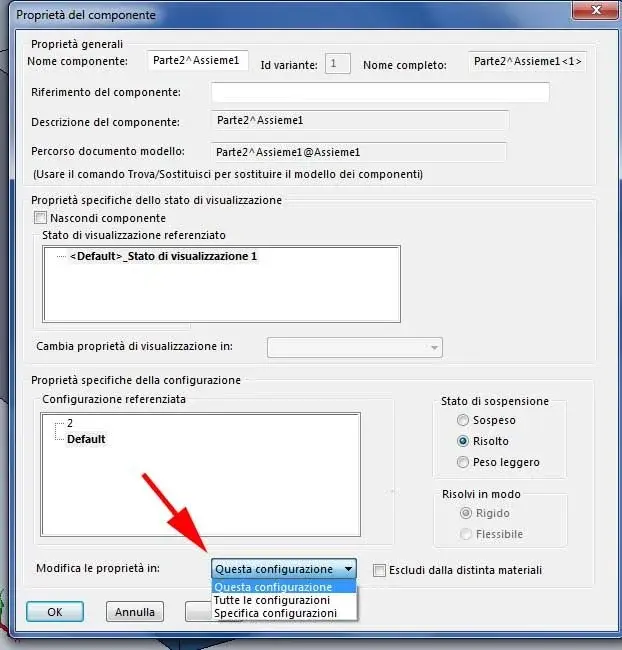
I don't remember if in 2009, from inside the axieme, in the component property tab that opens when you click on it with the right you have the option to choose which axieme configuration to change that part
see the image attached.
 

Attachments

  • congif.webp
    congif.webp
    40.9 KB · Views: 9
in the general axieme you have to create two configurations in which you config the parameters. so you will have a configuration linked by equation and the other not, just like everything else.
Hello, thank you for the answer
What you say is exactly the kind of operation I would like to achieve. But I can't configure the function so that it's connected to a configuration and not to another... Consider that the function has a reference in the context, it does not pass through an equation. . .

just laughed place an example.. .
 
the asm and the part part must be configured so as to create a situation like this:
asm(config1)+part(config1)
asm(config2)+part(config2)

in the part(config1) you must suspend the feature that interests you and in the part(config2) you have activated it
in the axiom asm(config1) go to choose as active configuration of the part the config1 and in the asm(config2) axieme choose the config2.
Hello, thank you for the answer.
resembles what had come to mind also to me: even for the part I have to set two configurations, one with the functions that refer to the axieme, and the other not as you say with the suspended functions, but identical but with the blocked references.
I hoped I didn't have to resort to this system because if the parts in the axieme are many (and for how I work almost all have some function with references to the axieme) , I have to obtain a second configuration and in the second configuration of the axieme to use only parts in the second configuration. . I see a lot of chance to make mistakes.. .
I don't remember if in 2009, from inside the axieme, in the component property tab that opens when you click on it with the right you have the option to choose which axieme configuration to change that part
see the image attached.
In 2009, I didn't see it as you posted it to me, but no matter, I realized what you mean...
 
place an example.
in the axieme there are two plates of a mold (!!!!) on which are obtained with the function "cavity" the quarries for the realization of the object "particular".
the axieme has two configurations: in the default the two plates are closed and in this configuration the "cavity" functions are correctly defined. in the configuration that I called mobile I would like to see the mold as it is with the stranded plates. . However, it happens that when I activate this configuration, the cavity function is updated and the quarry disappears (and in fact no longer intersects the plate that I have removed. . . )

is there a (simple) way to ensure that the "cavity" function refers to the axieme but only in the "default" configuration and not in the "mobile" configuration?

(Note: I used the quarry function, but the same situation reproposes me with any function defined with a reference in the axieme, for example: the a part has an extrusion function "up to the surface" of a part b in the axieme: if in a second configuration of the axieme flood part b is there any way to ensure that the extrusion in a does not flood? )
 

Attachments

Forum statistics

Threads
44,997
Messages
339,767
Members
4
Latest member
ibt

Members online

No members online now.
Back
Top