
Obiwalex
Guest
I have a problem with inventor 2015 (but it already showed me since 2014) that I can't fix and I can't find anything on the net: I tell you what I do and what happens
1-creo a new idw file going to take the default model that I did and saved in the template library.
2-I see a notice as shown.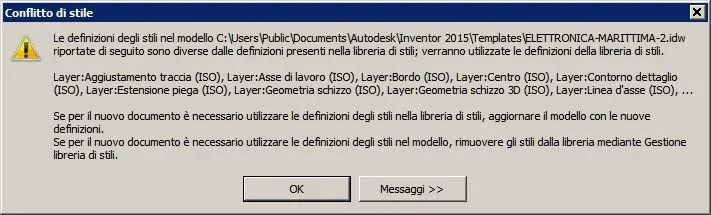 3- Once clicked on "ok" my model appears to me but with lines completely different from those of the original file (of the type with different thicknesses)
4-I close everything and go to change the setting of the project file with regard to the library of styles from "reading-writing" to "reading" (or vice versa but nothing changes)
5-I open the file again but I always have the same situation.
the only way I found to overcome the problem is, once the file model is opened, import a file ".styxml" (which I had created earlier) from management->editor styles->importa.
In practice I would like to create a new file from a model already preset as it serves me.
is there a more effective and fast way, without it having to upload the .styxml file every time?
thank you in advance to anyone who can help me.
1-creo a new idw file going to take the default model that I did and saved in the template library.
2-I see a notice as shown.
3- Once clicked on "ok" my model appears to me but with lines completely different from those of the original file (of the type with different thicknesses)4-I close everything and go to change the setting of the project file with regard to the library of styles from "reading-writing" to "reading" (or vice versa but nothing changes)
5-I open the file again but I always have the same situation.
the only way I found to overcome the problem is, once the file model is opened, import a file ".styxml" (which I had created earlier) from management->editor styles->importa.
In practice I would like to create a new file from a model already preset as it serves me.
is there a more effective and fast way, without it having to upload the .styxml file every time?
thank you in advance to anyone who can help me.