• This forum is the machine-generated translation of www.cad3d.it/forum1 - the Italian design community. Several terms are not translated correctly.

render the stage

  • Thread starter Thread starter Mone89
  • Start date Start date

Mone89

Guest
Hello, everyone. I have a little problem... indeed problem is a big word... Let's say lack... in any rendering that I perform I have no display problem except for the planimetry.. if I roar the view from above (as if it were a planimetry) I see everything except plants, or better I see their shadows but not their foliage.. as if they were hidden. Does anyone know why, or do you know how to make them turn out? thanks to all:)
 
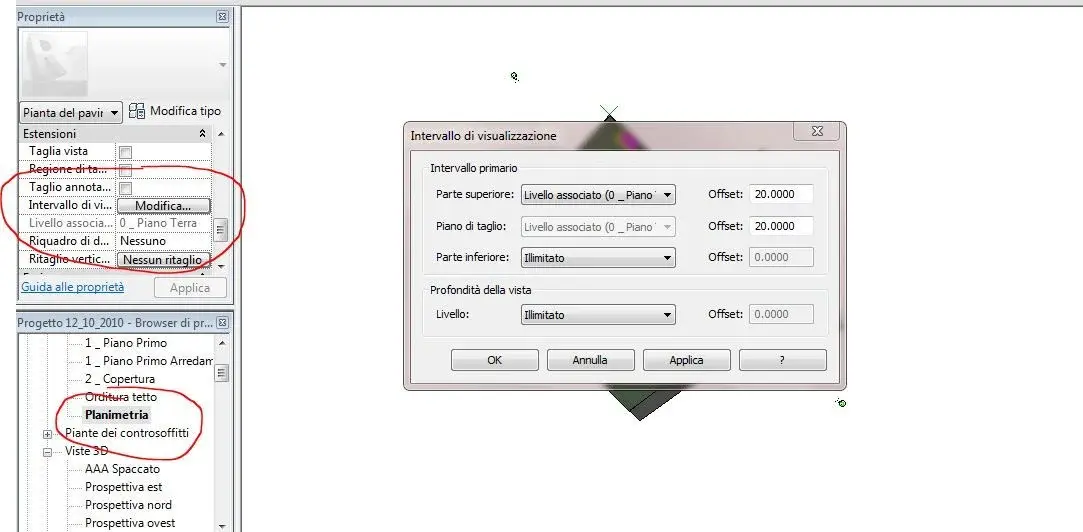
view planimetry-> view ownership-> to extensions-> display range-> select range you want to see from xx to xx.
 

Attachments

  • Cattura.webp
    Cattura.webp
    46.5 KB · Views: 15
view planimetry-> view ownership-> to extensions-> display range-> select range you want to see from xx to xx.
is already set so, however it concerns the planimetry view, if I follow the render in view 3d, moving with the cube to view from above the problem of the invisible plant hair persists
 
if I roar the view from above (as if it were a planimetria) I see everything except plants, or better I see their shadows but not their foliage
Sorry I misunderstood the post...:biggrin:. so in the 3d view from the other angles you see the plants and only when you place in "high" you see nothing... strange. I throw it there: is not that the point of observation is far and the leaves confuse with the grass, so you only see the shadow but not the leaves? It's just a guess thrown there. try posting some pictures to better understand.
 
Sorry I misunderstood the post...:biggrin:. so in the 3d view from the other angles you see the plants and only when you place in "high" you see nothing... strange. I throw it there: is not that the point of observation is far and the leaves confuse with the grass, so you only see the shadow but not the leaves? It's just a guess thrown there. try posting some pictures to better understand.
mmm. one of the trees is so big with the foliage that goes out towards the cemented part, and therefore in the other views you see but on the other you see only the shadow and nothing else... It's just like they disappeared. I also have rows of pink cherry trees, and they don't miss them... :
 
I honestly don't know what to think. ..any display error that depends on the object loaded in the library...but I don't know. .
 
Hello, everyone. I have a little problem... indeed problem is a big word... Let's say lack... in any rendering that I perform I have no display problem except for the planimetry.. if I roar the view from above (as if it were a planimetry) I see everything except plants, or better I see their shadows but not their foliage.. as if they were hidden. Does anyone know why, or do you know how to make them turn out? thanks to all:)
This is the usando rpc?
 
Hello, everyone. I have a little problem... indeed problem is a big word... Let's say lack... in any rendering that I perform I have no display problem except for the planimetry.. if I roar the view from above (as if it were a planimetry) I see everything except plants, or better I see their shadows but not their foliage.. as if they were hidden. Does anyone know why, or do you know how to make them turn out? thanks to all:)
the rpc of trees are projected into rendering as a surface on vertical planes, as a result, the view "from above" parallel to the horizontal plane, does not find any "surface" to render, but only the shadow as "calculated" by the inclination "of the sun".
if you move the 3d view slightly from above, so that non both parallel to the horizontal plane, and perform the rendering again, magically :eek: reappear.
solution:
work in post-production redering with external sw, or use "albers" derived from solid families (it seems to me that some are in the family forum) which, of course, do not have a "rese" of optimal rendering.
it seems (exception) that there are also rpc with trees in 3d (actual), but must be purchased
 
but it also applies to rpcs like people, cars... those you see from any angle... maybe because they have more surfaces?
 
It also applies to people, for cars I don't remember (but maybe in the car archive there is only one .. or is it wrong? )
 
in archive there is only the canine...in commerce there is practically all the circulating car park!:biggrin: for people never happened to me, maybe because they already happened with the right angle...boh!thanks.
 
thanks to all for exhaustive answers. . However the Mayon from above sees, is the only car I loaded.. As for the trees I will have to solve with a slightly inclined view by force... I would still have a curiosity. in autocad the view 3d I can rotate it by changing the angles, or giving a number to them both on the horizontal and vertical plane (e.g. 175° horizontal plane and 10 ° vertical).. in revit you can change the views, i.e. the ucs as in cad giving a specific angle, or dream to rotate the orbit only to "hand"?
 
but if instead of tilting to the sight to show the trees, were the trees to tilt? I don't know if it can work, but if you create a tilted plane (like a floor or region) of one meter by one meter and lean it over your tree? I don't even know if it can work (and I don't even know if it's "bim":wink:), but try... .
Bye.
 

Forum statistics

Threads
44,997
Messages
339,767
Members
4
Latest member
ibt

Members online

No members online now.
Back
Top