cicciounico
Guest
solid 2011 sp3.
every tnato exalted me with the fantastic rendering.
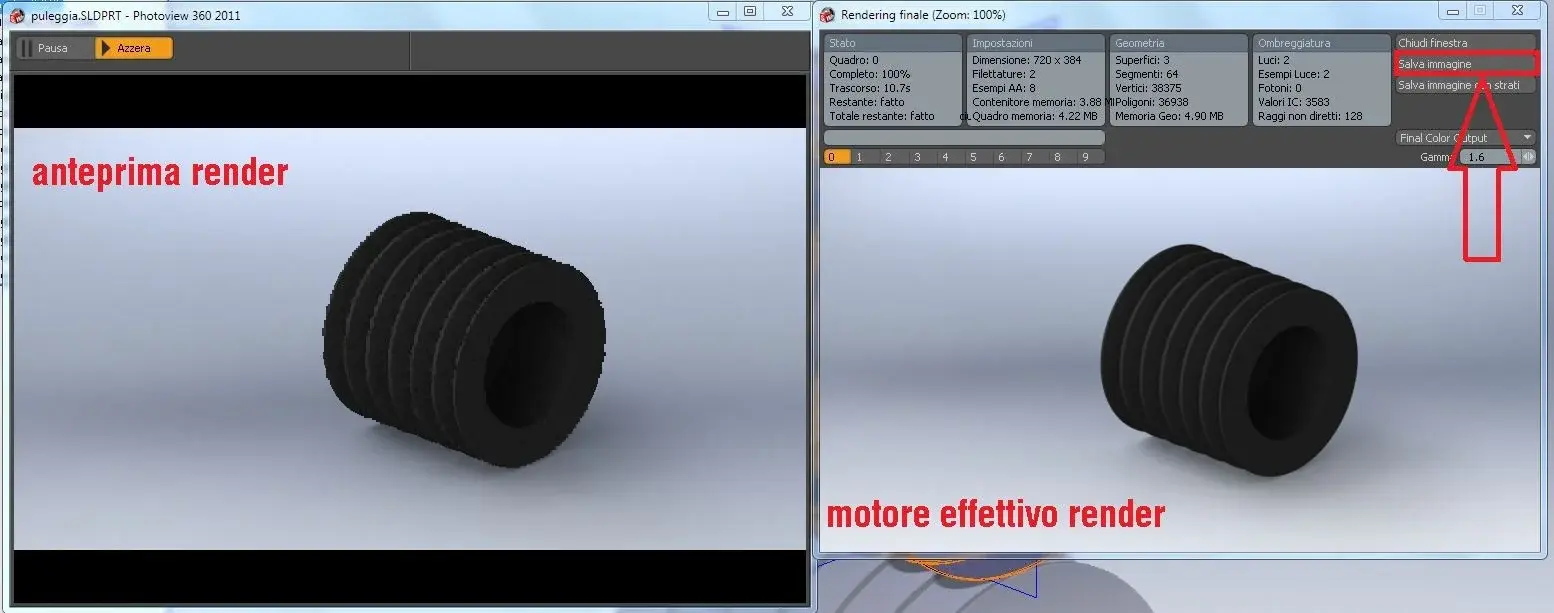
I noticed that after the final rendering I have 2 windows, one with "save image" and the other colo with "pause" and "azzera".
if except the image with image saving is less than what I see in the window with "pause" and "azzera". in this last window, however, the key is missing and there is also a drop-down menu to save the result.
I get to make a print screen that is still + beautiful than the one saved with the right button.
Where am I wrong?
Thank you again!
every tnato exalted me with the fantastic rendering.
I noticed that after the final rendering I have 2 windows, one with "save image" and the other colo with "pause" and "azzera".
if except the image with image saving is less than what I see in the window with "pause" and "azzera". in this last window, however, the key is missing and there is also a drop-down menu to save the result.
I get to make a print screen that is still + beautiful than the one saved with the right button.
Where am I wrong?
Thank you again!