• This forum is the machine-generated translation of www.cad3d.it/forum1 - the Italian design community. Several terms are not translated correctly.

replace the base file for derived parts

  • Thread starter Thread starter MauroTC
  • Start date Start date

MauroTC

Guest
Hello, everyone.
I often realize "guided" assemblies from a file in which I collect all parameters (dimensions, reference plans, etc.), thus adopting the mode of drifting the various parts that will compose that together.

now a necessity that has happened to me several times, but that for me it has always turned out unsolved. :confused:
do you know if there is a way to "seat" from the various parts of this derivation their father, giving them another? it was also because you want to change his name or residence folder. . .

I'll explain better, in case you weren't clear:
I do my .ipt guide file that collects all info, called "parameters_box_a";
from this realisation/derive n parts that will compose my set "box_a";

Now for any need I would also like to make a box b (maybe also c, d, etc.), so I make a copy of the above. the problem (for me) is now to tell the new parts that make up the axieme "scatola_b" that their resulting file is no longer "parameters_scatola_a", but "parameters_scatola_b".
even more banally, I just wanted to test two different solutions (with different parameters) of a certain set, and wanted from time to time assign to the various parts one of the two different configurations, is there the way to change their .ipt file to which they are connected?
(of course there would be the same voices assigned to the various guiding parameters, same plans, etc., in short, all well done that does not give rise to "incans" following the replacement of this guide file... )

I don't use the vault, maybe there is the solution?

thanks in advance.
 
If you try to make a pack&go, then with the design assist you can't rename, replace what you want?
 
you can do as a design assistant. open in from your set and replace the "father" file: with save apply the change. It's important not to have opened the axieme you're intervening on, otherwise sometimes things get messed up. If you do the thing on the axieme, when you replace in one of the parts you select all.
 
If you try to make a pack&go, then with the design assist you can't rename, replace what you want?
Thank you for the answer.
I didn't try this.
I remember that by other need, doing only the p&g continued to search (in new files generated) the original father.

regardless of this:
the optimal for me would be a "immediate" replacement of the father file, for the last example I had done; that is on a set it would be very convenient to tell him to all the parts that make it:
now your father is "parameters_box_a"
But no, let me try the other version and then I tell him:
now your father is "parameters_box_b".

In short, the question more than anything else was intended to know if there is a way to replace their father at the flight. as for example I do not know the vault, maybe this tool also allows these things...:confused:
 
you can do as a design assistant. open in from your set and replace the "father" file: with save apply the change. It's important not to have opened the axieme you're intervening on, otherwise sometimes things get messed up. If you do the thing on the axieme, when you replace in one of the parts you select all.
Thank you. .

I'll have used the design assistant a couple of times in all these years... :eek:

Well, a good reason to deepen its use...

I will try!
 
if you never use it, I will point out that if you select a table you can copy tables and pieces with the new table already connected to the new set/part: often it is useful.
 
if you never use it, I will point out that if you select a table you can copy tables and pieces with the new table already connected to the new set/part: often it is useful.
Thank you.
That was one of the two cases I used it.

the other case was to find the recurrences of use of a certain part within various assemblies.

I will therefore try for this occasion. . .
even if my reminescences are of a quite ostic tool. . .
 
Trying I just realized something though, that I had escaped in my initial explanation:
not all files are managed with the derived component mode; a good part, which must draw only parameters, were connected to the father file through the table parameters fx, connecting it to these with the appropriate "connect" button, then indicating the reference ipt.
is the design assistant also adopted in this case?
Because I can't... :redface:
 
Trying I just realized something though, that I had escaped in my initial explanation:
not all files are managed with the derived component mode; a good part, which must draw only parameters, were connected to the father file through the table parameters fx, connecting it to these with the appropriate "connect" button, then indicating the reference ipt.
is the design assistant also adopted in this case?
Because I can't... :redface:
Yes, if I didn't do it again, there's the old system to erase the original father file and when at the opening of the new son asks you the path, you give him the path of the new father, as it was done to change model on the idw...but be careful that the parameters you go to replace, have the same identical name of the previous ones; were capital initial sections, they recognize them not. .
 
I add to what tarkus said that the parameters to be exported must have the "export" visa. .

just tried to avoid saying nonsense, I confirm that it works
 
... then it will depend on my ignorance in this matter!
I can't even find how/where to replace the parent file...

It is urgent to deepen the design assistant tool, which I will dedicate to the first occasion.

thank you all!:finger:
 
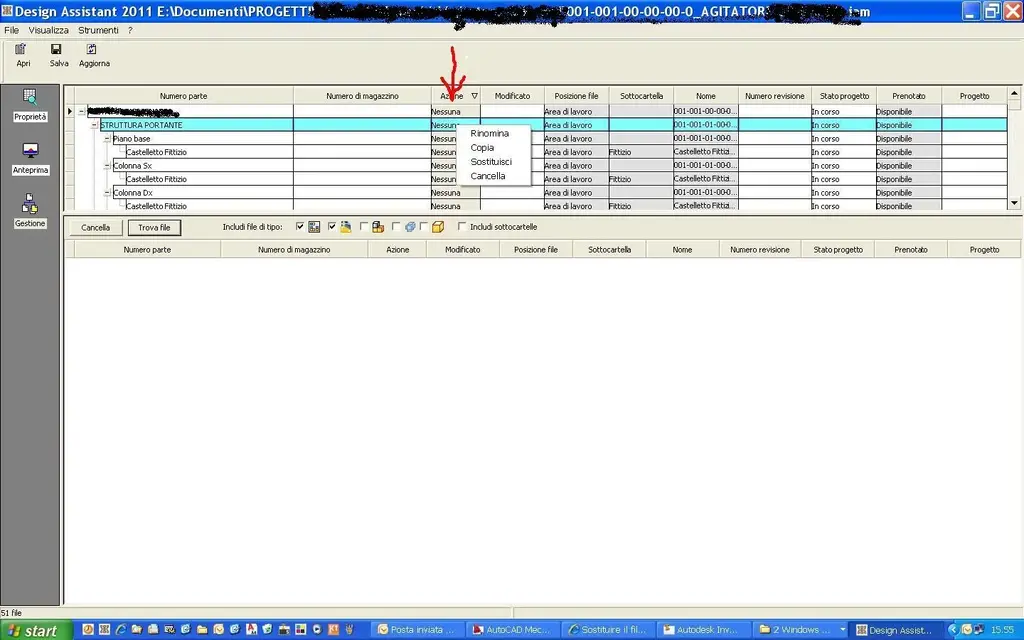
look at the annex:
right click on the indicated column. . .
opens the window where you can choose "replace". .
 

Attachments

  • Designi Assistant.webp
    Designi Assistant.webp
    93.7 KB · Views: 51
look at the annex:
right click on the indicated column. . .
opens the window where you can choose "replace". .
Thank you!
I had already tried, only that I by clicking with the dx, of the 4 items available, 3 are not selectable (grigies, including "replace"), while only the fourth one is selectable, or cancels.

boh... will it be some basic setting that is part of the design assistant's abc?

p.s. launch from resource management, with inventor closed.
 

Forum statistics

Threads
44,997
Messages
339,767
Members
4
Latest member
ibt

Members online

No members online now.
Back
Top