
You are using an out of date browser. It may not display this or other websites correctly.
You should upgrade or use an alternative browser.
You should upgrade or use an alternative browser.
graziano-g
Guest
hello batleo, thanks for the useful information and for the video ( is there audio?? )
I changed the information following the indications highlighted in the video by inserting my information/path (in brackets doubts):
dim title = my description (in mountains I assigned to my cartiglio )
dim template = path of my template
strstamplist.add = my description (text string that appears to verify that the operation has gone smoothly ? can you omit?? )
dim sourcefile as string = path of my template
of course all following/maintaining punctuation/symbols/parents/spaces.
no result except the error message that appears in a previous answer with the only difference that after giving ok nothing changes.
Where am I wrong?
Thank you.
Hi.
I changed the information following the indications highlighted in the video by inserting my information/path (in brackets doubts):
dim title = my description (in mountains I assigned to my cartiglio )
dim template = path of my template
strstamplist.add = my description (text string that appears to verify that the operation has gone smoothly ? can you omit?? )
dim sourcefile as string = path of my template
of course all following/maintaining punctuation/symbols/parents/spaces.
no result except the error message that appears in a previous answer with the only difference that after giving ok nothing changes.
Where am I wrong?
Thank you.
Hi.
batleo
Guest
Hi.
can you post your correct rule, distorting the names I try to take a look at?
can you post your correct rule, distorting the names I try to take a look at?
graziano-g
Guest
too kind and especially quick, in the meantime I understood what I had wrong: the path was not complete. . .
I take advantage of your kindness, having to change, or rather replace the name and layout in a massive way, the carts in an imprecisate number of files generated with inventor 2019.4, currently I use 2021, do I have to reinstall 2021.9 or do I have another system?
example: n drawings contain cards a, b, c which have the corporate logo and other fields in common me differ for some fields related to model parameters (of course the types of cartiglio are included in the template ), I would like to rename to, b, c in x, y, w.
It is clear that I will have to make a new template with the new x, y,w chart layouts but by applying your method the old files remain and new ones are added that instead I would like to replace by eliminating the old ones.
any advice besides the pot with magic beans and the chicken with golden eggs??? :
Thanks again.
Good night.
I take advantage of your kindness, having to change, or rather replace the name and layout in a massive way, the carts in an imprecisate number of files generated with inventor 2019.4, currently I use 2021, do I have to reinstall 2021.9 or do I have another system?
example: n drawings contain cards a, b, c which have the corporate logo and other fields in common me differ for some fields related to model parameters (of course the types of cartiglio are included in the template ), I would like to rename to, b, c in x, y, w.
It is clear that I will have to make a new template with the new x, y,w chart layouts but by applying your method the old files remain and new ones are added that instead I would like to replace by eliminating the old ones.
any advice besides the pot with magic beans and the chicken with golden eggs??? :
Thanks again.
Good night.
batleo
Guest
Hi.
I'm sorry, but last night I collapsed, so if I realized what you want to do, I explain to me by the method that I suggest you do x file with buttons to do it massively (practice that I find risky because it discards how many changes you've made to the carts over the years) cmq you could find something useful with its migration tools or maybe the face if you use it
I'm sorry, but last night I collapsed, so if I realized what you want to do, I explain to me by the method that I suggest you do x file with buttons to do it massively (practice that I find risky because it discards how many changes you've made to the carts over the years) cmq you could find something useful with its migration tools or maybe the face if you use it
batleo
Guest
I wanted to write voult (no face) cursed fingers
graziano-g
Guest
Damn t9...I wanted to write voult (no face) cursed fingers
Hello, thank you anyway, at any time...
I do not have the voult then the only option, excluding one to one, is to reinstall 2019 then use the appropriate tool. changes are absent, I must switch from one logo/heading to another. in practice change the names and layout, I have to replace and delete the existing old with the new.
Thank you.
batleo
Guest

graziano-g
Guest
I do not have 2022, it seems that the tool of 2021, as the drawings were made with 2019, fail the change in phase of implementation.do not need to reinstall version 2019, you can use inventor2022 utilities
batleo
Guest
but its migration tool should be made specifically for these things
graziano-g
Guest
Reveal...
graziano-g
Guest
Here I am, the migration tool only works on the files generated or saved, if coming from a previous version (in my case from 2019.4 ) with the version that contains the tool itself, then it seems that 2021 only works on the files generated and/or saved with that version.
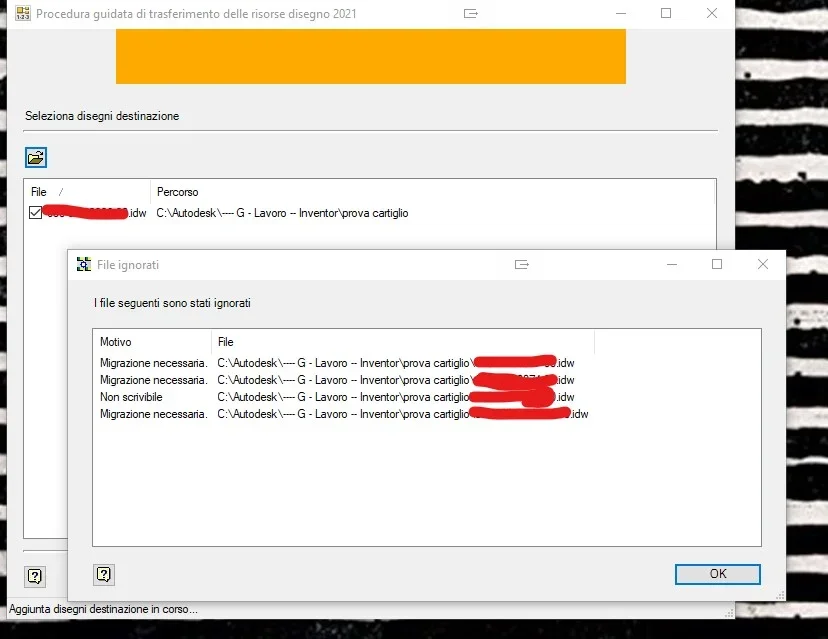
premise: the files arrive from inventor 2019, first image in which you notice the migration necessary as the iproprieties option that appears between the voices of the click dx menu on the file is version 2021 which recognizes the version used to generate the file that the properties question.
in the pictures: uploaded source // drawing digested // not writeable if protected by writing (only reading, in case of multiple files only readable simply with multiple selection then click dx > delete the check in read-only ) // migration needed, solved by opening and saving with 2021.
the opening and the relative saving of all files to adapt them to version 2021, if not done automatically with a macro, it becomes annoying: is there anything that does???
Last, having tried on some files, I noticed that it is added how much content in the source template without however eliminating the existing, in my case the old files, also this operation done manually is long and annoying.
Is there anything for this?
Sure with the ilogich rule that you have made available is a small but important step, what I miss is the giant leap.... .
Hello, thank you again
premise: the files arrive from inventor 2019, first image in which you notice the migration necessary as the iproprieties option that appears between the voices of the click dx menu on the file is version 2021 which recognizes the version used to generate the file that the properties question.
in the pictures: uploaded source // drawing digested // not writeable if protected by writing (only reading, in case of multiple files only readable simply with multiple selection then click dx > delete the check in read-only ) // migration needed, solved by opening and saving with 2021.
the opening and the relative saving of all files to adapt them to version 2021, if not done automatically with a macro, it becomes annoying: is there anything that does???
Last, having tried on some files, I noticed that it is added how much content in the source template without however eliminating the existing, in my case the old files, also this operation done manually is long and annoying.
Is there anything for this?
Sure with the ilogich rule that you have made available is a small but important step, what I miss is the giant leap.... .
Hello, thank you again
Attachments


summer2010
Guest
Hello everyone
I put myself in the discussion with my request...
in the company we continue to update the cartilage, which is within the standard.idw ..
My request is if you can make a rule ion o una macro to update the cart (is always the same updated) of a table made a few years ago ... without making a copy paste between tables?
Thank you for your patience
I put myself in the discussion with my request...
in the company we continue to update the cartilage, which is within the standard.idw ..
My request is if you can make a rule ion o una macro to update the cart (is always the same updated) of a table made a few years ago ... without making a copy paste between tables?
Thank you for your patience
windreef
Guest
hi, simply to change cartiglio is useless to shake ilogic, the procedure for transferring resources of the design works well and is simple and fast.Hello everyone
I put myself in the discussion with my request...
in the company we continue to update the cartilage, which is within the standard.idw ..
My request is if you can make a rule ion o una macro to update a table cartilage made a few years ago... without making a copy paste between tables?
inventor 2020...
Thank you for your patience
However, with ilogic it can be done because there is the function , but a more complex code must be set to copy the cartilage from a source file and paste it into the file in use , then if it has the same name, it overwrites and is already in place, if it has a different name then it must set it as active. I have the certainty that you can do it but for the moment I am not able to do it.
Hi.
summer2010
Guest
Hello, thank you for your interesthi, simply to change cartiglio is useless to shake ilogic, the procedure for transferring resources of the design works well and is simple and fast.
However, with ilogic it can be done because there is the function , but a more complex code must be set to copy the cartilage from a source file and paste it into the file in use , then if it has the same name, it overwrites and is already in place, if it has a different name then it must set it as active. I have the certainty that you can do it but for the moment I am not able to do it.
Hi.
I write more info to make the subject clearer:
- we in the company use the vault
- the cartella and the stardard.idw and always has the same name
- I was looking for a command to do it from time to time...
Thank you.
windreef
Guest
So I would do (and do) to swab the situation like this:Hello, thank you for your interest
I write more info to make the subject clearer:With the procedure for transferring resources of the drawing, can I change all the documents massively? I didn't even know the existence of that instrument...
- we in the company use the vault
- the cartella and the stardard.idw and always has the same name
- I was looking for a command to do it from time to time...
Thank you.
If I have to change a single drawing paper:
open source file in your standard.idw case
in the tree (at the left) open the resources of the drawing, select the cartilage and cup (ctrl + c)
open the target file
same procedure, open design resources and neckline (ctrl + v)
the procedure works automatically if the carts have the same name, otherwise it should be selected the new cartiglio , dx mouse and make it active
if I have to change carts to a whole folder massively , use wizard and even if the carts have the same name asks you if you want to overwrite , answer yes and you are finished, otherwise you have to open every drawing and make the new cartilage active
windreef
Guest
Wait, use the vault, then if you update the files out of the vault I think it breaks the boxes, wait for the vault to confirm or deny. I used vaults many years ago (vers. 2010) for these things was more flexible but now they told me they are more restrictive. once you replace a file in the workbook (of course the same name) , the vault gave an incompatibility error but with an extraction-archiveation cycle it reallined, now it seems that it is no longer possible. if so were they made a serious mistake in autodeskHello, thank you for your interest
I write more info to make the subject clearer:With the procedure for transferring resources of the drawing, can I change all the documents massively? I didn't even know the existence of that instrument...
- we in the company use the vault
- the cartella and the stardard.idw and always has the same name
- I was looking for a command to do it from time to time...
Thank you.
summer2010
Guest
Hello windreefSo I would do (and do) to swab the situation like this:
If I have to change a single drawing paper:
open source file in your standard.idw case
in the tree (at the left) open the resources of the drawing, select the cartilage and cup (ctrl + c)
open the target file
same procedure, open design resources and neckline (ctrl + v)
the procedure works automatically if the carts have the same name, otherwise it should be selected the new cartiglio , dx mouse and make it active
if I have to change carts to a whole folder massively , use wizard and even if the carts have the same name asks you if you want to overwrite , answer yes and you are finished, otherwise you have to open every drawing and make the new cartilage active
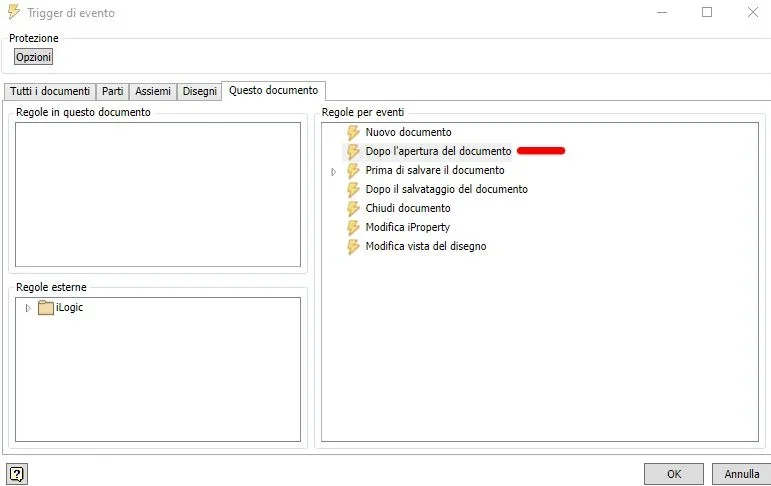
I used to copy glue from the new to the old, that's why I wanted to shake ion to do dirty work ... then I put the rule in the trigger after opening(as attached image)
I miss the rule though...
Attachments
windreef
Guest
I don't know how to help you, but it would also interest me.Hello windreef
I used to copy glue from the new to the old, that's why I wanted to shake ion to do dirty work ... then I put the rule in the trigger after opening(as attached image)
I miss the rule though...
summer2010
Guest
Good morning, someone knows what rule to put inion to update the cart? maybe even the edge?
Cartridge and board I put them inside the standard.id w w w w
Cartridge and board I put them inside the standard.id w w w w