• This forum is the machine-generated translation of www.cad3d.it/forum1 - the Italian design community. Several terms are not translated correctly.

report informazioni

  • Thread starter Thread starter mello89
  • Start date Start date

mello89

Guest
hello to all
Today I have something strange that I cannot find a solution.
I use a lot of information reports of ug 7.5, today inexplicably no longer appears to me.
I tried to turn on and off the function with the f4 key set by default but nothing, I can no longer have the information window.
in case I didn't explain well (I'm not very good in descriptions) if with the right click on a solid, curve, point etc. "in the tree scheme" and click information generally shows me the information report with point coordinates etc, but from today nothing.
Have you ever happened? How do I solve this?
Thank you.
 
Are you sure you don't have it "iconized" or worse, pushed out of the screen field?

if you have the relative icon in the active standard toolbar, the information window is open.
 
to me has happened several times such a thing but with the axiemi navigator / part,
having multimonitor, I often get out of the viewing area.
Sometimes it was enough to reset the role I had saved.
sometimes instead it was necessary to act on the windows registry
 
Sorry I'm late. .
However the icon in the toolbar is open.. What do you mean by icon?
I no longer have monitors and setting the role does not work, can you indicate a solution?
Thank you.
 
Maybe it's just a boiata, but it came back to my mind when a similar problem happened to me.

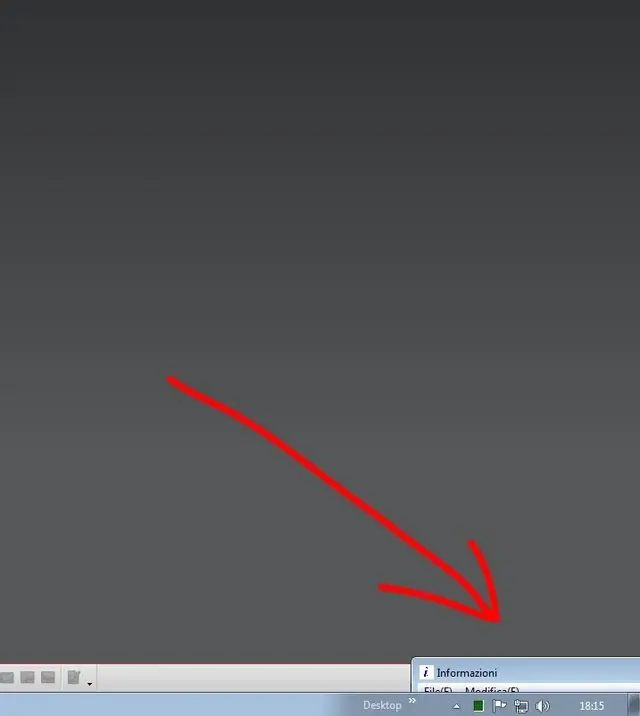
iconized, first image .
The information window is in fact a window of the operating system like the others, so it can be iconized . Once such, even if you use it, it does not open automatically .

moved, second image .
for various drags or setting the screen resolution, it can end 'eight'.
to make it back you just change the screen resolution temporarily that should fit the various windows.

in any case, if you have the active window, it must appear circled in the menu or white background in the role icons - third image
 

Attachments

  • info iconizzata.webp
    info iconizzata.webp
    75 KB · Views: 10
  • info spostata.webp
    info spostata.webp
    7.6 KB · Views: 9
  • info visualizza.webp
    info visualizza.webp
    131.3 KB · Views: 10
the icon is active while I'm sure the window is not iconized, at least I can't see it I also tried to change the screen resolution but nothing to do.
other ideas?
 
the icon is active while I'm sure the window is not iconized, at least I can't see it I also tried to change the screen resolution but nothing to do.
other ideas?
I don't know from what version but to view the information window you do with
ctrl+shift+s (or view menu)

I happened something like this but not for the info window and I solved it as in the figure.

Hi.
 

Attachments

  • reset.webp
    reset.webp
    24.5 KB · Views: 15
in fact from the view menu there icon is checked and also through the button does not appear.
tomorrow I try from the menu indicated in the image.
 

Forum statistics

Threads
44,997
Messages
339,767
Members
4
Latest member
ibt

Members online

No members online now.
Back
Top